PROPILOT 700
38
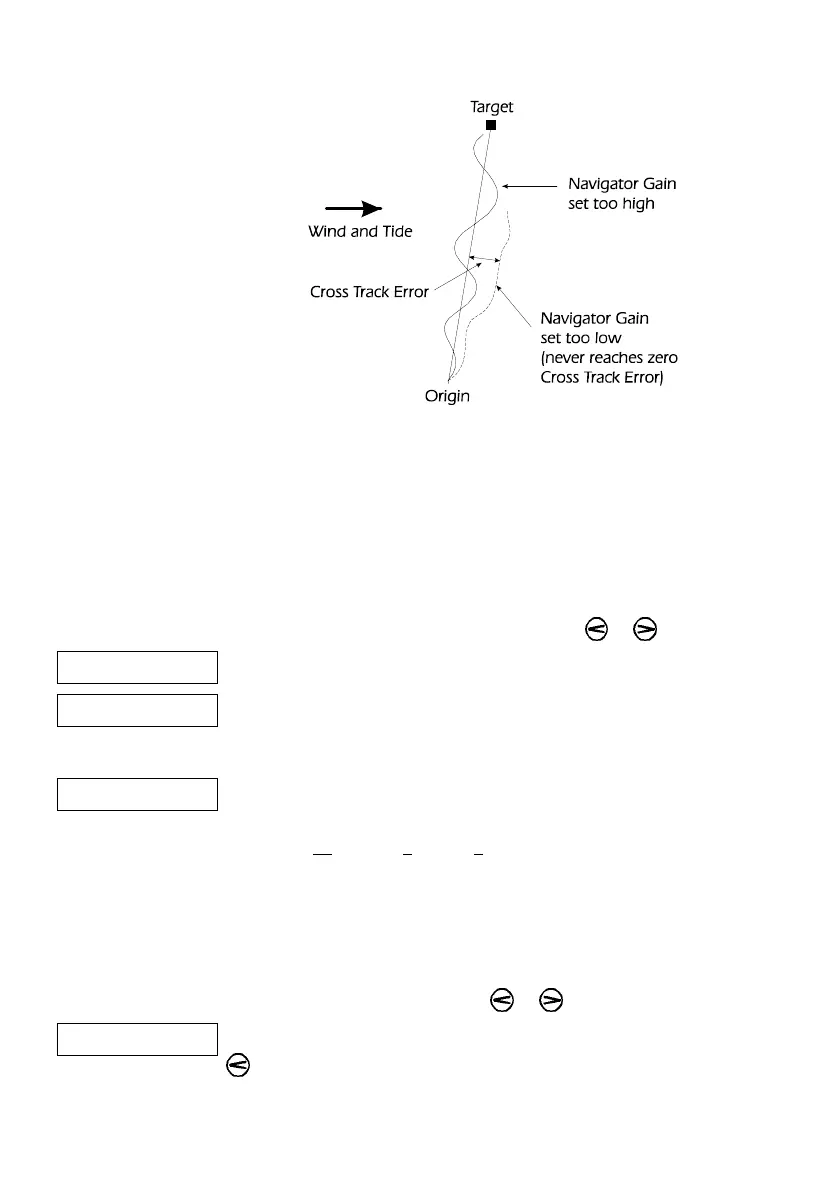
Figure 10 - Navigator Gain
7.5 Waypoint Sequence
When following a route, prepared on a navigator or plotter, there
are two options: follow the whole route automatically or to
manually advance to the next waypoint.
Press the ADJ key, "AUTO" or "not auto" is
displayed. Change the setting by using the or keys.
AUTO Automatic Waypoint Following.
not Auto Manual Acceptance Sequence.
7.6 Compass Damping
AuCd The ProPilot 700 will automatically calculate a suitable damping
setting for the compass display to correspond with sea conditions,
using the Automatic Compass Damping routine.
The normal setting is Automatic Compass Damping, this may only
need to be changed if the compass has been mounted high above
the waterline.
Press the ADJ key, "AuCd" or "Cd" is displayed.
Change the setting by using the or keys.
Cd If the display is slow in updating, decrease the damping, using the
key.
The range of settings is: Automatic Compass Damping; then
manual values from 0 minimum to 9 maximum damping.



 To Next Page