PROPILOT 700
24
Allow adequate clearance for cable connections to
ensure cables are not unduly stressed and that there is
sufficient length of cable to remove the unit for service
purposes.
A Trunnion Mounting kit is available, part number 930291.
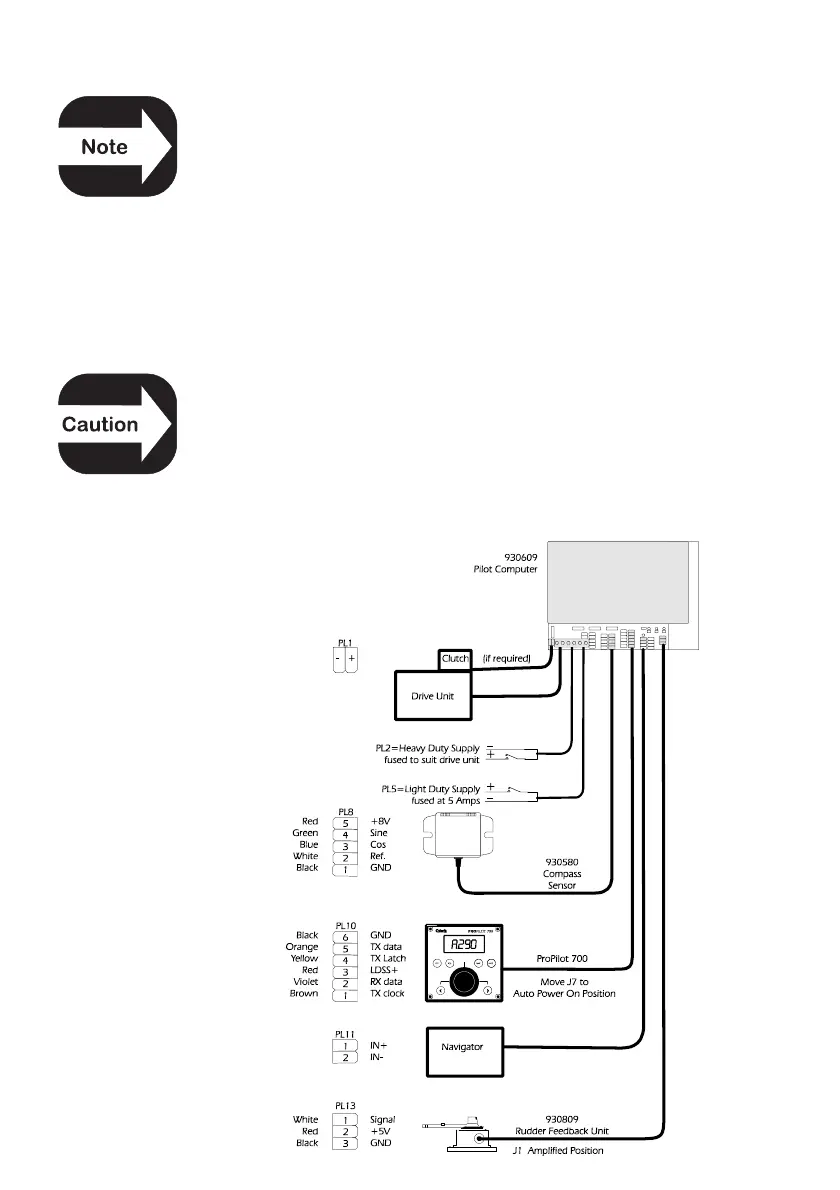
4.5 Connecting The ProPilot 700
Route the cable to the Pilot Computer. Remove the plug if the
cable needs to pass through a bulkhead, note the wire colours in
the white connector, then remove to aid fitting.
Incorrect wiring (e.g. reverse polarity) can cause
irreparable damage to some equipment and is not
covered by the Cetrek warranty agreement.
Insert the connector into the Pilot Computer (PL10). Connect the
cable screen securely to the fixing ‘tongue’ using the two cable ties
provided.



 To Next Page