PROPILOT 700
42
Press the ADJ key "t" is displayed.
Change the setting by using the or keys.
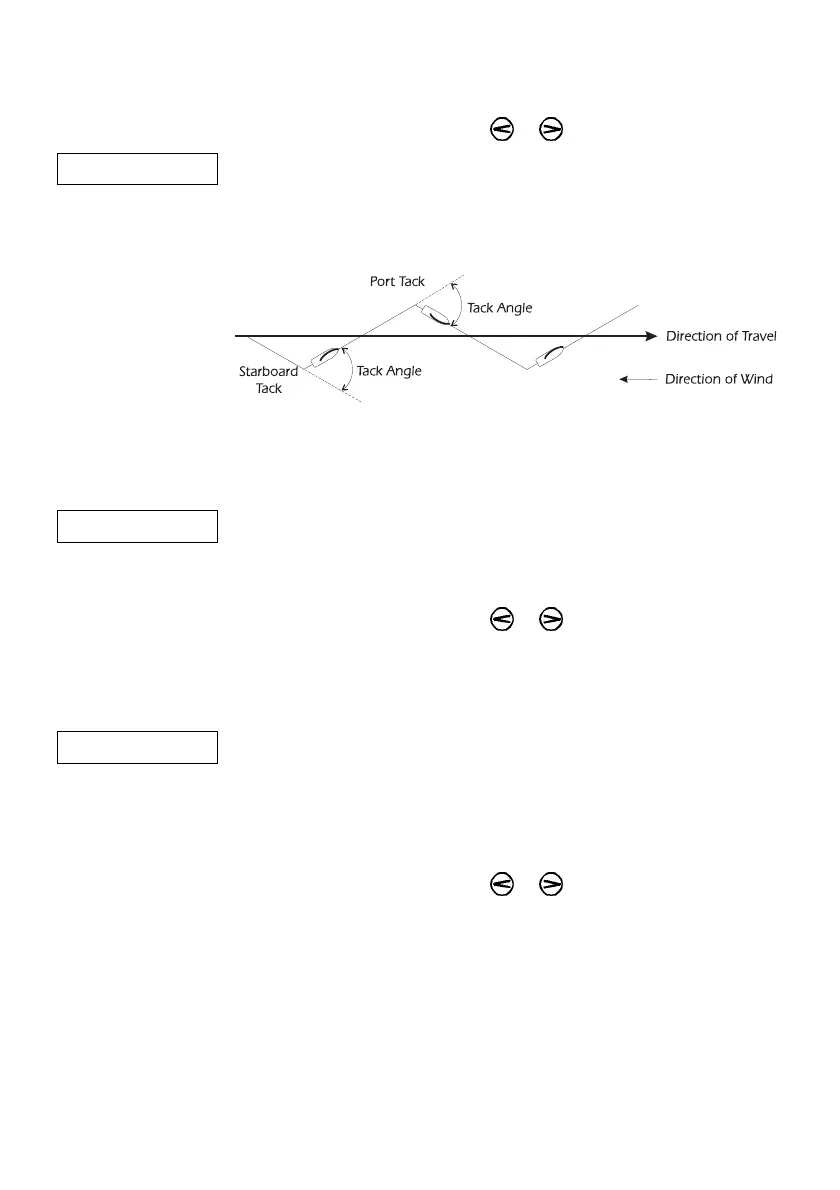
t100 Manually calculate the Tack Angle in the normal way and enter this
value into the Configuration Routine.
The range is from 60º to 110º in increments of 10º.
Figure 13 - Tack Angle
7.13 Power Steer Gain
PS This adjusts the sensitivity of the steering when it is controlled by a
remote device such as a 930788 ProSteer.
Press the ADJ key, "PS" is displayed.
Change the setting by using the or keys.
The range is from 01 (least sensitive) to 10 (most sensitive)
7.14 Rudder Limits
RL This allows adjustments to the maximum rudder movement, either
side of amidships, obtainable under autopilot control. The
Dockside Settings automatically calculated this value, however
Rudder Limits allows manual override.
Press the ADJ key, "RL" is displayed.
Change the setting by using the or keys.
The range is from 01 (4º) to 10 (40º).
Ensure the limit set does not allow the rudder to touch its end
stops.



 To Next Page