PROPILOT 700
36
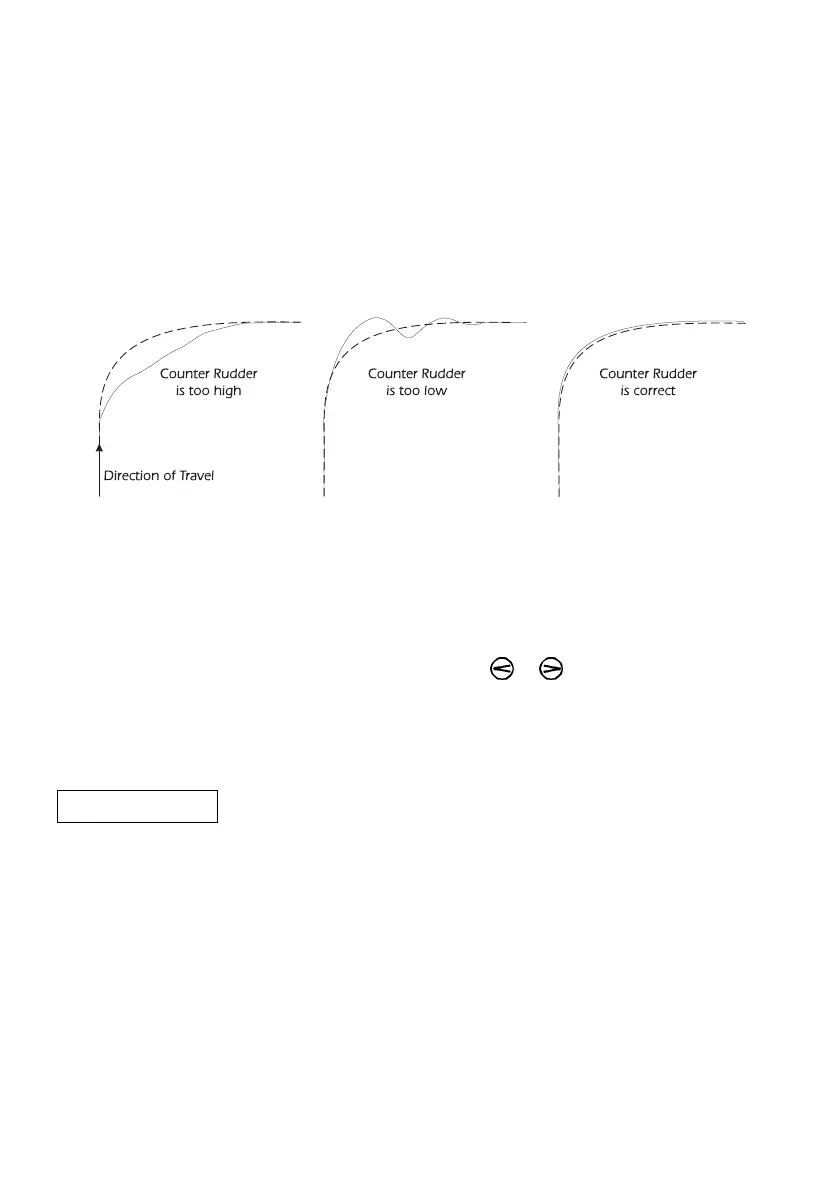
If this is set too high the vessel will not settle on to the new
heading quickly enough. If the Counter Rudder is set too low the
vessel will overshoot and the pilot will have to correct accordingly,
possibly causing the vessel to oscillate from side to side, before
settling to the new heading.
If your vessel is suddenly pushed off course, an increased amount
of rudder will be applied to counteract the action returning you
onto course.
Figure 9 - Counter Rudder
This setting will have a greater effect on heavier displacement
vessel’s. Adjust to give approximately 10º of overshoot for a 90º
change of course.
Press the ADJ key twice, "Cr" is displayed.
Change the setting by using the or keys.
The range is from 0 (No Counter Rudder) to 20 (Maximum Counter
Rudder).
7.3 Trim
tr4 Normally, if the rudder is amidships the vessel will travel in a
straight line. Often something will cause the vessel to drag to one
side, for example the wind, towing something or current. To
counteract this, a few degrees of rudder will be applied, this is
termed Trim or Standing Helm.
This setting adjusts the rate at which that standing helm is applied.
The higher the setting, the faster the standing helm is applied. This
should be set so that the ProPilot 700 will trim the vessel within 60
seconds.
On single screwed vessels or sailing yachts it is only possible to
check the Trim setting while using the craft when, for example, the
prevailing conditions cause the vessel to steer with offset rudder.



 To Next Page