18
Battery Backup Wiring
NOTE: It’s recommended to install battery backup unit at ground level, prior to mounting operator on xed location.
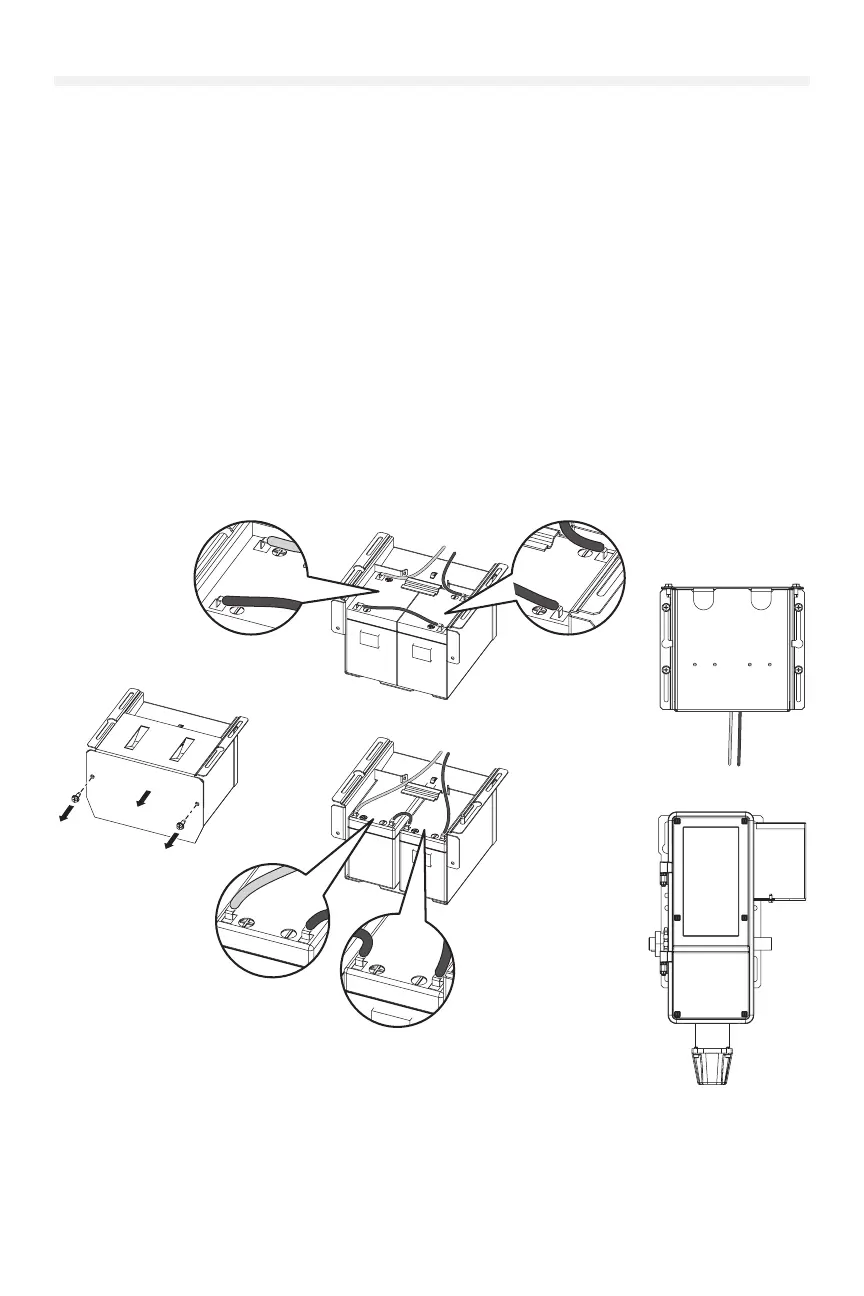
1. Remove the battery cover from the battery enclosure (see image 1).
2. Ensure jumper and battery harness are properly routed and connected (see images 2 and 3).
3. Using supplied screws, reinstall and secure battery box cover and ensure screws are tightened rmly (see image
1).
4. Using supplied screws, mount battery enclosure to operator (OR) in an appropriate alternate location and ensure
screws are tightened rmly. (Reference the Recommended mounting location.)
5. Route wires around backside of battery enclosure, through knock out and into electrical box. (Reference the
Knock out location.)
6. Place snap in cord gland over top of wires and snap into place.
Recommended mounting location:
• JHDC/JDC: Side of operator; opposite from drive shaft and sprocket location.
• TDC: Mount to the bottom of the operator. Open electrical box and knock out appropriate backside ½
conduit location.
Knock out location:
• JHDC/JDC: Bottom of the electrical box, adjacent to the EMI lter board.
• TDC: Bottom of the electrical box, adjacent to the antenna AUX connection.
7Ah Battery
4.5Ah Battery
1
3
4











 To Next Page