34
Programming (continued)
Determine and Set Operating Mode
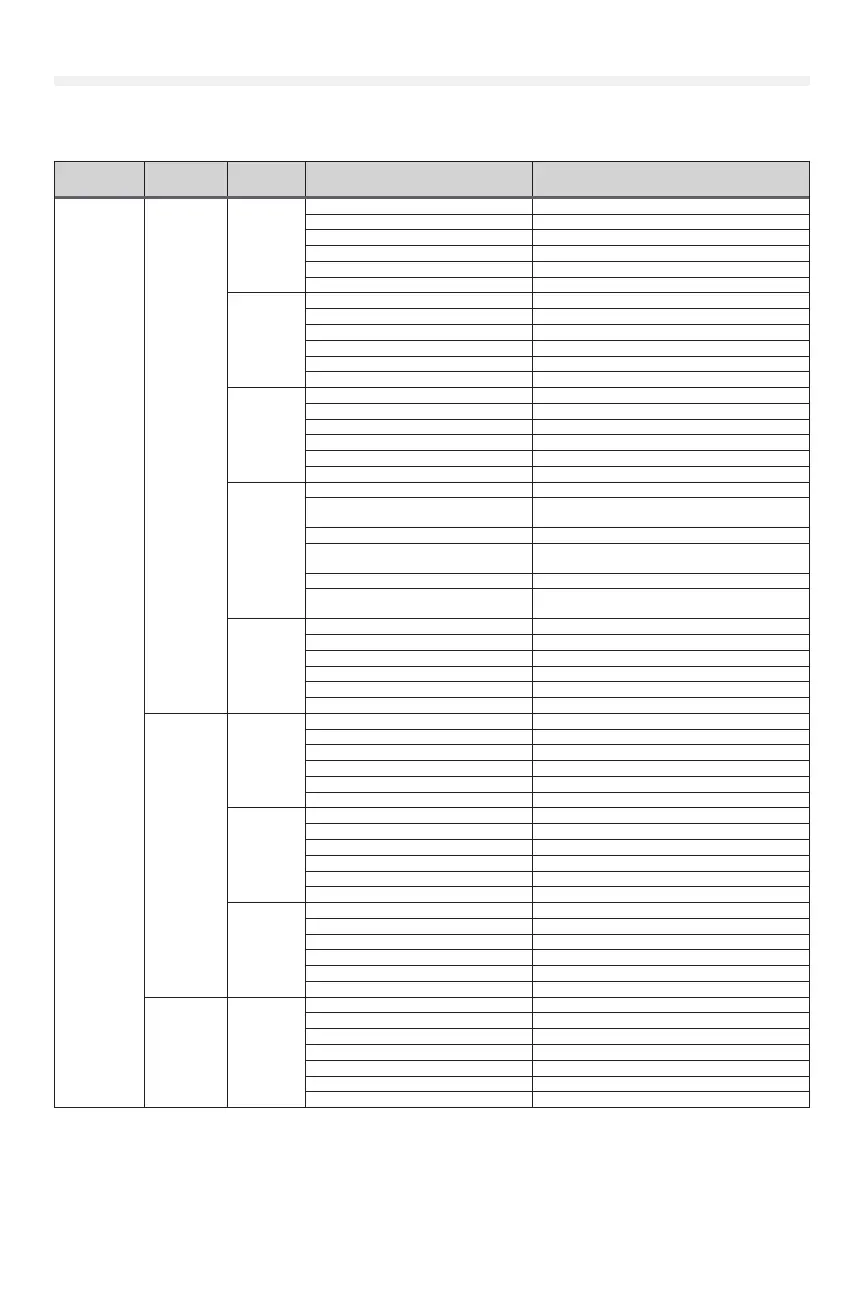
Select the operating mode for your application from the menu in the Wall Controller.
WIRING
TYPE
DEVICE
ACTION
STATE RESPONSE
B2 -
Momentary
contact to
open,close
and stop, plus
wiring for
sensing device
to reverse
and auxiliary
devices to
open and
close with
open override.
Programmable
Mid-Stops
available with
this wiring
type. Close Mid
Stop available
but not shown
in table.
Compatible
with 3-Button
Station,
1-Button
Station, 1
and 3-Button
Remote
Control.
Monitored
Entrapment
Protection
(LMEP) Device
required.
Front panel
buttons
(membrane)
and 3-Button
Wall
Controller
OPEN button
is pressed
momentarily
Operator at OPEN limit No change in state
Operator at CLOSE limit Door opens to the OPEN limit or Mid-Stop
Door opening No change in state
Door closing Door will auto reverse to OPEN limit or Mid-Stop
Door at Open Mid-Stop Door opens to the OPEN limit
Door stopped during open or close cycle Door opens to the OPEN limit or Mid-Stop
CLOSE
button is
pressed
momentarily
Operator at OPEN limit Door closes to the CLOSE limit
Operator at CLOSE limit No change in state
Door opening No change in state
Door closing No change in state
Door at Open Mid-Stop Door closes to the CLOSE limit
Door stopped during open or close cycle Door closes to the CLOSE limit
STOP button
is pressed
momentarily
Operator at OPEN limit No change in state
Operator at CLOSE limit No change in state
Door opening Door stops
Door closing Door stops
Door at Open Mid-Stop No change in state
Door stopped during open or close cycle No change in state
OPEN button
is held
(constant
pressure)
Operator at OPEN limit No change in state
Operator at CLOSE limit
Door opens to the OPEN limit (bypasses Mid-
Stop)
Door opening No change in state (bypasses Mid-Stop)
Door closing
Door will auto reverse to OPEN limit (bypasses
Mid-Stop)
Door at Open Mid-Stop Door opens to the OPEN limit
Door stopped during open or close cycle
Door opens to the OPEN limit (bypasses Mid-
Stop)
CLOSE
button
is held
(constant
pressure)
Operator at OPEN limit Door closes to the CLOSE limit
Operator at CLOSE limit No change in state
Door opening No change in state
Door closing No change in state
Door at Open Mid-Stop Door closes to the CLOSE limit
Door stopped during open or close cycle Door closes to the CLOSE limit
3-Button
Remote
Control
Programmed
as OPEN/
CLOSE/STOP
OPEN button
is pressed
momentarily
Operator at OPEN limit No change in state
Operator at CLOSE limit Door opens to closest OPEN limit or Mid-Stop
Door opening No change in state
Door closing Door will auto reverse to OPEN limit or Mid-Stop
Door at Open Mid-Stop Door opens to the OPEN limit
Door stopped during open or close cycle Door opens to the OPEN limit
CLOSE
button is
pressed
momentarily
Operator at OPEN limit Door closes to the CLOSE limit
Operator at CLOSE limit No change in state
Door opening No change in state
Door closing No change in state
Door at Open Mid-Stop Door closes to the CLOSE limit
Door stopped during open or close cycle Door closes to the CLOSE limit
STOP button
is pressed
momentarily
Operator at OPEN limit No change in state
Operator at CLOSE limit No change in state
Door opening Door stops
Door closing Door stops
Door at Open Mid-Stop No change in state
Door stopped during open or close cycle No change in state
Single Button
Remote
Control
Programmed
as SBC
Button is
pressed
Operator at OPEN limit Door closes to the CLOSE limit
Operator at CLOSE limit Door opens to the OPEN limit or Mid-Stop
Door opening Door stops
Door closing Door will auto reverse to OPEN limit or Mid-Stop
Door at Open Mid-Stop Door opens to the OPEN limit
Door stopped during the open cycle Door closes to the CLOSE limit
Door stopped during the close cycle Door opens to the OPEN limit or Mid-Stop











 To Next Page