59
Troubleshooting (continued)
Code
Display
Message
Description
Possible
Causes
Diagnosis Resolution
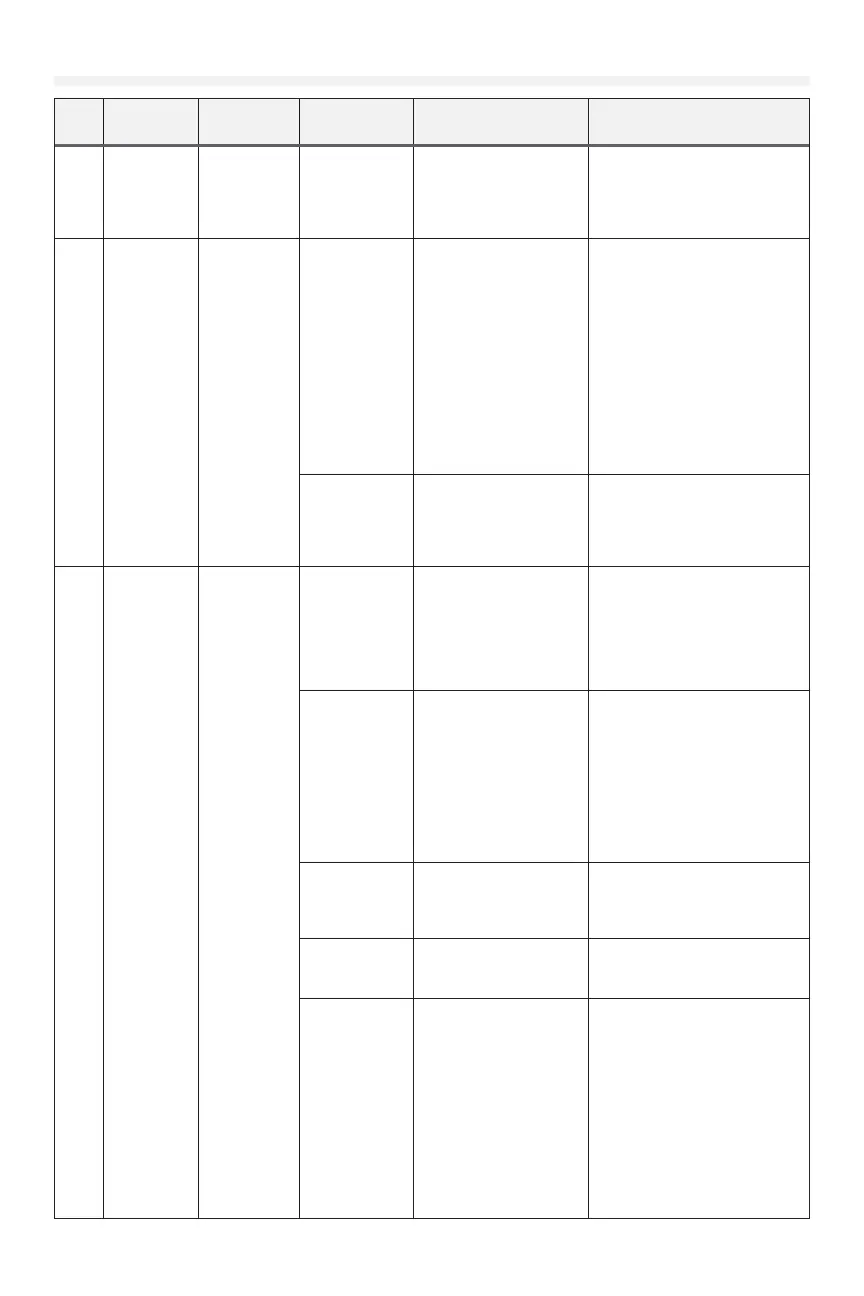
F68 F68 WE
CRITBATT
Wireless edge
transmitter
has low
battery
The battery
in the
wireless edge
transmitter is
low
Check battery condition
in wireless edge
transmitter
Replace battery in wireless edge
transmitter.
F89 F89 WC
DISC
Indicates wall
control is not
detected
Wall control is
intentionally
disconnected
See resolution Liftmaster strongly recommends
using an LCD wall control with
the operator.
If the wall control is intentionally
disconnected, this error can
be cleared by placing a jumper
wire between the WALL CTRL
teminals on the powerhead main
board. If the jumper is removed
and a wall control reconnected,
the system may require a power
cycle to recognize the new wall
control.
Wall control is
wired but o or
not functional
Check wall control for
display backlight, text on
the display, and function
of open/close/stop
buttons
If LCD wall control isn't
functioning properly, see
diagnosis for fault 'LCD wall
control is o or not functioning'
F91 F91
ENCODER
The system
has detected
irregularities
in the signals
received from
the encoder.
Direction
of rotation
incorrect
Watch operator output
shaft when commanding
operator to open. If
output shaft rotates
in the close direction,
then rotation direction is
incorrect.
Ensure motor red and black
wires match the labeling on the
powerhead main board near the
motor connector.
Ensure reverse mount setting is
set properly.
System ID
mismatch
between
powerhead
main board
and operator
chassis can
cause the
encoder to not
be recognized.
Check that the system ID
in the system information
menu matches the model
of the operator
Main board system ID
must match the operator.
Replacement service kit main
boards allow setting the system
ID using the menu on the LCD
wall control.
Factory installed boards cannot
have the System ID set manually.
Door is drifting
up or down due
to imbalance
when starting
Check for excessive door
imbalance
Rebalance door
Encoder wiring
fault
Inspect encoder cable
for disconnection, bad
connection, cut cable, etc.
Correct any issues found with
encoder wiring
Encoder fault
or encoder
interface fault
Go to limit learn process.
Number displayed while
in door limit learn mode is
the encoder position.
Jog door several inches
in either direction and
release button. Number
displayed should change.
Make sure to cancel
changes or set limit again
when nished.
If encoder position does not
change with door movement,
ensure system ID in the system
information menu matches the
operator.
If the system ID matches but the
problem persists, the encoder,
encoder wiring, and powerhead
main board are suspect. Check
all three for any visible damage.
Replace or repair suspected
faulty components.











 To Next Page