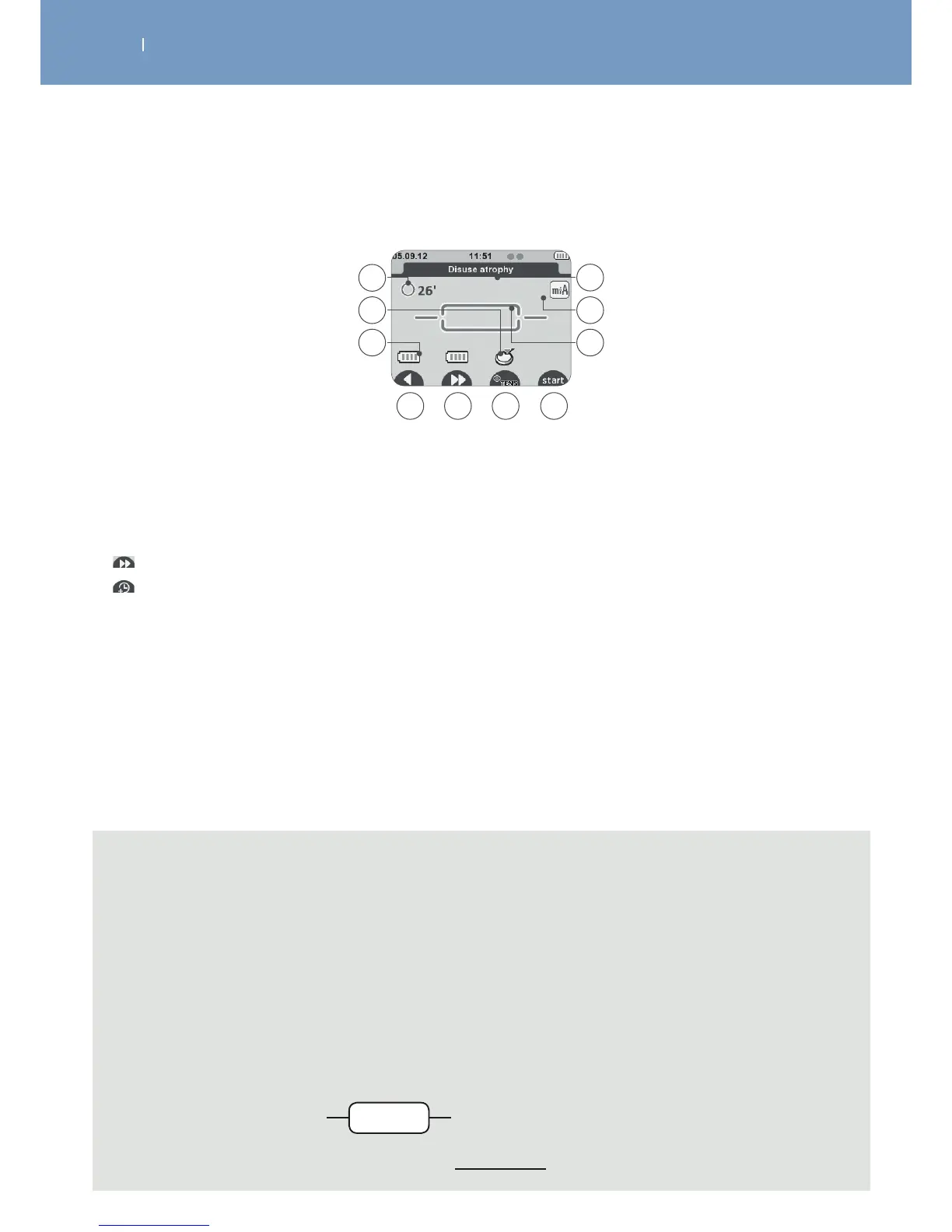
3.5.3 Diplay when programm is selected, Modules need to be turned on, mode
A Total programme time (minutes)
B Module activation indication
C Module battery level
D Back to previous menu
E Skip function allows you to jump programme sequences (if available) or
Programme time increase function (if available)
F +TENS function (if available)
G Start Session
H Programme architecture
• 3-sequence programme: Warm-up, Work, Relaxation
• Programme with 1 continuous sequence
I Active option in the programme
J Programme name
C
D F G
A
B
E
H
I
J
Note
- “B” the device asks you to activate the next module. 1 module needs to be activated at least
(1-channel treatment). After activating the number of channels required for the treatment
(1 up to 4) press start to start the treatment.
- “E” functions are not available within all programs, symbols will only be displayed in programs
available
- “F” the “+TENS” function allows you to combine a TENS programme with a selected basic
programme. The function will be displayed for the channels if available. (see as well …)
- “H” the dierent program architectures are:
• 3-sequences program:
a) Warm-up
b) Work
c) Relaxation
• 1-sequence program, a) continuous work
ba c
a



 To Next Page