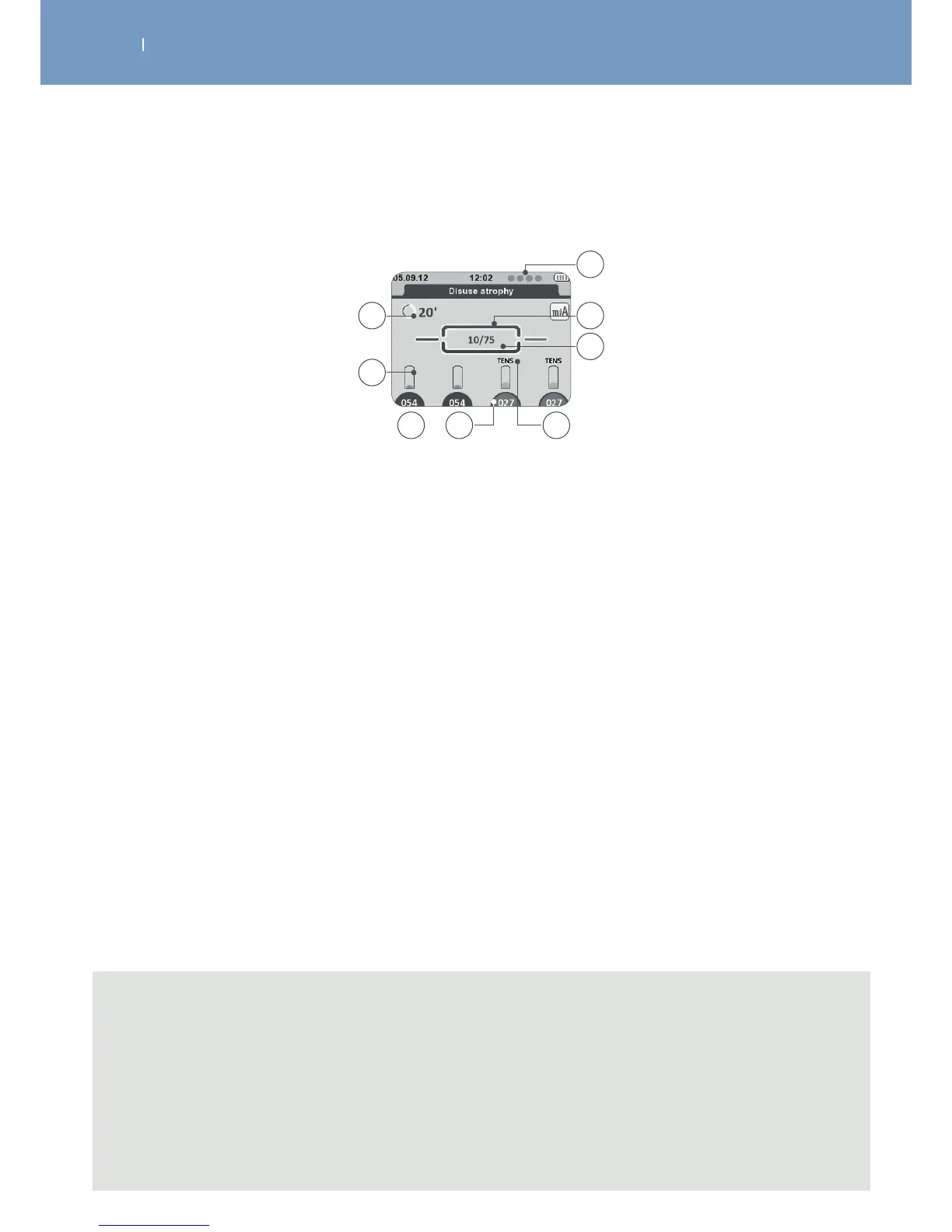
3.5.4 Display during treatment
A Total remaining programme time (min)
B Energy level bar graph for each channel
C Energy level for each channel
D Intensity background is:
Dark background = active channel
Bright background = inactive channel
E Indication relating to the channel:
• TENS: channel providing a TENS current
• I-II: channel group
F Number of contractions remaining / total number of contractions
G Indicator of programme execution
H Number and order of attached channels. Circle = channel recognised but module turned o.
C D E
A
B
G
H
F
Note
“D” intensity control
- Channels can be selected/de-selected by pressing the corresponding button below.
- To change intensity during treatment, channel needs to be selected (dark blue background).
- While channel is not selected (light blue background) stimulation will be performed with the set
intensity.
- This function allows you to change the intensity for each channel itself or more than 1 at the same
time (by marking the designated channels).



 To Next Page