EasyManua.ls Logo

Check Point 4000 - Check Point 4400 and 4600 Front Panel

Check Point 4000
55 pages
Print Icon
To Next Page IconTo Next Page
To Previous Page IconTo Previous Page
Loading...
Check Point 4000 Appliances Hardware
40 | Check Point 4000 Appliances Getting Started Guide
Item
Description
4
USB ports
5
Console port - A serial connection to the appliance using a terminal emulation program
such as HyperTerminal or PuTTY
6
Power indicator LED
7
LCD display screen
8
Keypad
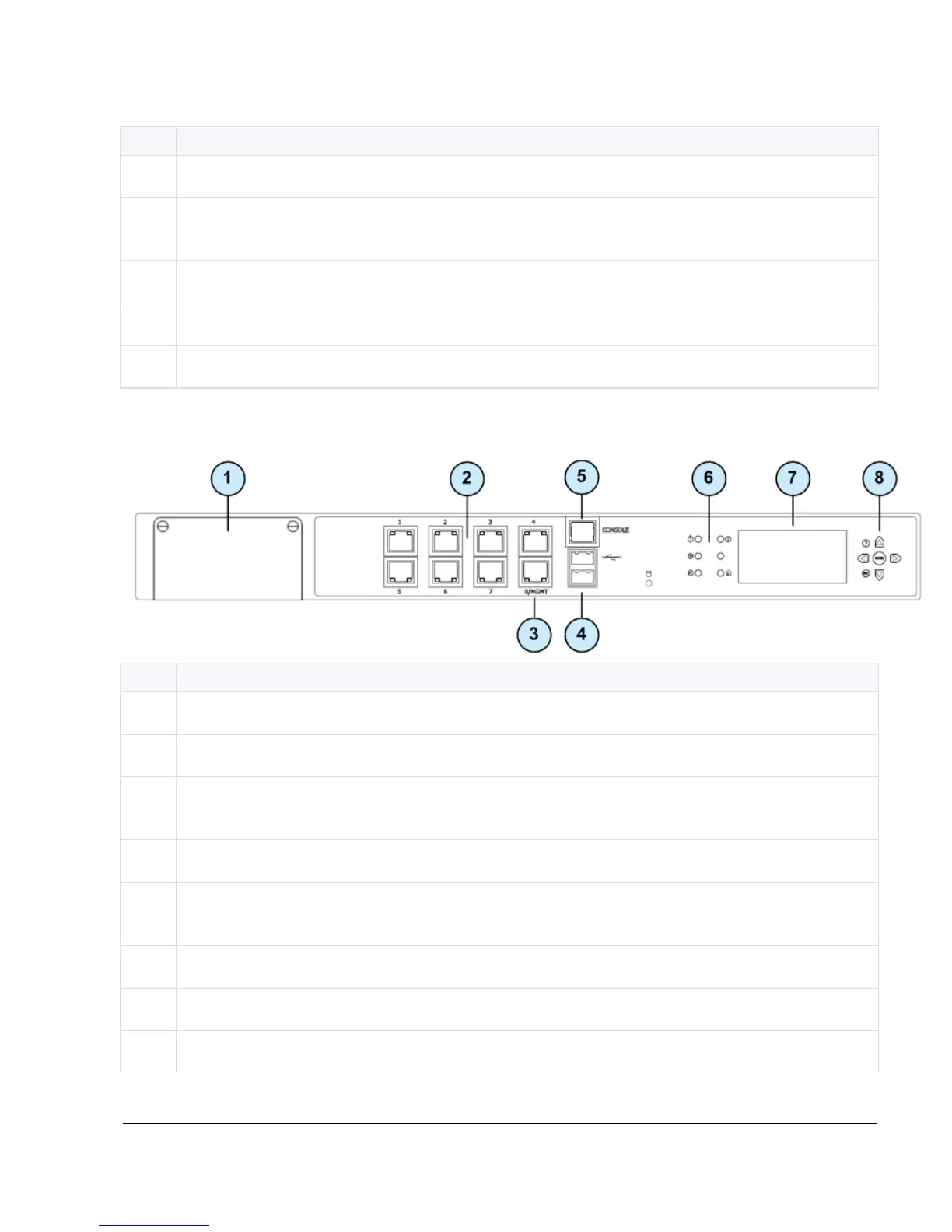
Check Point 4400 and 4600 Front Panel
Item
Description
1
Expansion line card slot
2
Built in Ethernet ports (ETH1 - ETH7)
3
Management configuration port - Ethernet connection to a remote management
workstation
4
USB ports
5
Console port - A serial connection to the appliance using a terminal emulation program
such as HyperTerminal or PuTTY
6
Power indicator LED
7
LCD display screen
8
Keypad

Table of Contents

Other manuals for Check Point 4000

Related product manuals