9
10
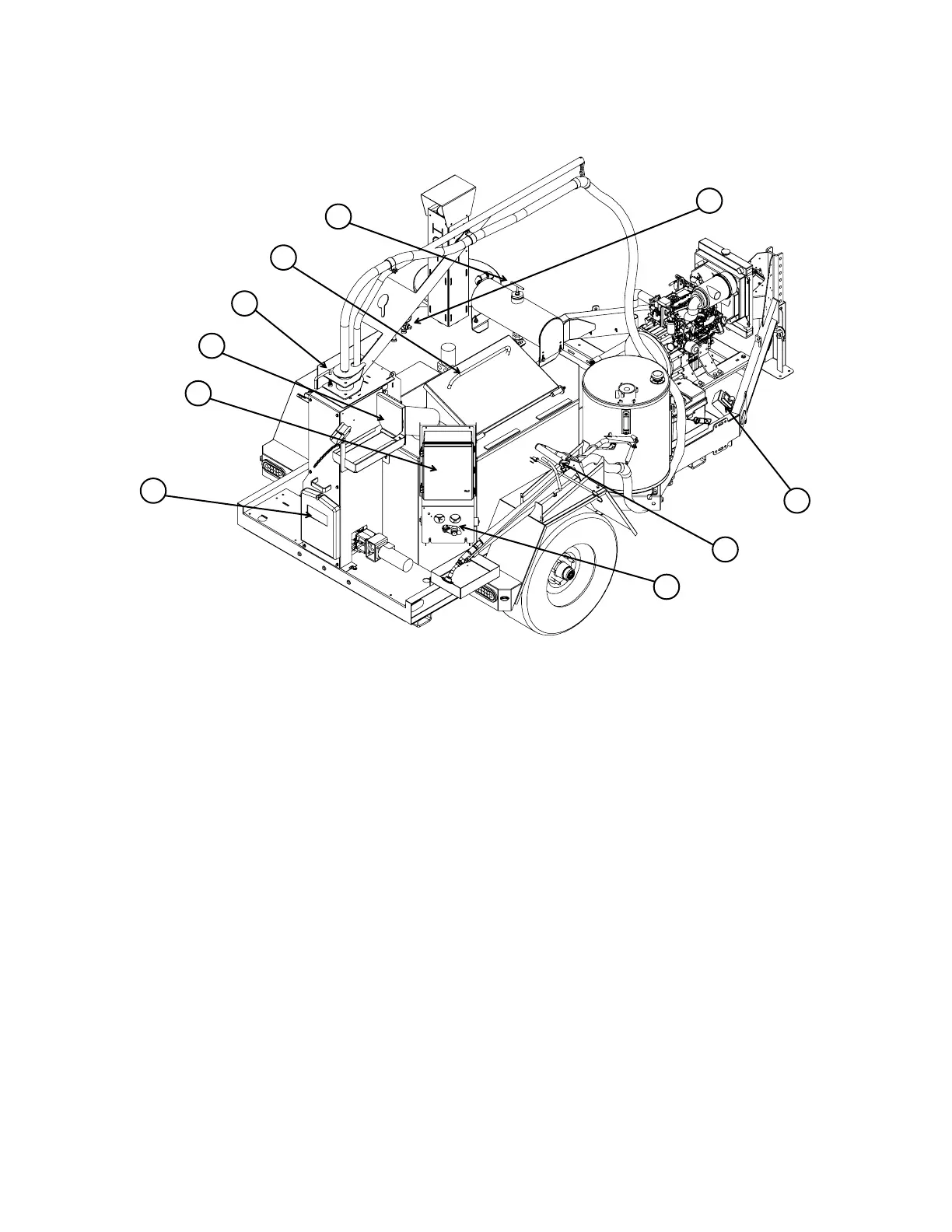
M-Series Feature Overview
NOTE: This general outline will familiarize you with this machine, dependent on model,
location and style and may vary with options installed. Read through the entire manual before
putting this machine into operation.
1) Main Control Panel: The main control panel is used to control the primary functions of the
melter, including simple automated user controls for Off / Run / Clean Out / Cool Down as well as
manual control of the sealant material pump direction and tank agitator. You can also monitor or
adjust the temperature of the sealant material and heat transfer oil on the control sub panel. See
page 10-11 for more information on the main control panel.
2) Boom Rotation Lock: This handle locks the boom from rotating during transport.
3) Loading Door: Place the sealant material block or biscuit on the open door to load the sealant
melting tank. See page 14 for more information on safely loading sealant material into the melter.
4) Heat Transfer Oil Level Dipstick: Allows you to monitor the amount of heat transfer oil in the
melter oil tank. See page 24 for more information on using the heat transfer oil dipstick.
5) Heat Transfer Oil Temperature Gauge: Displays the heat transfer oil temperature.
6) Ignition Switch: Engine key “Start”/ “On” / “Off” and also displays engine running hours, glow plug
status, alternator charge, engine oil pressure and engine coolant warnings.
7) Sealing Wand: Dispenses sealant material to the ground.
8) Material Sealant Flow Control: Controls the flow rate of sealant by varying the pump speed.
9) Recirculation Port: The sealing wand is placed here when not in use. This allows operator to
continue circulating sealant material through the hose and wand to prevent the sealant material from
cooling and freezing up.
10) Instruction Manual Case: Keeps the manual and important documentation protected.
1
9
2
3
4
8
7
6
5



 To Next Page