© 1999-2017 Citrix Systems, Inc. All rights reserved. p.61https://docs.citrix.com
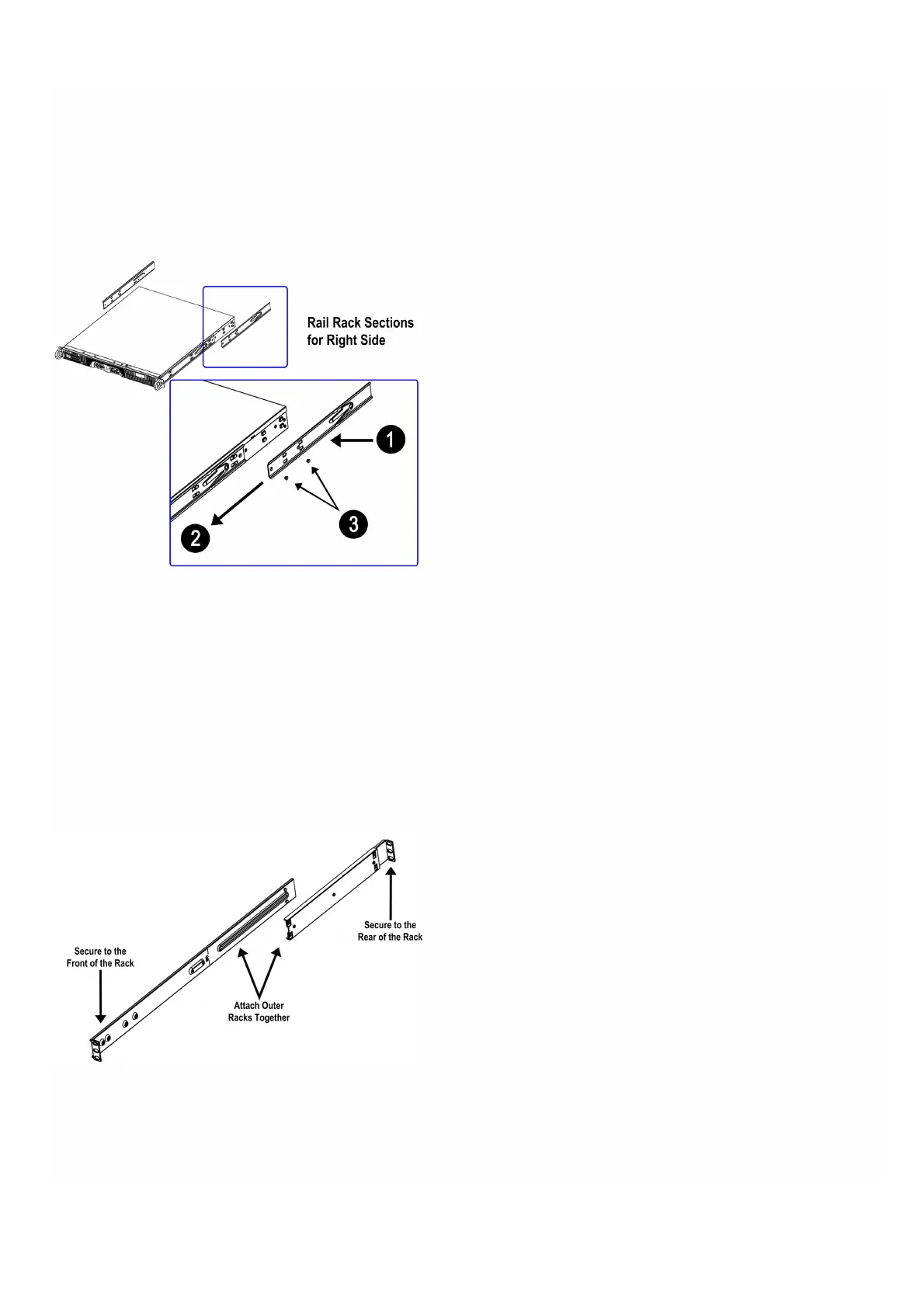
holes. Make sure the extension faces outward like the preattached inner rail.
2. Slide the extension toward the front of the chassis.
3. Secure the chassis with the two screws.
4. Repeat the above steps to mount the rack on the other side of the appliance.
The following illustration shows how you should attach the right-side rail rack sections to the appliance.
Figure 2. Attaching the rail rack sections to the right side of the appliance
When the rails are attached to the appliance, install the outer rails to the rack.
To install the outer rails to the rack
1. Attach the short bracket to the outside of the long bracket. The pins must be aligned with the slides. Both bracket ends
must face the same direction.
2. Adjust both the short and long brackets to the correct distance so the rail fits tightly into the rack.
3. Secure the long bracket to the front side of the outer rail with two M5 screws and the short bracket to the rear side of
the outer rail with three M5 screws.
4. Repeat the above steps for the second rail.
Figure 3. Assembling the outer rails to the rack
Figure 4. Installing the outer rails to the server rack


 To Next Page