53
Figure 4-64
4.6.8 PTZ
Note: All the operations here are based on PELCOD protocol. For other protocols, there might
be a little difference.
Cable Connection
Please follow the procedures below to go on cable connection
z Connect the dome RS485 port to NVR 485 port.
z Connect dome video output cable to NVR video input port.
z Connect power adapter to the dome.
PTZ Setup
Note: The camera video should be in the current screen. Before setup, please check the
following connections are right:
z PTZ and decoder connection is right. Decoder address setup is right.
z Decoder A (B) line connects with NVR A (B) line.
Boot up the NVR, input user name and password.
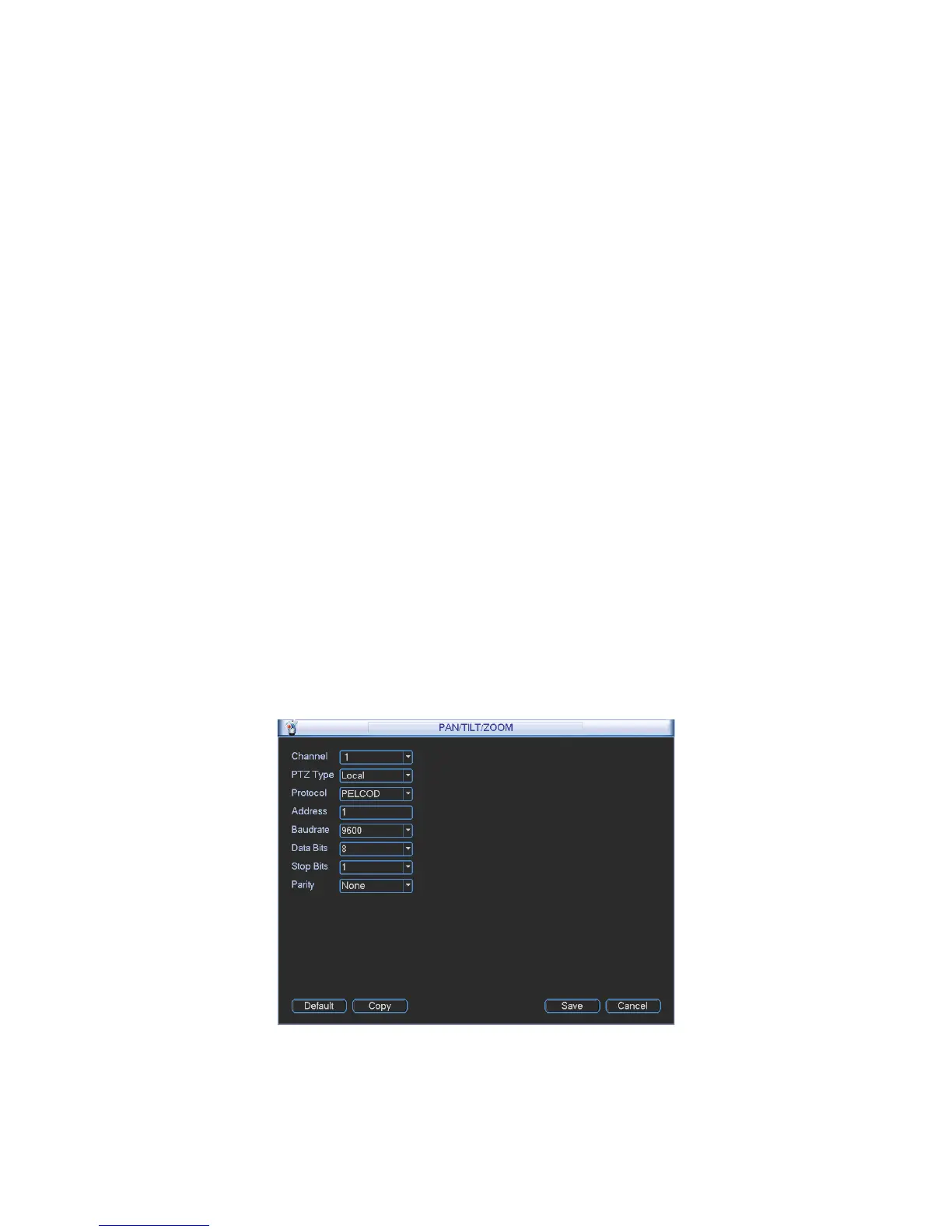
In the main menu, click setting, and then click Pan/Tilt Control button. The interface is shown
as in Figure 4-65. Here you can set the following items:
z Channel: Select the current camera channel.
z PTZ type: There are two types: local/remote.
z Protocol: Select corresponding PTZ protocol(such as PELCOD)
z Address: Default address is 1.
z Baud rate: Select corresponding baud rate. Default value is 9600.
z Data bit: Select corresponding data bits. Default value is 8.
z Stop bit: Select corresponding stop bits. Default value is 1.
z Parity: There are three options: odd/even/none. Default setup is none.
Figure 4-65
If you are connecting to network PTZ, the PTZ type shall be remote. See Figure 4-66.



 To Next Page