Advanced M52 Microprocessor User's Guide
ADVANCED M52UMCT2019 COLOR 17
This is CAN ID and is only used for co-work.
CANBUS ID
1
2
3
4
1 0 0 0 0
2
0
0
0
1
3
0
0
1
0
4
0
0
1
1
5
0
1
0
0
6
0
1
0
1
7
0
1
1
0
8
0
1
1
1
9
1
0
0
0
10 1 0 0 1
11 1 0 1 0
12 1 0 1 1
13 1 1 0 0
14 1 1 0 1
15 1 1 1 0
16 1 1 1 1
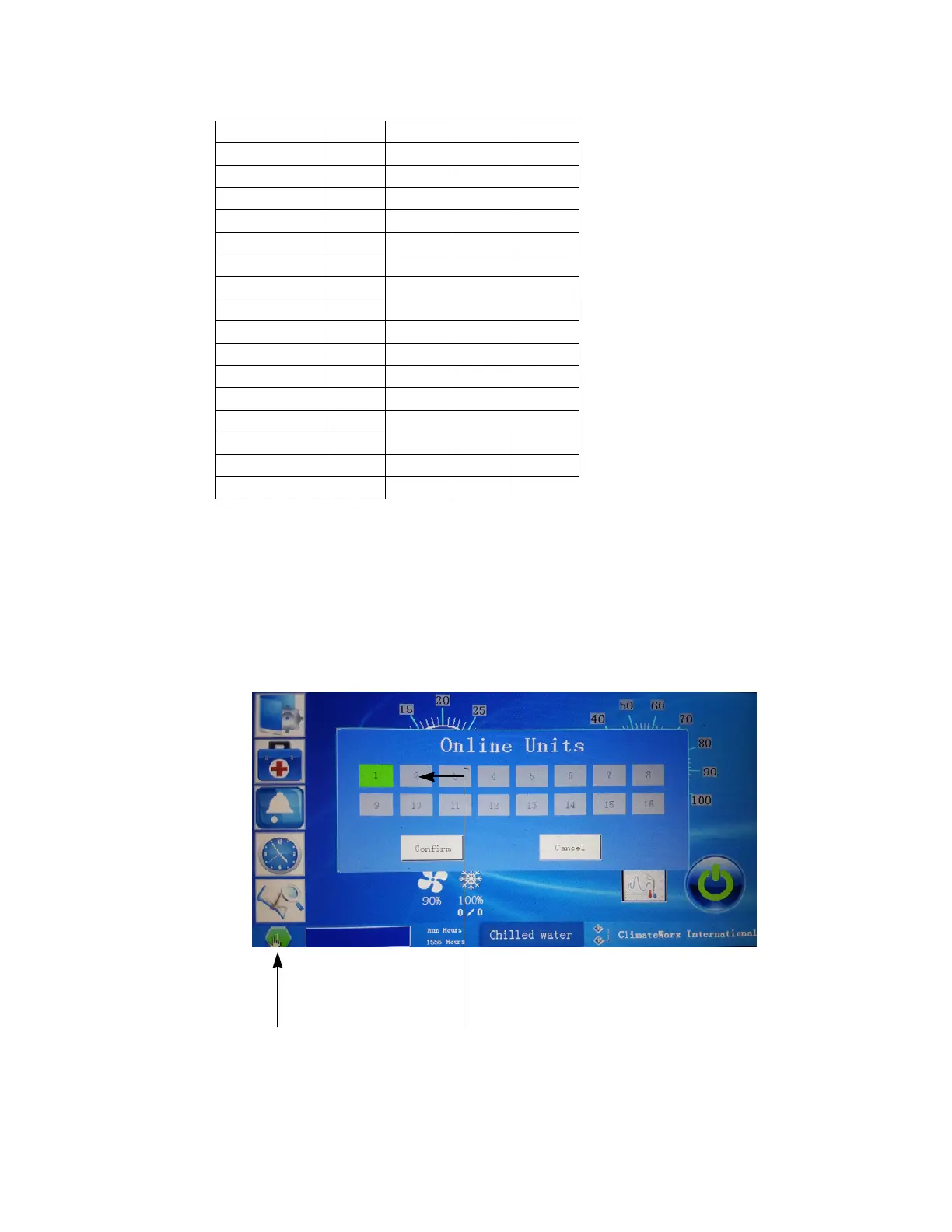
Each display must have the corresponding Co-work address selected to display in the upper
right hand corner. This is done by logging in with level 1 pass word and then touching the co work
icon in the upper right hand corner. Selected the appropriate number of icon to correspond with the
addressing of the main board done in the previous step.
Note: In the Co-work configuration the member with the lowest Co-work number will always be the
master unit.
Co Work network active Icon
Select unit Icon



 To Next Page