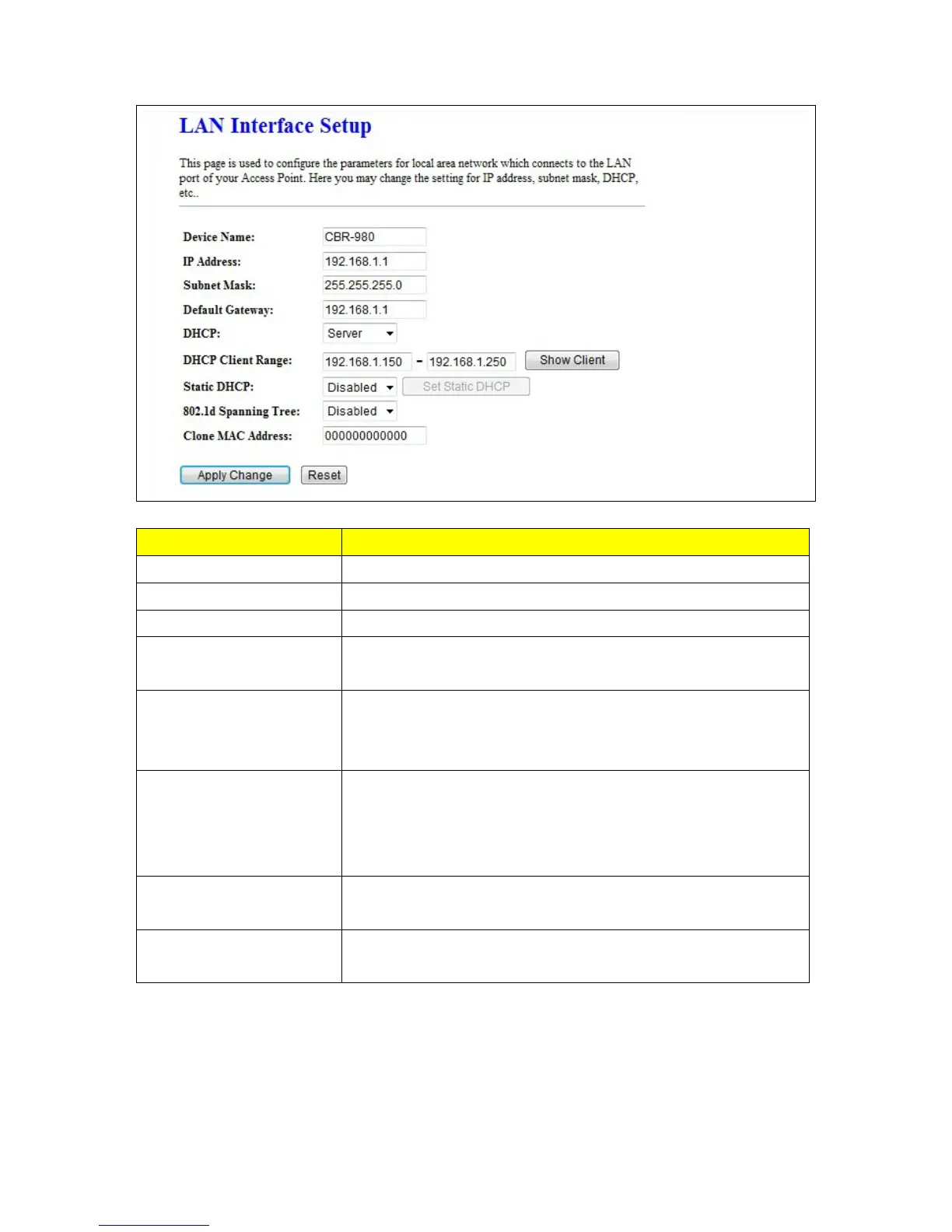
Item Description
IP Address
The default IP address is 192.168.1.1
Subnet Mask Please enter the Subnet Mask address
Default Gateway Please enter the Default Gateway address for LAN interface.
DHCP
Click to select Disabled, Client or Server in different operation mode
of LAN access point.
DHCP Client Range
Fill in the start IP address and end IP address to allocate a range of IP
addresses; client with DHCP function set will be assigned an IP
address from the range
802.1d Spanning Tree
IEEE 802.1d Spanning Tree Protocol (STP) is a link layer network
protocol that ensures a loop-free topology for any bridged LAN. Select
enable or disable the IEEE 802.1d Spanning Tree function from
pull-down menu.
Clone MAC Address
If your ISP asks you to enter a specific MAC Address, please input the
correct info at the column.
Apply Change & Reset
Click on Apply Changes to save the setting data. Or you may click on
Reset to clear all the input data.



 To Next Page