EasyManua.ls Logo

Codan 8528 Series - Page 65

Codan 8528 Series
189 pages
Print Icon
To Next Page IconTo Next Page
To Previous Page IconTo Previous Page
Loading...
Using selective call
Outback HF Radiophone 5-13
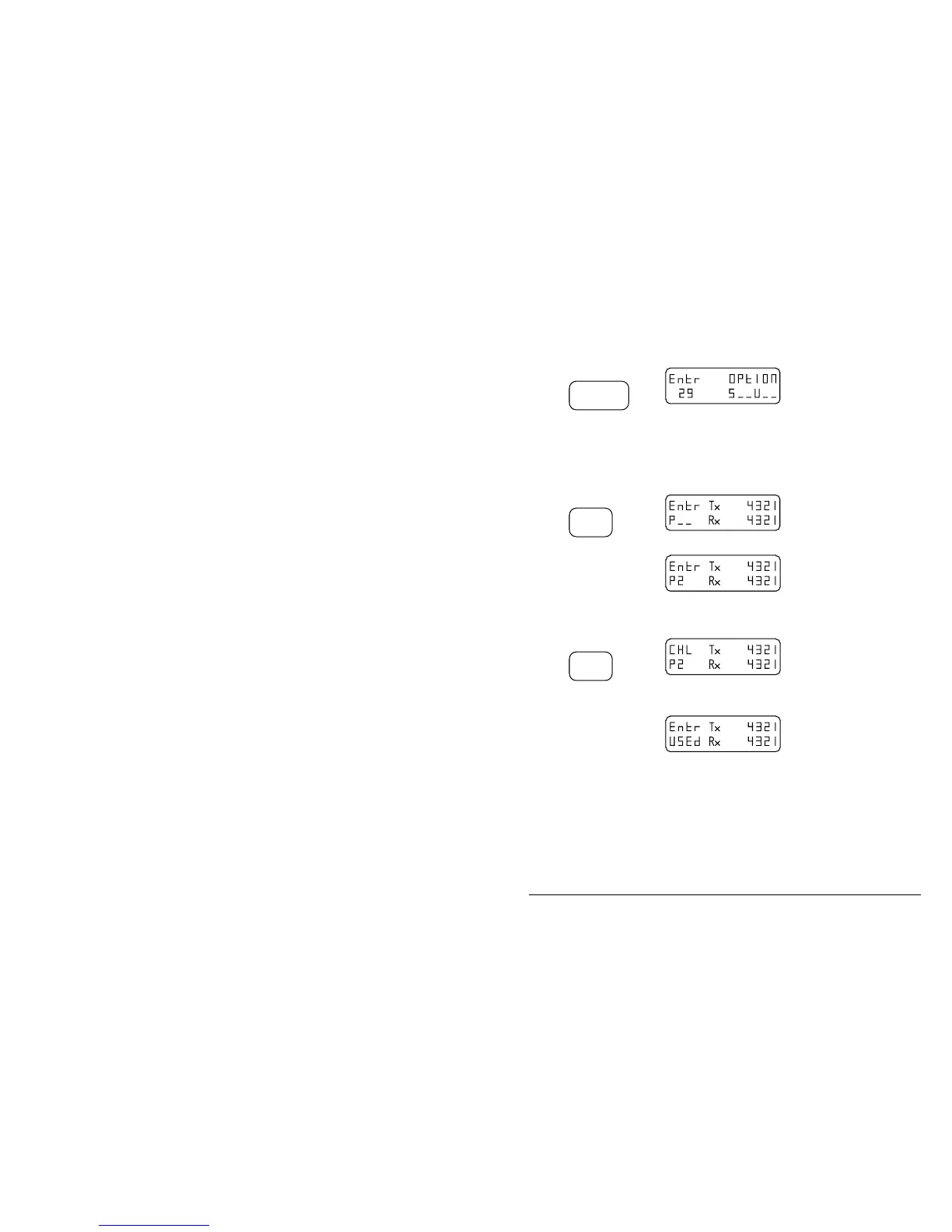
Step Action… Display shows… Remarks…
4.
Press
Call
Selective
Repeat this action
until an S appears
in the left hand
position of the
options bar.
You will hear a ’pip’.
5.
Press
Enter
You will hear a ’pip’.
6.
Use the numeric
buttons to enter
the ’P’ channel
number you wish
to use.
You will notice that the
display automatically
inserts a ’P to the
number.
7.
Press
Enter
If the channel is already
used the display shows
8.
If the channel is
already used, you
can either enter
another number or
press Enter again
to override the
existing one.
The display reverts back
to normal.
The information will
either be stored under an
existing channel number,
or you will have created
a new one.
q

Table of Contents

Other manuals for Codan 8528 Series

Related product manuals