
 Need help?
Do you have a question about the Code Party 600 and is the answer not in the manual?
Instructions for initial setup of the Party 600, including power and connections.
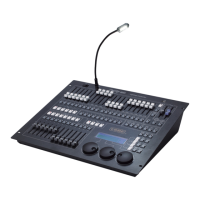
Detailed description of the front panel components of the Party 600 console.
Explanation of the 20 faders and their dual function (channel/level) for control.
Description of unit selection buttons, pages, and their role in fixture patching.
Details on Preset keys, Playback section, and Master faders for console operation.
Explanation of Function keys, LCD Screen, Control Wheels, Soft-keys, and Action keys.
Description of Operate keys for navigation and the console's power switch.
Details on DMX output jacks and the audio input for music trigger function.
Information on MIDI, USB ports, power supply jack, and fuse.
Procedures for clearing all console data, including Patch, Preset, and Playback.
Steps for patching DMX addresses to units, including automatic and manual methods.
Instructions for patching dimmer channels to faders, including master fader usage.
Guide on patching fixtures using the system or user fixture library.
Instructions for setting up fixture channels, including Pan/Tilt inversion.
How to view the current patching status and DMX addresses of units.
Description of Live Mode types and steps for selecting units for manual control.
How to interpret the console's output display, including unit status and values.
Detailed steps for manually controlling dimmer channels using faders and wheels.
Steps for controlling fixture attributes and parameters, including light beam activation.
Methods for changing fixture attributes using control wheels and channel mode.
Using presets, running effects, manual clear, and creating fixture groups.
Overview of Preset pages, saving presets, and quick recall of fixture attribute values.
Using the Effect Generator to create lighting movements and control their parameters.
Explanation of HTP/LTP principles and how to save and replay programs.
Procedures for recording Cues, including different record modes and saving.
Introduction to Chases, timing, and link mode parameters.
Steps for creating a new Chase and editing existing chase steps.
Adjusting link mode and independent time for individual chase steps.
How to change independent timing parameters (Fade In, Wait) for chase steps.
Procedures for editing an existing chase step and inserting new steps.
How to insert or delete steps within a Chase sequence.
How to navigate and select different Playback pages.
Controlling playback state, chase direction, and activating music trigger.
Adjusting playback global timing and temporarily changing playback speed.
Positioning fixtures without brightness and setting link modes for chases.
Instructions for copying preset and playback data between different locations.
Procedures for deleting unwanted Playbacks, Presets, and Units from the console.
How to delete individual preset data and playback sequences.
Warning and procedure for deleting units, noting potential data errors.
How to upgrade the fixture library and view system library contents.
Managing user-defined fixtures, including adding, editing, and deleting.
Steps for manually creating a fixture entry in the user library.
Configuring DMX channels, channel settings, and fixture name/manufacturer.
How to import R20 files and edit existing fixtures in the user library.
How to delete user-defined fixtures from the library.
Steps to upload a show file to the console and back up the current show file.
Overview of USB flash drive utilities like deleting documents and formatting.
How to delete files from USB and check the USB drive's capacity.
Instructions for formatting the USB flash drive to FAT format.
Options for clearing console data, including all data, presets, and playback data.
Settings for console language and MIDI configuration.
Configuring the console for MIDI master/slave operation and setting the MIDI channel.
Describes the command structure for MIDI control of playback pages and levels.
Procedure for downloading and installing software updates via USB.
Technical details and specifications of the Party 600 lighting console.
 General
| Brand | Code |
|---|---|
| Model | Party 600 |
| Category | Lighting Equipment |
| Language | English |

 To Next Page