EN
19
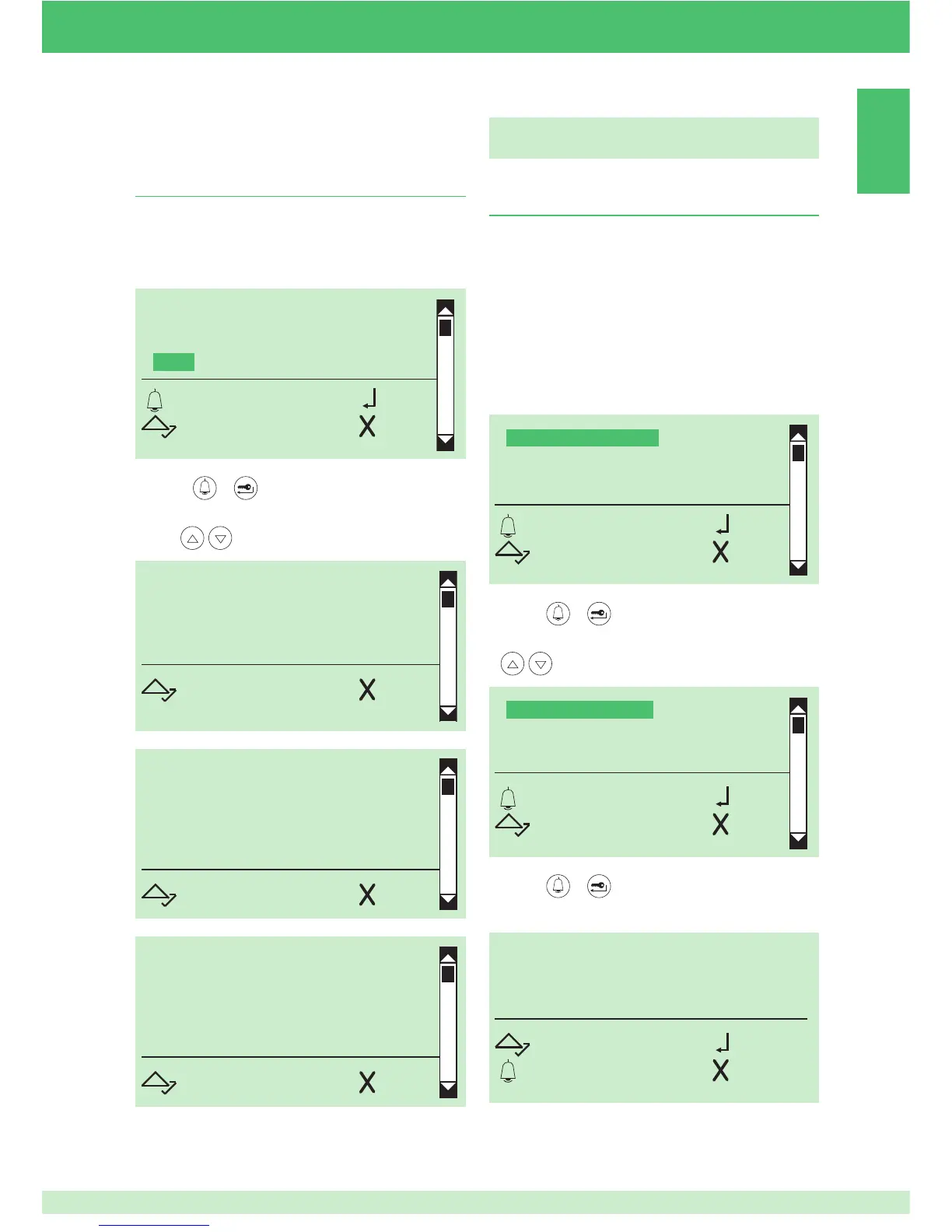
15. Viewing the number of names entered in
the directory, the software version, the number
of passwords entered and the ID code (RS485
address)
1. access programming mode, see page 5
2. select the menu item:
Info
REV. 1.0
RS485 ADDRESS
001
SCROLL ESC
REV. 1.0
PASSWORDS ENTERED
0010
SCROLL ESC
REV. 1.0
NAMES STORED
0020
SCROLL ESC
NAME DIRECTORY
ACCESS CONTROL
SETTINGS
INFO
OK OK
SCROLL ESC
3. press or to confi rm
4. to display the information, scroll through the directory
using
Standard settings of the porter module (Art.
1622, Art. 4680, Art. 4680C)
1. Setting the porter module parameters
(audio time, door lock time, reset time)
AUDIO TIME= 10 - 180 sec.
DOOR LOCK TIME= 1 - 8 sec.
RESET TIME= 1 - 10 sec.
1. access programming mode, see page 5
2. select the menu items:
Settings ⇒ System parameters ⇒ Speaker parameters
ENTER AUDIO TIME
ENT. DOOR LOCK TIME
ENTER RESET TIME
VIEW
OK OK
SCROLL ESC
VALUE IN SECS
10
SCROLL OK
ESC ESC
SPEAKER PARAMETERS
RS485 ADDRESS
OK OK
SCROLL ESC
3. press or to confi rm
4. select the porter parameter that you want to modify using
5. press or to confi rm
6. enter the value using the alphanumerical keypad


 To Next Page