EN
24
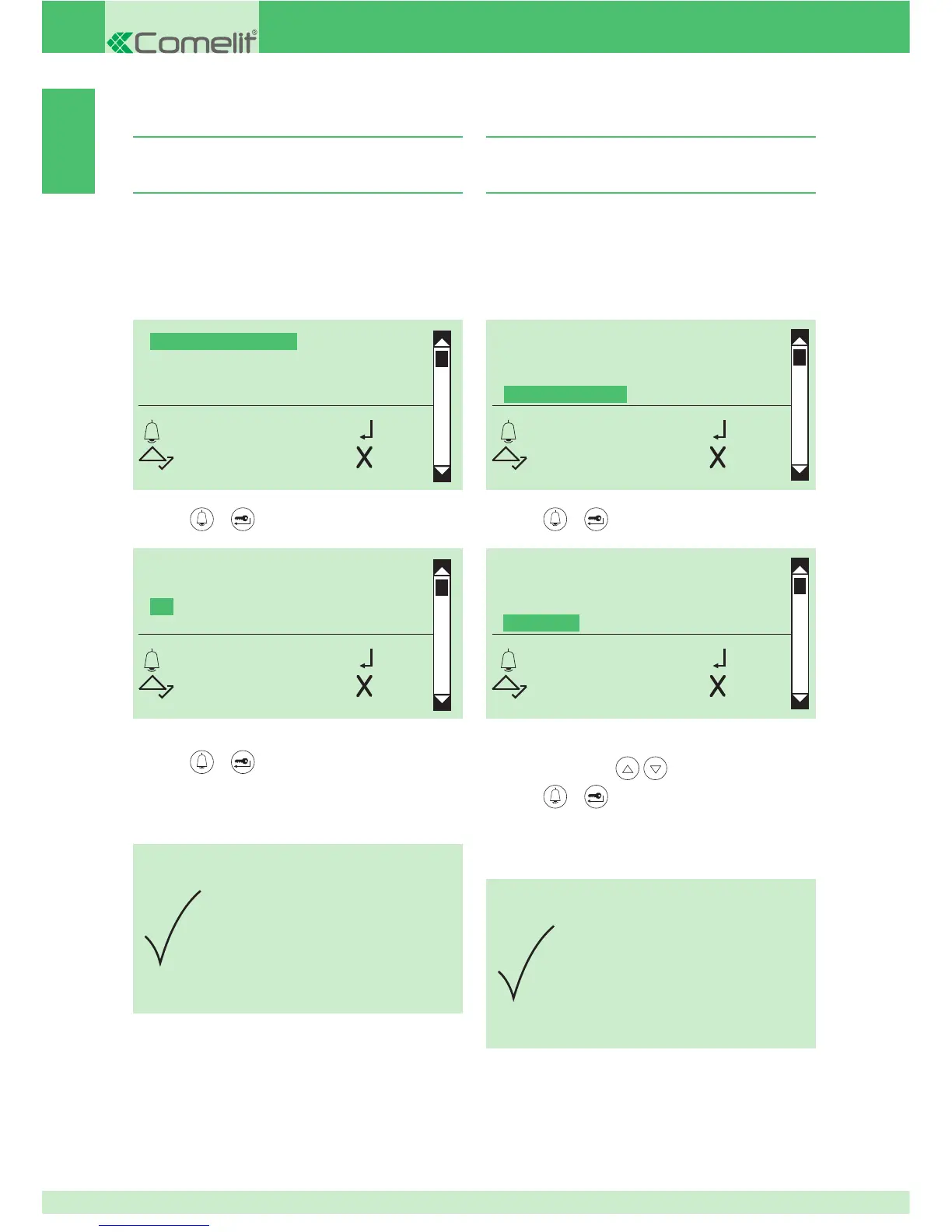
3A. Enabling/disabling the actuator function on
the S serial line
1. access programming mode, see page 5
2. select the menu items:
Settings ⇒ System parameters ⇒ Speaker parameters
⇒ Advanced options ⇒ S serial ⇒ Actuator function
3. S serial
ACTUATOR FUNCTION
OK OK
SCROLL ESC
ACTUATOR FUNCTION
YES
*NO
OK OK
SCROLL ESC
PARAMETER
CHANGED
4A. Enabling/disabling voice and visual
messages on the porter module
1. access programming mode, see page 5
2. select the menu items:
Settings ⇒ System parameters ⇒ Speaker parameters
⇒ Advanced options ⇒ Voice messages
4. Voice messages
SELECT LANGUAGE
*OFF
ITALIANO
FRANCAIS
OK OK
SCROLL ESC
LOCK ON SE
RELAY CONTACT
S SERIAL
VOICE MESSAGES
OK OK
SCROLL ESC
3. press or to confi rm
PARAMETER
CHANGED
4. to display the language that you want to select, scroll
through the list using
5. press or to confi rm
» * indicates language selected
DEFAULT= Italiano
» confi rmation tone
3. press
or to confi rm
4. select YES to enable the function, NO to disable it
5. press or to confi rm
» * indicates active selection
» confi rmation tone


 To Next Page