EN
5
1A. Automatic entry
It is possible to download a name list using software Art.
1249B, see page 28.
CAUTION: not available if the call mode is IMMOTEC
STANDARD or IMMOTEC INDIRECT, see page 13.
1B. Manual entry
1. access programming mode, see page 5
2. select the menu items:
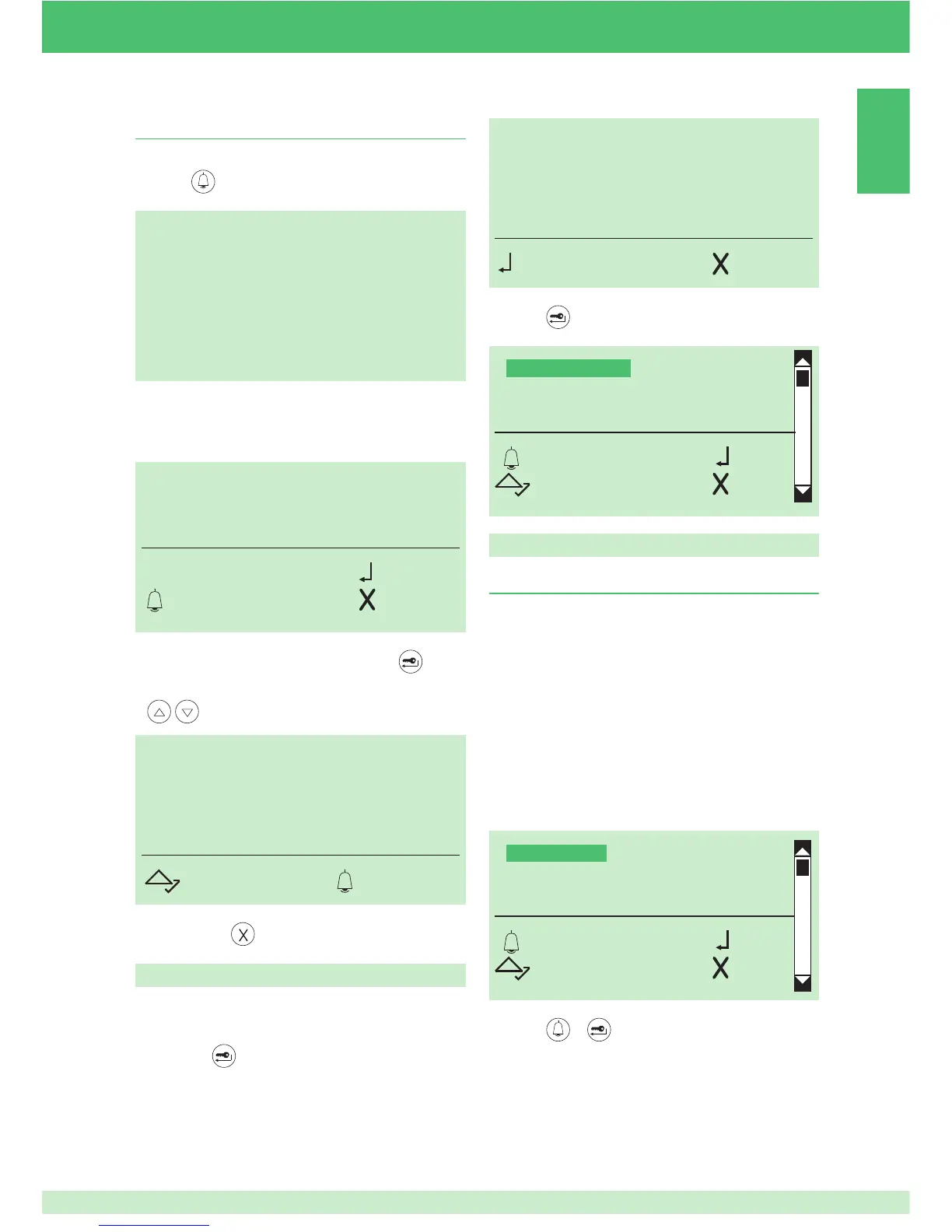
Name directory ⇒ Enter names
2. Finding a name in the directory
} standby mode
1. press
Name directory
1. Entering names in the directory
ENTER PART
OF THE NAME
REQUIRED
ENTER NAMES
DELETE NAMES
CHANGE NAMES
CLEAR ALL NAMES
OK OK
SCROLL ESC
MARIO ROSSI
CODE: 002
SCROLL CALL
M_
OK
ESC CANC
ENTER PASSWORD:
*****
9
OK CANC
Accessing the programming mode
1A. connect terminal PRG to GND and power up the
module
1B. or press
and enter the default supercode 778899
NAME DIRECTORY
ACCESS CONTROL
SETTINGS
INFO
OK OK
SCROLL ESC
2. enter the name using the alphanumeric keypad, for the
use of special characters see table on page 3
} to exit, press
2.
press
to confi rm
3. press
or to confi rm
4. enter the name using the alphanumeric keypad, for the
use of special characters see table on page 3
3. to confi rm the fi rst letter of the name, press
4. to display the name, scroll through the directory using


 To Next Page