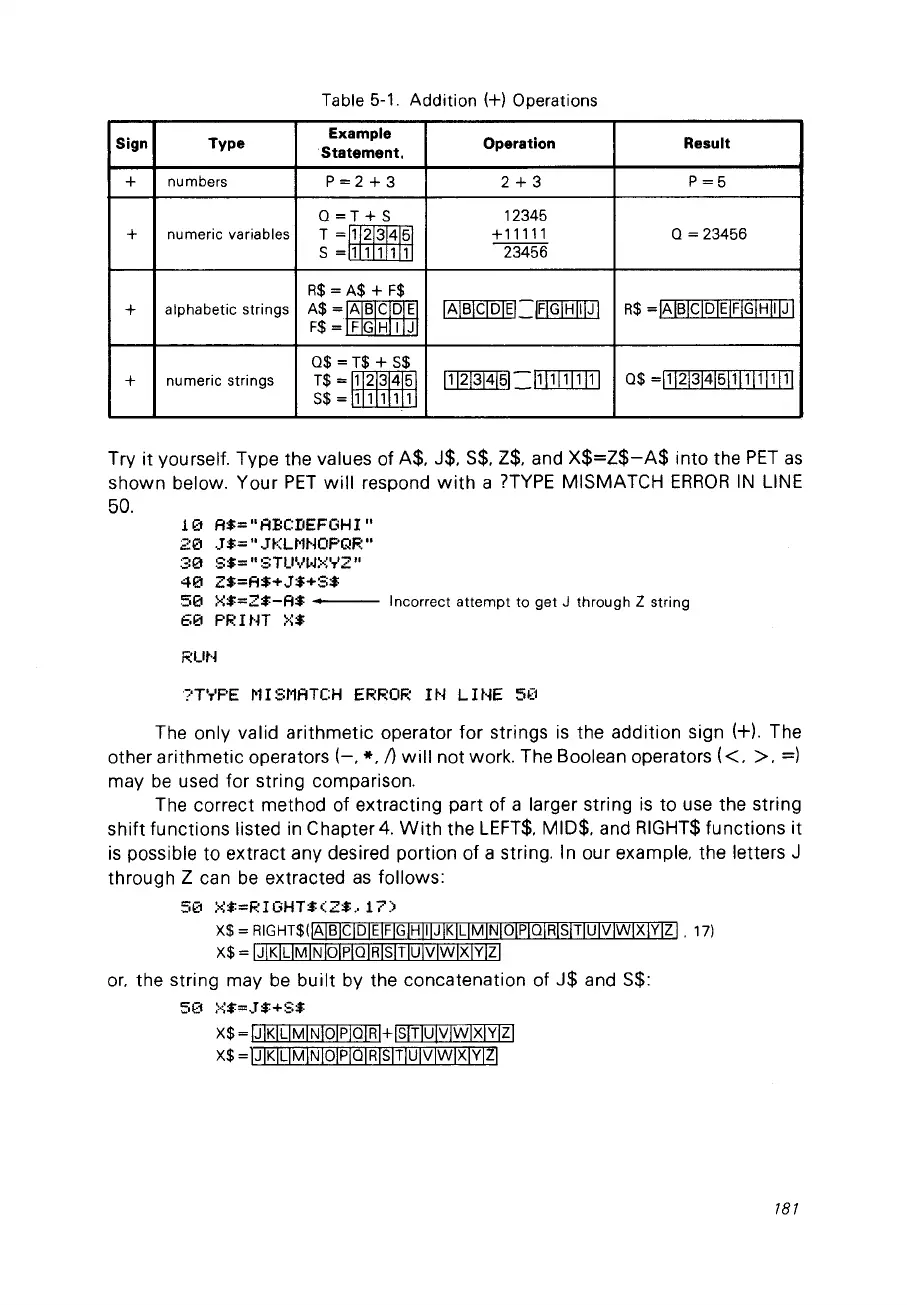
Table 5-1. Addition (+) Operations
Sign
Type
Example
Operation Result
Statement,
+
numbers
P=2+3
2+3
P=5
O=T+S
12345
+
numeric variables
T
=11121314151
+11111
0=23456
S
=11111111111
23456
R$
=
A$
+
F$
+
alphabetic strings
A$
=IAISICIDIEI
IAlslclDIEI
IFIGIHIiIJI
R$
=IAlslcIDIEIFIGIHIIIJ
1
F$
=1
FIGIHIIIJI
0$
=
T$
+
S$
+
numeric strings
T$
=
1112131415\
11121314151_11111111111
0$
=11\213141511111111111
S$
=11111111111
Try
it
yourself. Type the values of A$, J$,
S$,
Z$, and
X$=Z$-A$
into the
PET
as
shown below. Your
PET
will
respond
with
a
?TYPE
MISMATCH
ERROR
IN
UNE
50.
1(1
A$="
ABC!IEF(;Hl
..
20
.J$="JKL~lNOPQR"
30
S$="
STlIVW>NZ"
40
Z$=A$+J$+S$
50
X$=Z$-A$
• Incorrect
attempt
to get J through Z string
60
PRINT
>~$
RUN
?T'T'PE
NI
SNATCH
ERROF:
IN
L l
t~E
50
The only valid arithmetic operator for strings
is
the addition sign (+). The
other arithmetic operators
(-,
*, Il
will
not work. The Boolean operators
«,
>,
=)
may
be
used for string comparison.
The correct method of extracting part of a larger string
is
to use the string
shift functions listed in Chapter
4.
With
the
LEFT$,
MID$, and RIGHT$ functions
it
is
possible to extract any desired portion of a string. In our example, the letters J
through Z can
be
extracted
as
follows:
50
X$=RI(;HT$(Z$.17)
X$
=
RIG
HT$
qr.-A=ls"-lc=1
D""'"I=E
I=F
l''G
l'''H'''I
q"J
l'''K
l''Lj'"M.-r.IN-''-lo=l=pl'''o''-j
R=ls=IT=1
u'""l""v"'lwC>Tl"'x
l"'v="'lz
1.
17)
X$
=
IJIKILIMINlolplolRlslTlulvlwlxlvlzl
or,
the string may
be
built
by the concatenation of
J$
and S$:
5(1
X$=J$+8$
X$
=
'""'!J"""'IKr-1
Lrc-IM=I
NCTlo=l=pl=ol=RI+lslTlulvlwlxlvlzl
X$
-IJ
IKILI
MINlolplol
RlslTlulvlwlxlvlzl
181



 To Next Page