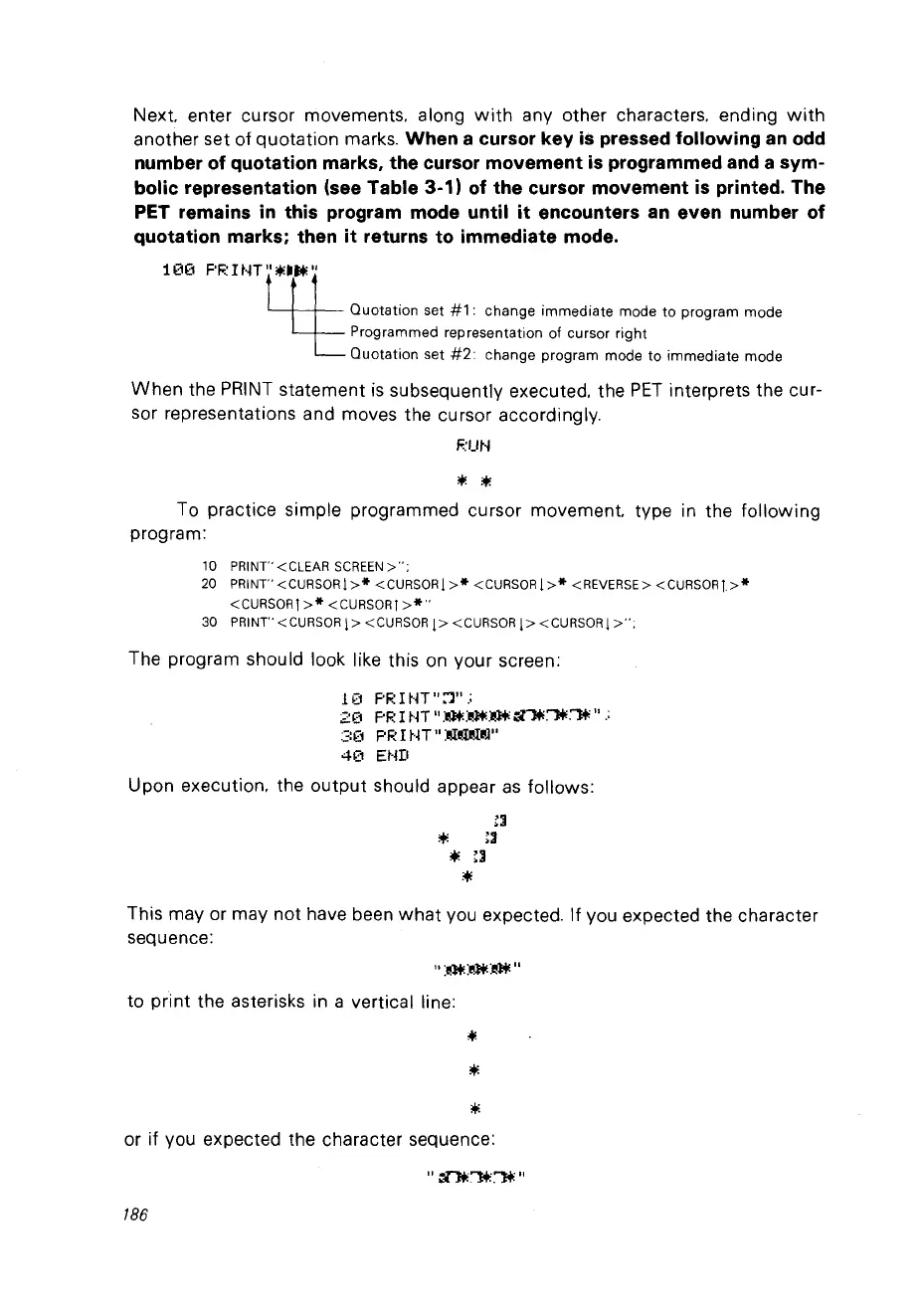
Next. enter cursor movements. along
with
any other characters. ending
with
another set of quotation marks. When a cursor key
is
pressed following
an
odd
number of quotation marks, the cursor movement
is
programmed
and
a sym-
bolic representation (see Table 3-1) of the cursor movement
is
printed. The
PET remains
in
this program mode until
it
encounters
an
even number of
quotation marks; then it returns to immediate mode.
1
00
F'F~
ItH
"....
M:"
ctt
Quotation set
#1:
change immediate mode ta program mode
Programmed representation of cursor right
Quotation set
#2:
change program mode ta immediate mode
When
the
PRINT
statement
is
subsequently executed. the
PET
interprets the cur-
sor representations and moves the cursor accordingly.
F.:UN
;t.
:+;
To practice simple programmed cursor movement. type in the
following
program:
10 PRINT" <CLEAR
SCREEN>":
20
PRINT"
<CURSORI
>*
<CURSOR j
>*
<CURSOR j
>*
<REVERSE>
<CURSOR»*
<cURSORl
>*
<CURSORj
>*"
30
PRINT"
<CURSOR
1>
<CURSOR
j>
<CURSOR
1>
<CURSORI
>";
The program should look like this
on
your screen:
1(1
PF~
l
~·lT
":1"
.;
20
PR l
~H
Il
»n~m
~"."'lt
Il
.;
:';:(1 PR l
NT
Il
:1ll:~I~J"
4"-1
Et·jI1
Upon execution. the
output
should appear
as
follows:
~:I
...
~:I
+.
::1
+.
This may or may
not
have been
what
vou expected. If
Vou
expected the character
sequence:
to print the asterisks in a vertical line:
*
or if
Vou
expected the character sequence:
186



 To Next Page