27
K-series OEM Board User Guide
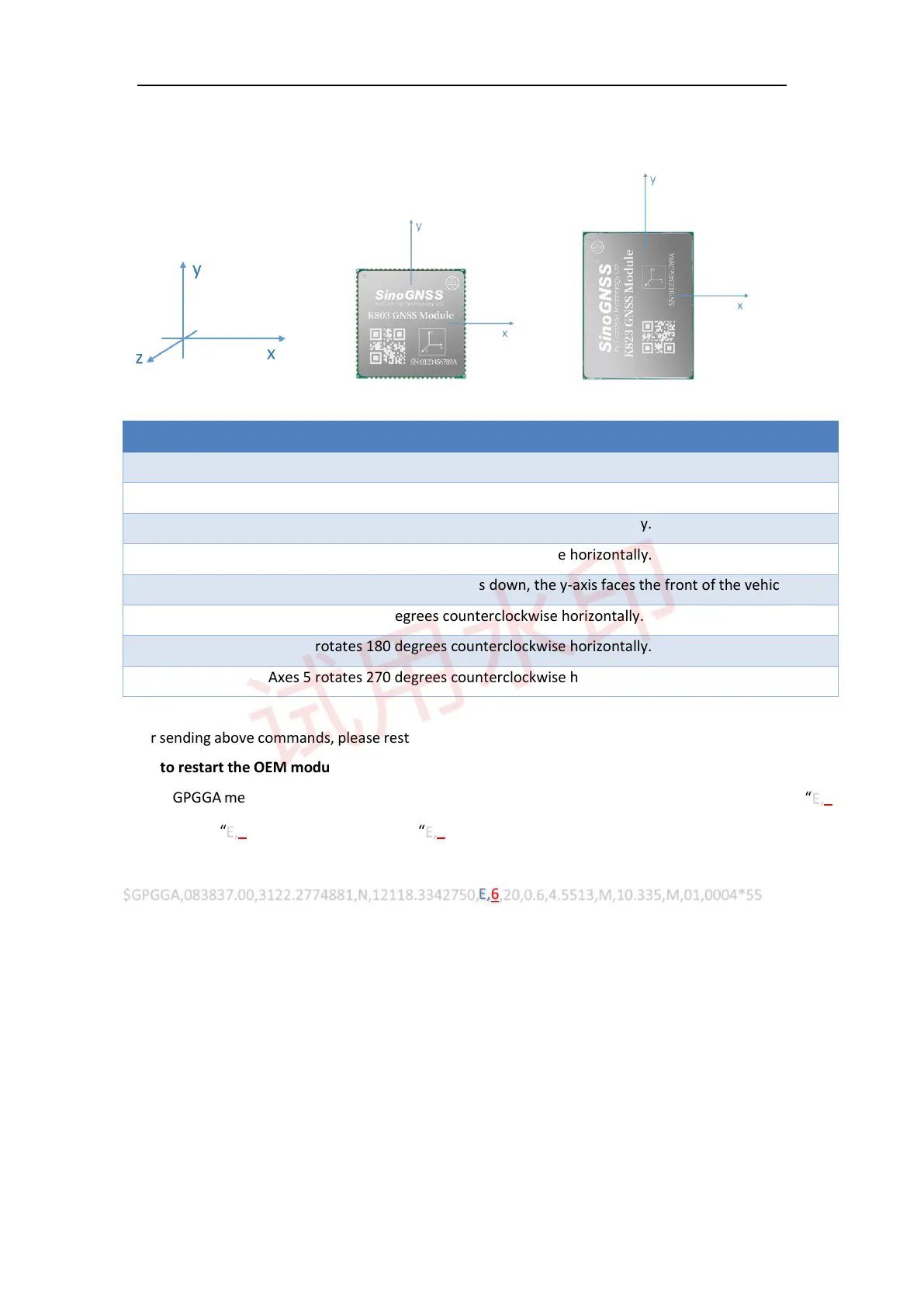
The INS coordinate system is shown in the followed figure and is also shown on the front of K8 module. The
y-axis direction is the direction of vehicle movement.
Axes type Description
1 The front of the OEM module faces up, the y-axis faces the front of the vehicle.
2 Axes 1 rotates 90 degrees counterclockwise horizontally.
3 Axes 1 rotates 180 degrees counterclockwise horizontally.
4 Axes 1 rotates 270 degrees counterclockwise horizontally.
5 The front of the K8 module faces down, the y-axis faces the front of the vehicle.
6 Axes 5 rotates 90 degrees counterclockwise horizontally.
7 Axes 5 rotates 180 degrees counterclockwise horizontally.
8 Axes 5 rotates 270 degrees counterclockwise horizontally.
After sending above commands, please restart the OEM module. Notice that once you set the axes type, you
need to restart the OEM modules.
Output GPGGA message to check if OEM module is in INS mode, the solution status should vary between “E,6”
(INS solution), “E,4” (RTK fixed solution) and “E,0” (no solution).
$GPGGA,083837.00,3122.2774881,N,12118.3342750,E,6,20,0.6,4.5513,M,10.335,M,01,0004*55



 To Next Page