. . . . . . . . . . . . . . . . . . . . . . . . . . . . . . . . . . . . .
Introduction
1-7
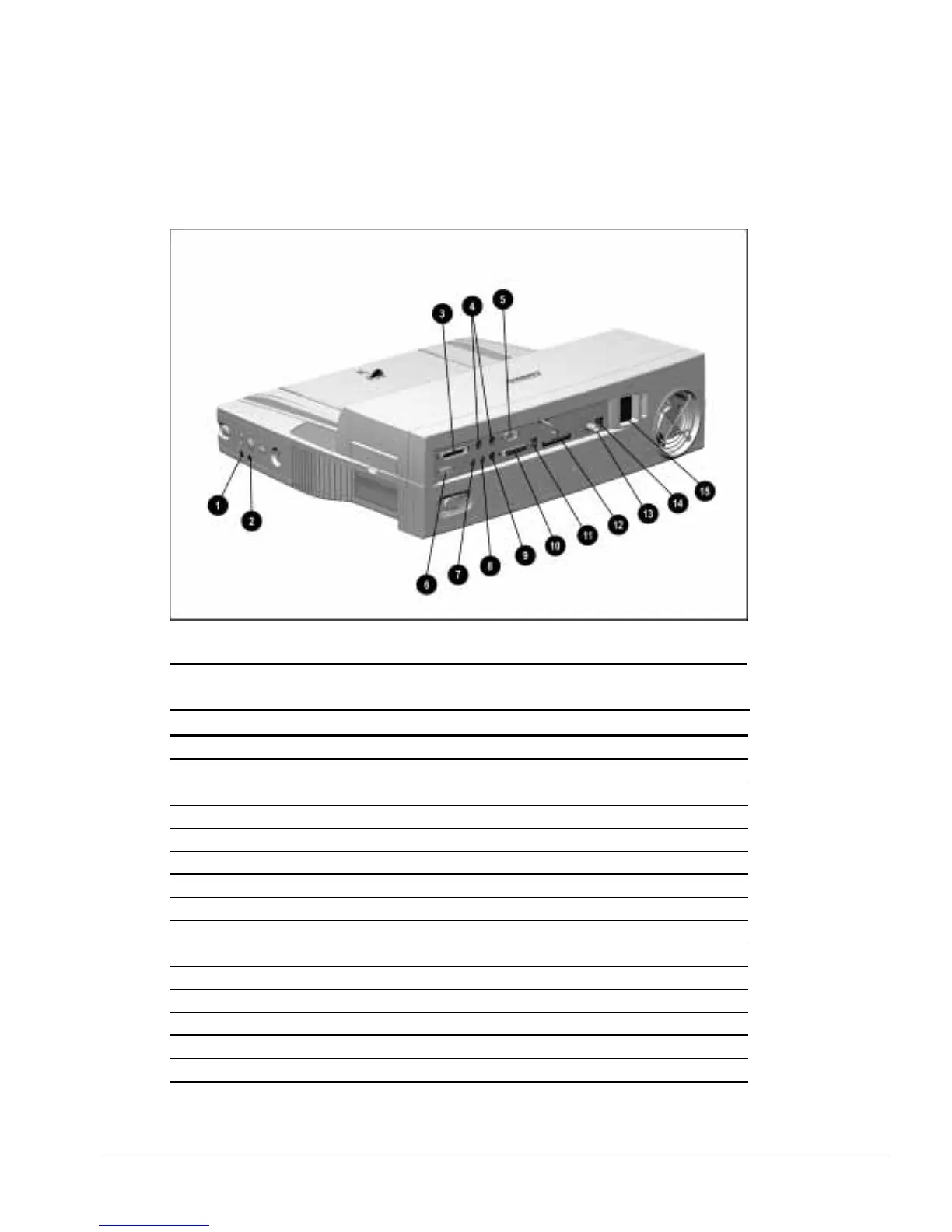
The external connectors on the right side and rear panel of the ArmadaStation are
shown in Figure 1-5 and described in Table 1-4.
Figure 1-5.
ArmadaStation Connectors: Right Side and Rear Panel
Table 1-4
ArmadaStation Connectors: Right Side and Rear Panel
Item Description
1 Headphone jack
2 Microphone jack
3 Parallel connector
4 External keyboard/mouse connectors
5 Serial connector
6 External monitor connector
7 Stereo line-out jack
8 Stereo line-in jack
9 Infrared transceiver connector
10 MIDI/joystick connector
11 RJ-11 jack (North America, Latin America, Japan, and Hong Kong modem models)
12 25-pin connector (Europe, Middle East, Africa, and Asia Pacific modem models)
13 BNC connector (Europe, Middle East, Africa, and Asia Pacific models)
14 RJ-45 jack (all models)
15 Power connector



 To Next Page