. . . . . . . . . . . . . . . . . . . . . . . . . . . . . . . . . . . . .
ArmadaStation Removal and Replacement Procedures
5-15
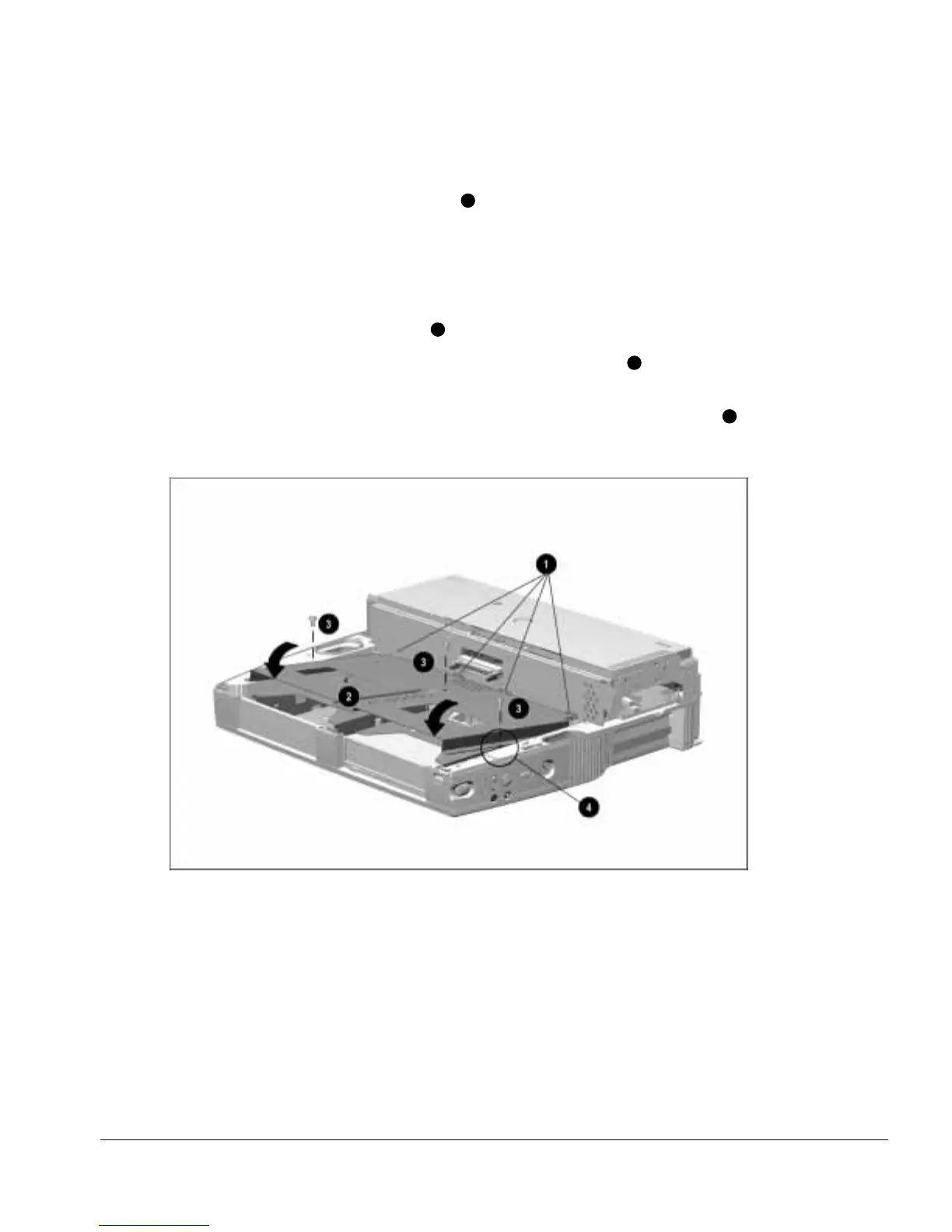
To install the drive cage shield, follow these steps:
1. Align the tabs on the back of the shield
1
with the slots in the backplane assembly
(Figure 5-15).
NOTE: Make sure any cables used to connect half-height drive assemblies are properly
tucked underneath the slots in the backplane cover and not resting on top of the drive
cages before installing the drive cage shield.
2. Swing the front of the shield down
2
.
3. Install the three screws securing the shield to the base assembly
3
. Note that the
middle screw is different in size and type from the other two screws.
NOTE: Make sure the screw installed on the right side of the drive cage shield
4
secures the control panel assembly ground strap to the drive cage shield.
Figure 5-15.
Installing the Drive Cage Shield



 To Next Page