4-2 l Operation
Dryer System Control Panel
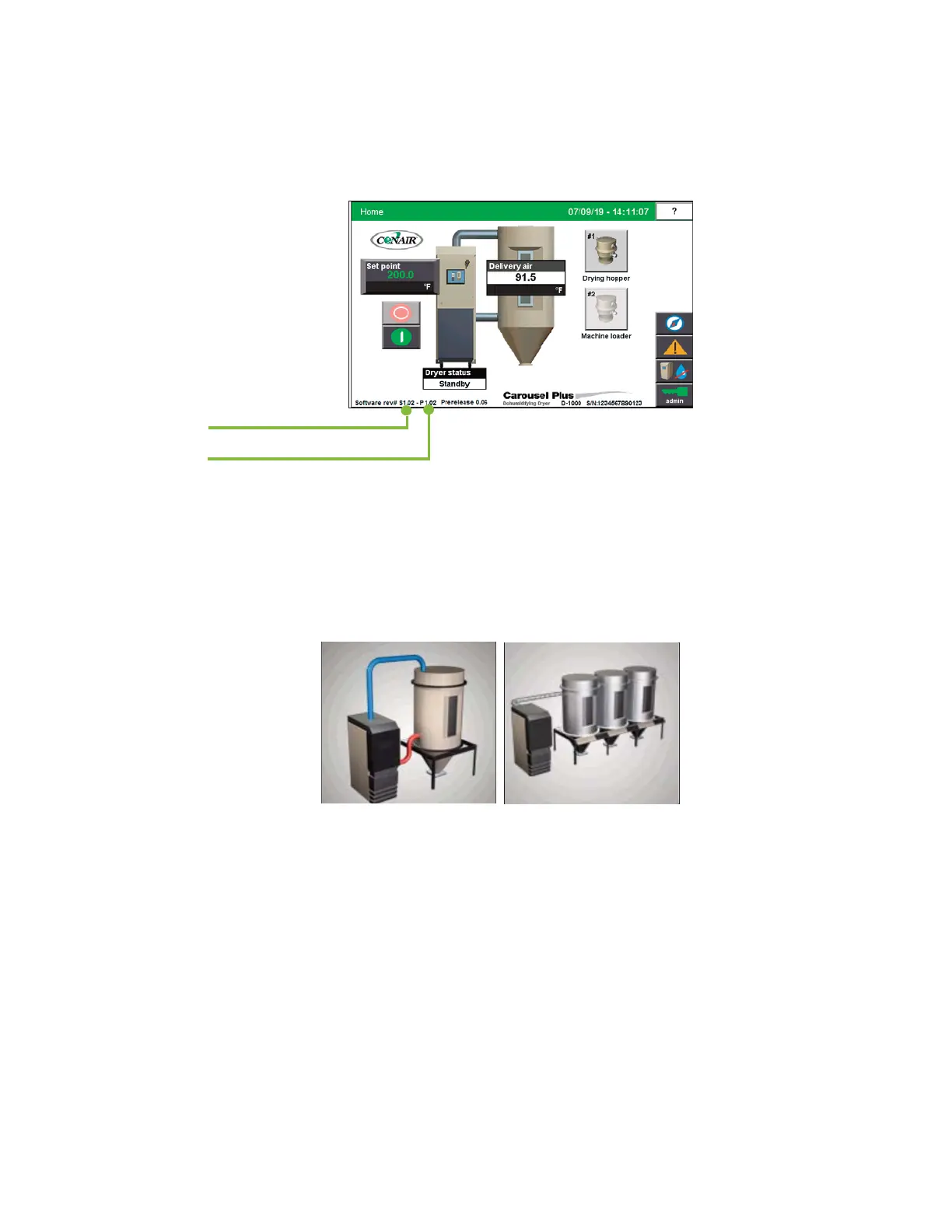
On power-up, the Carousel Plus Dryer control displays the initial system Home screen.
At start-up, the system security level is "Default". Once the operator clicks the Login button
and enters the user name and password, access is permitted to various areas of the control.
The user, depending on security access level, can access the various system and setup
screens for the entire Carousel Plus Dryer system.
Your Carousel Plus Dryer Control has been configured at the factory based on the configu-
ration you chose when placing the order. The DC-C can be configured for use with a Resin-
Works dryer with multiple hoppers, a central dryer with separate heat source to multiple
hoppers, or as a stand alone dryer with heater pack at a single hopper. Once this factory
configuration is set (based upon your order) a customer can not change this configuration.
The screens, the screen flow, and operation will differ greatly depending on which configu-
ration you are using. The Operation section of this user guide covers each of the three con-
figurations individually.
NOTE: The bottom of the Home
screen displays valuable infor-
mation, including the current
date and time, the HMI software
version, and the PLC software
version. The software versions
will be helpful for service and
troubleshooting purposes.
0
PLC software version
HMI software version
Stand alone dryer
Central or ResinWorks dryer


 To Next Page