Installation l 3-15
3
Installation
Checking for Proper Air Flow
IMPORTANT: This procedure must be performed before loading material into the hopper.
CAUTION: If the airflow direction is incorrect due to improper phase connection, material from
the hopper can be pulled back into the dryer, causing permanent damage to this equipment.
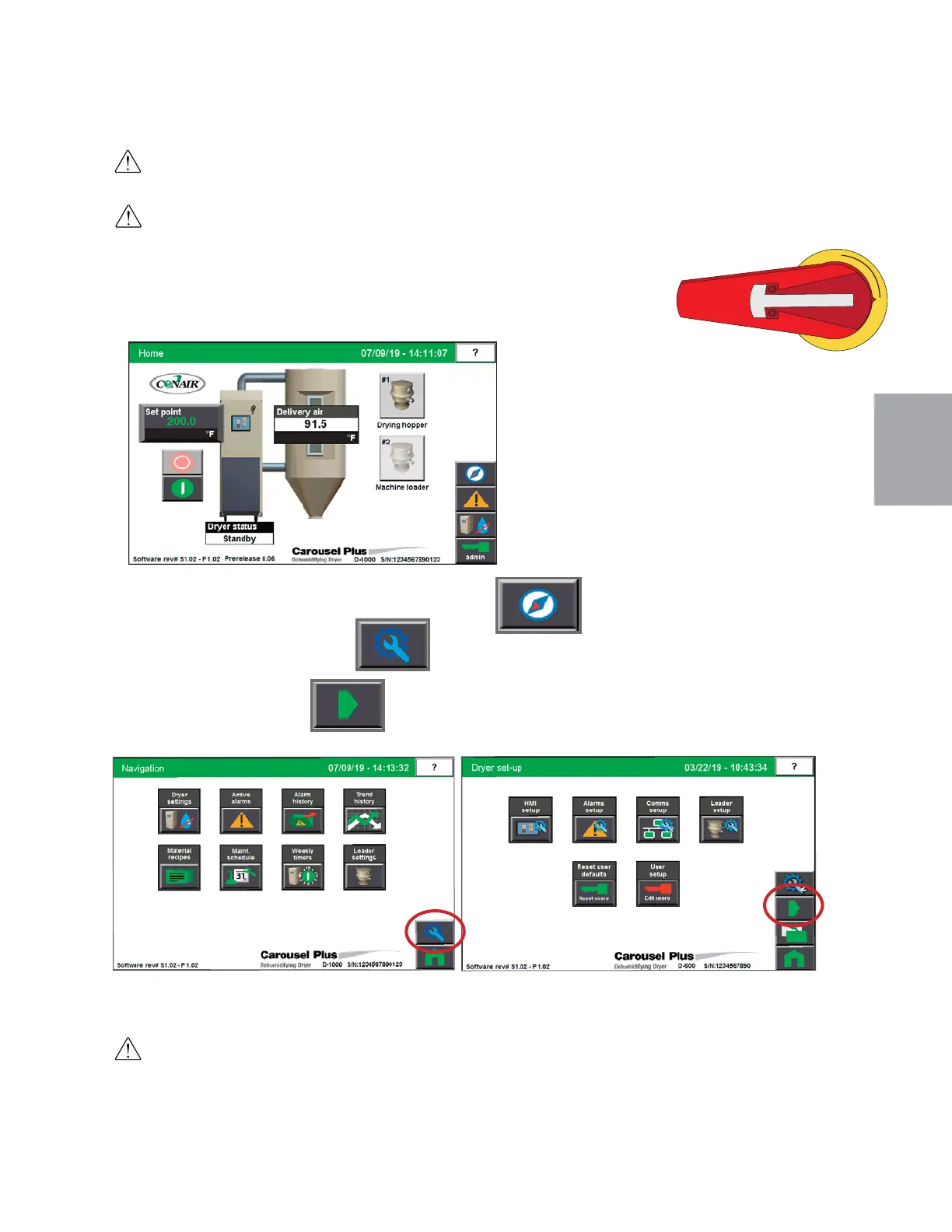
1 Turn on the main power to the dryer. Make sure the dryer’s disconnect dial is in the ON
position. This powers up the control and the display will illuminate.
-
2 From the Home Screen , press the “Navigation” button.
3 Press the Set-up button (wrench) .
4 Press Right Arrow button.
(continued)
WARNING: All wiring, disconnects, and fuses should be installed by qualified electrical technicians in
accordance with electrical codes in your region. Always maintain a safe ground. Do not operate the
equipment at power levels other than what is specified on the machine serial tag and data plate.
NOTE: Users must be
logged in as Maint 1 (user
level 3) in order to per-
form this operational test.
0
NOTE: Must be no alarms, and in Standby mode.
0


 To Next Page