3-16 l Installation
Checking for Proper Air Flow
(continued)
5
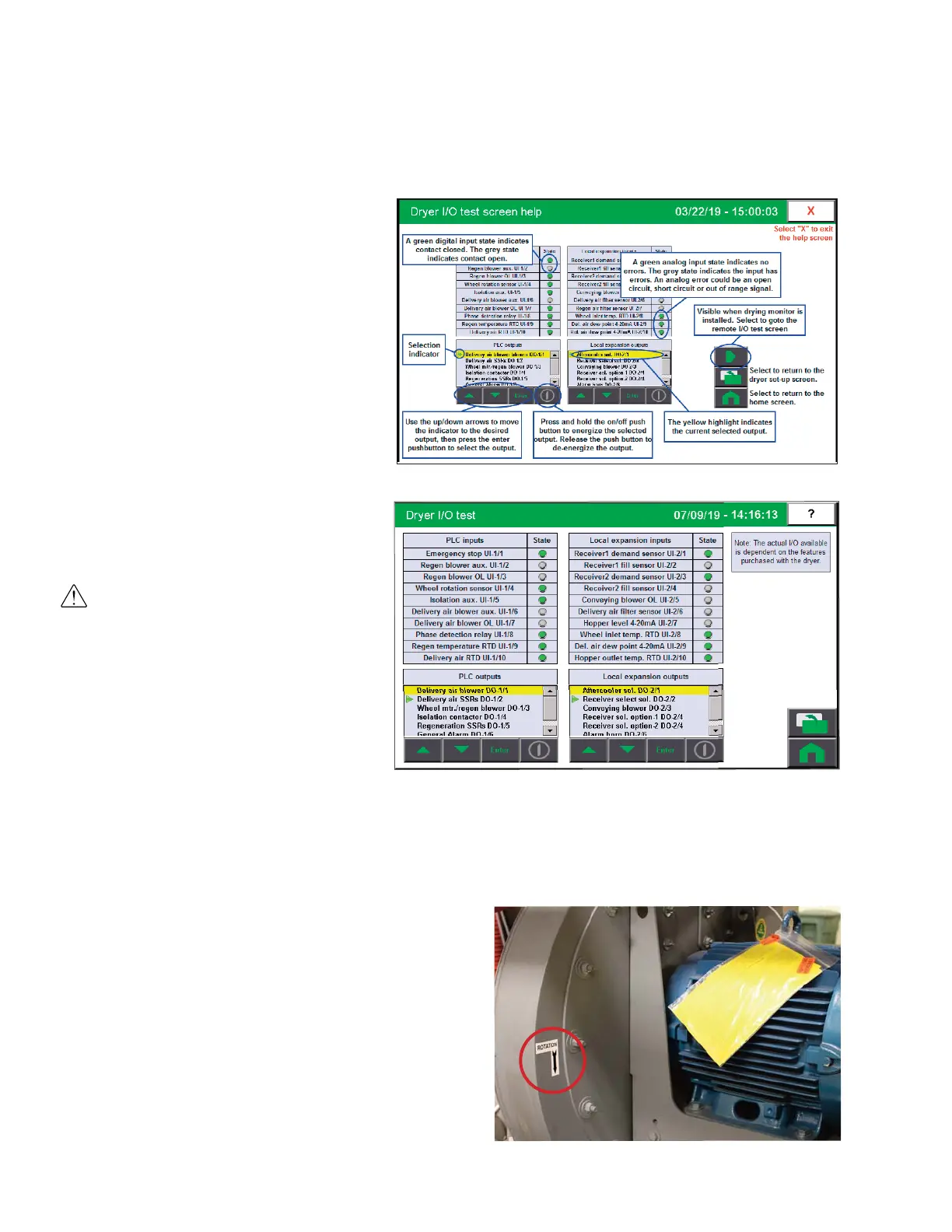
Select IO test. Refer to “Help Screens”.
6
Remove the dryer’s side panels.
See Installation section entitled, Opening the Dryer
Doors.
7
Visually verify the delivery
air blower motor is moving in
the correct direction indi-
cated by the arrow on the
blower housing. The Carousel
Plus D Series 600-5000 dryers
are equipped with centrifugal
delivery air blowers.
WARNING: All wiring, discon-
nects, and fuses should be in-
stalled by qualified electrical
technicians in accordance with
electrical codes in your region.
Always maintain a safe
ground. Do not operate the
equipment at power levels
other than what is specified on
the machine serial tag and
data plate.
(continued)
NOTE: On initial test (first time
in Dryer I/O Test Mode) use the
arrows to select the blower and
press enter, then holding the
on/off button runs the blower
and releasing it stops the
blower.
0


 To Next Page