4
Operation
(continued)
Operation l 4-21
Control Function Descriptions - RW
Configuration
(continued)
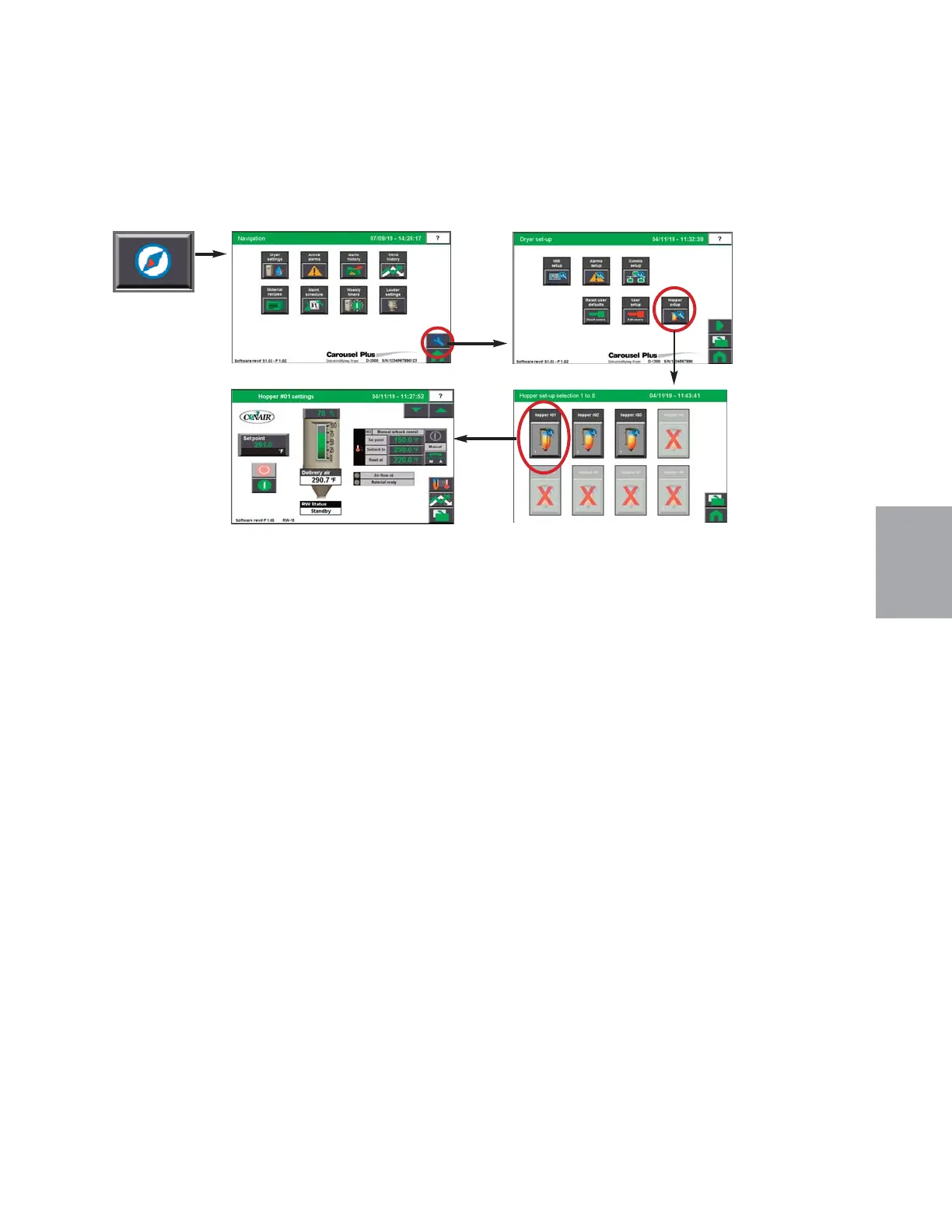
ResinWorks Hopper Setup screen
To access the ResinWorks Hopper Setup screen:
1 Press the Navigation button from the Home screen.
2 Press the Wrench button and then Press the Hopper Setup button to go to the
Hopper Set-up Selection screen.
3 Press the individual Hopper Button to go to the Hopper Settings screen for that in-
dividual hopper.
The Hopper Set-up screen provides the user with the list of enabled hoppers. Selecting the
individual hopper takes you to a Hopper Settings screen where hopper parameters can be set
and the dryer can be stopped or started using the red (stop) and green (start) buttons.
NOTE: Proper login is required to change these settings.
0
NOTE:
See the Appendix of this
User Guide for more information
about using the Drying Monitor.
0


 To Next Page