4
Operation
Control Function Descriptions -
Stand Alone Configuration
(continued)
Dryer Settings Screen
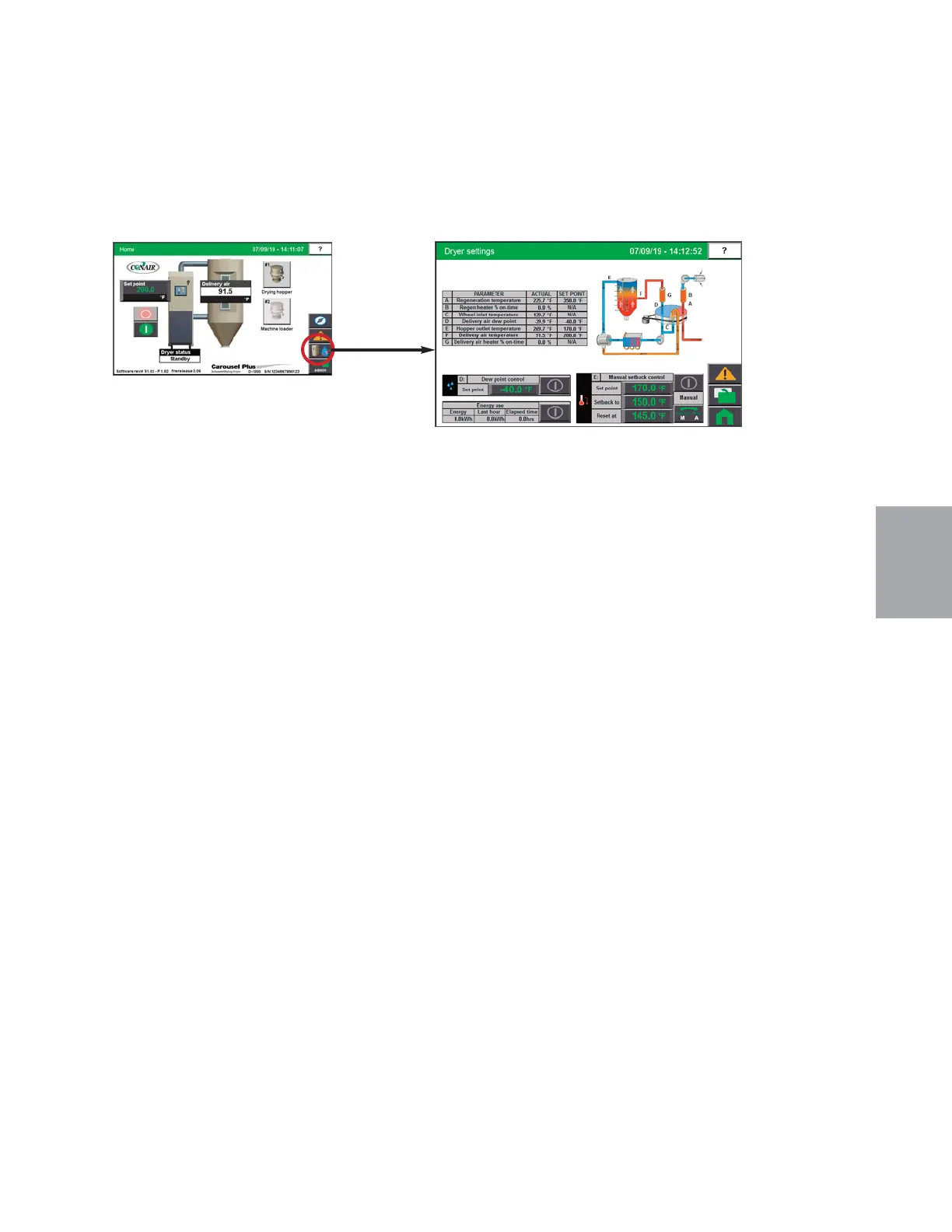
To access the Dryer Detail screen:
1 Press the Dryer button associated with the dryer on the Home screen.
The Dryer Settings screen provides the user with the current live information concerning the
processes within the dehumidifying dryer including:
• Regeneration Temperature
• Regen Heater % on-time
• Wheel Inlet Temperature
• Hopper Outlet Temperature (if equipped with setback)
• Delivery Air Temperature
• Delivery Air Dewpoint
• Delivery Air Heater % On Time
• Drying Monitor Zone Temperatures (if equipped)
If the user is logged-in at the proper security level, setpoint changes can be made to:
• Manual Setback Control
• Dewpoint Control Setpoint
The user can also view the other system parameters, view alarms, or return to the Home
screen by pressing the applicable buttons on the right of the screen.
NOTE: Live data is displayed as
colored text inside a box. Set
points boxes are beveled buttons
Set points can be changed, if the
user has logged in at the proper
security level, by pressing the set
point boxes. This will launch a
pop-up keypad window that can
be used to change the set point.
See Operation section entitled,
How to Navigate Control Screens.
After the new set point value has
been entered, press the "Enter"
key to lock in the new set point.
0
Operation l 4-39


 To Next Page