4-54 l Operation
Adjusting the Temperature or Dewpoint
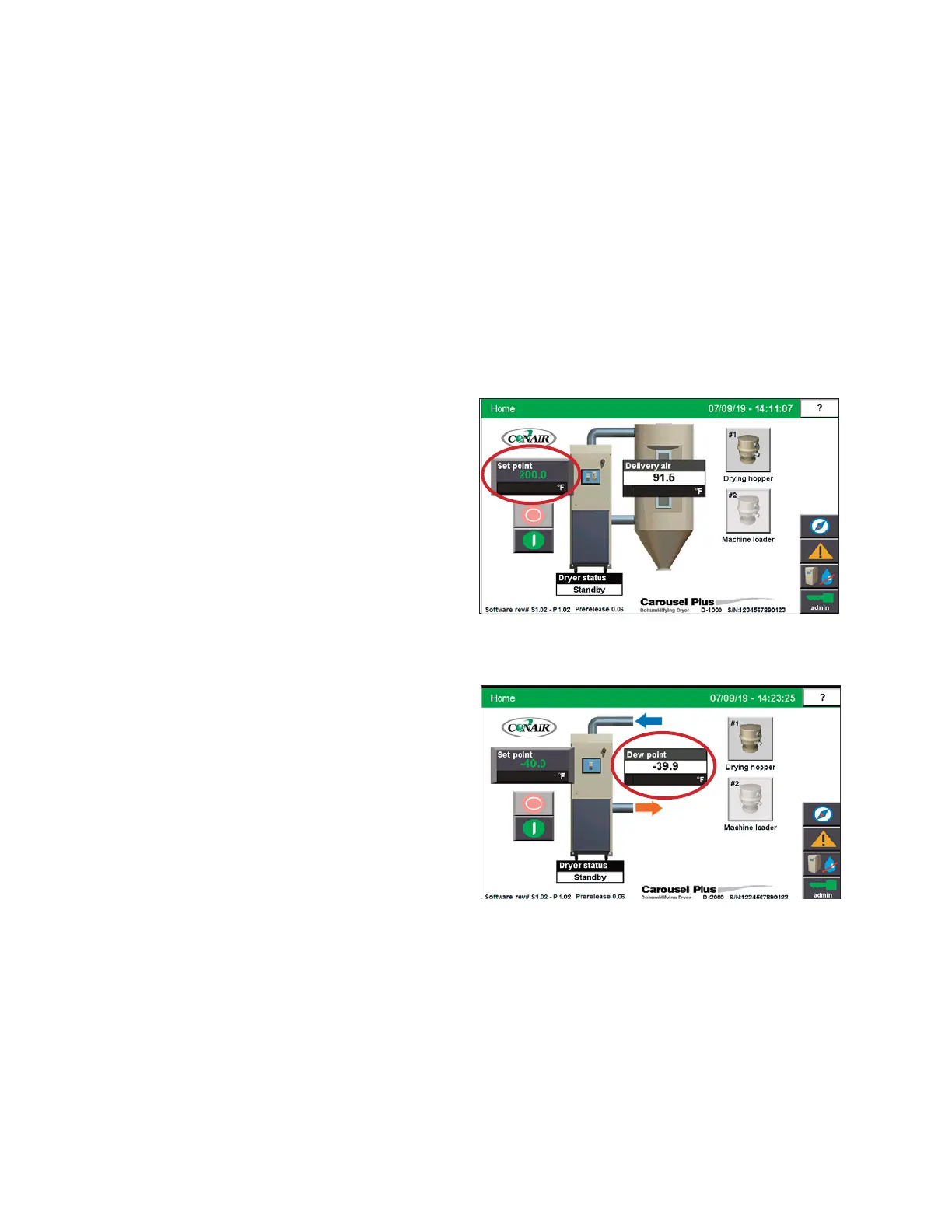
Setpoint
Any changes to the setpoint temperature once the dryer is operating will affect the on time
value. To minimize energy usage, Conair recommends using the lowest setpoint tempera-
ture that is required to dry your material and maintain the required material throat tempera-
ture. In situations where the incoming material moisture content is low (1000 ppm or less -
in the winter) you will be able to run lower setpoint temperatures.
Changes to material temperatures will affect the material temperature profile and the hopper
outlet temperature.
Increasing the hopper outlet
temperature will increase the
pressure drop in filters due to
the velocity of the air increas-
ing. Increasing air temperature
decreases its density (air ex-
pands as it is heated). This de-
crease in density causes an
increase in the velocity of the
air. Increased velocity in-
creases the pressure drop.
NOTE: Making too large of a
change in the setpoint will
change the material throat
temperature too fast for the
processing machine to react.
This may cause changes to
barrel temperatures, back pres-
sures, and injection pressures.
0
Stand alone configuration - Temperature setpoint
ResinWorks configuration - Dewpoint setpoint
IMPORTANT: Always
consult with the material
manufacturer for correct
processing temperatures.


 To Next Page