IDC 255 Progate Drive Thru Service Manual
Publication Number: 621057419SER - 8 - © 2006-2013, IMI Cornelius Inc.
LID DISPENSER MAINTENANCE
The lid dispensers are manufactured out of materials that can survive chlorine-based cleaners and warm water
<100°F. Ensure that the parts are thoroughly dried before refilling with lids.
NOTE: Lid dispenser parts should not be soaked in the powersoak washing machine as this will result
in
the parts getting scratched. Instead the dispenser parts should be rinsed in warm soap water
and then dried.
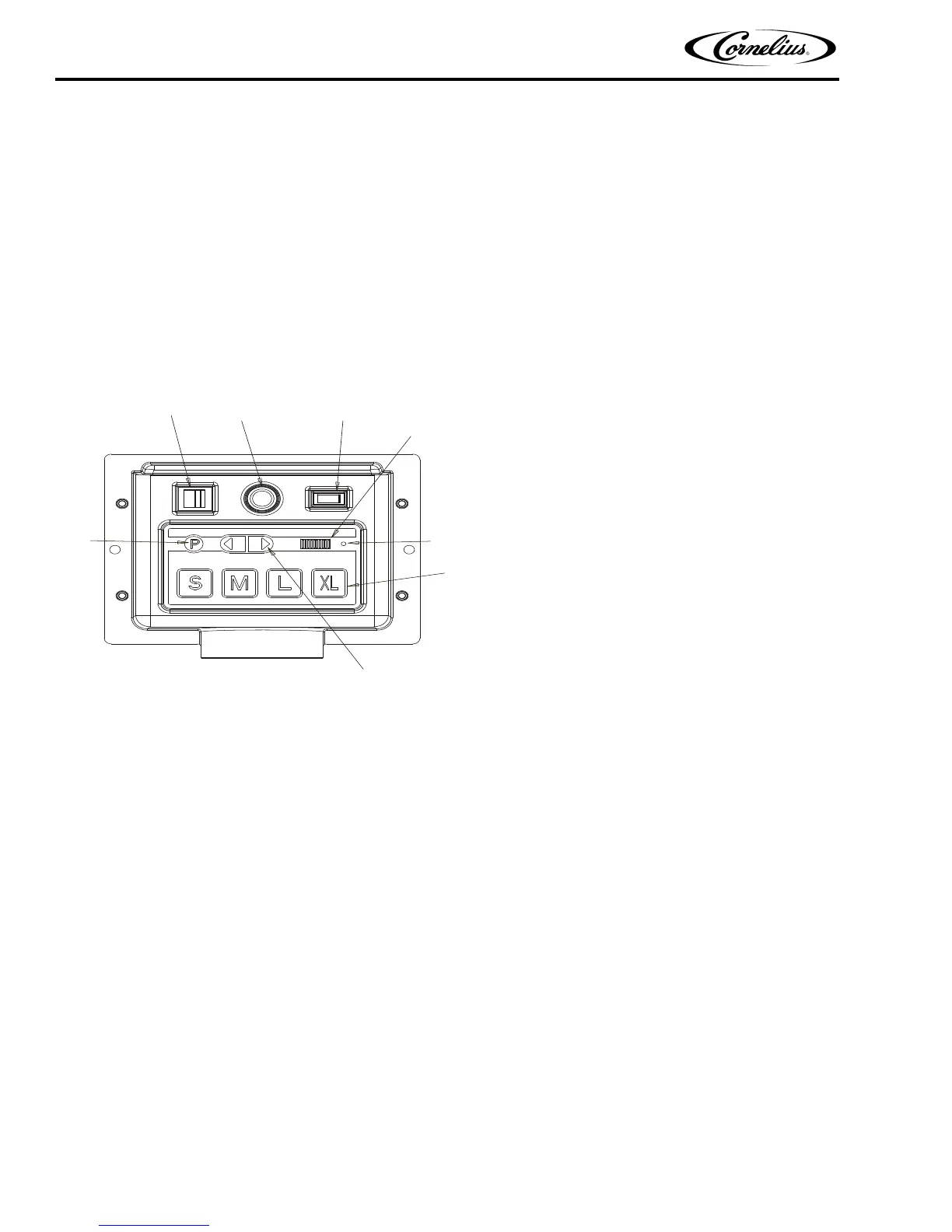
PROGATE 2 CONTROL BOX OPERATION
Portion Control Box Functions
The portion control box on the PROGATE 2 has several functions including dispensing 4 programmed ice portions
for 4 cup sizes, programming and a manual dispense mode.
1. Main Power ON/OFF: Turns power to the entire machine off. Lights Orange when ON.
2.
Agitator Push ON: Turns on agitator and opens ice gate allowing continuous dispense. This button will
turn green in the manual mode and will be off in PROGATE automatic. This button will also agitate in the
automatic mode but not dispense ice.
3.
Mode Switch Manual/Progate: Turns on agitator and opens ice gate allowing unlimited ice portion.
4.
Program Button: The programming button is used with cup size button enabling the user to enter the
portion programming mode to adjust the ice portions. The programming button is used with the directional
arrow buttons to adjust the agitation time.
5.
Ice Portion Dispense Buttons: Used to dispense the appropriate ice portion. Can also be used in con-
junction with the program button to program a portion size.
6.
Ice Size Program Bar: The program bar is only active in the program mode as a visual aid in setting the
portion size.
7.
Light: On start up of the unit or during a mode change (Manual to Progate) this light turns orange to
inform the user that the unit is going through a self diagnostic test. On completion of this test the light turns
green to inform the user that the machine is ready to dispense. If the light remains solid on red and the unit
is not dispensing any ice when an ice portion is pressed this should generate a service call. During ice dis-
pense if there is insufficient ice in the ice chute then the light turns red instantaneously to inform the user
that there is insuff
icient ice. Once the user releases the portioned button then the red light goes out.
8.
Portion Up/Down Buttons: The program bar is only active in the program mode to change the ice dis-
pense program size.
1. MAIN POWER ON/OFF
2. AGITATOR PUSH ON
3. MODE SWITCH MANUAL/PROGATE
4. PROGRAM BUTTON
5. ICE PORTION DISPENSE BUTTONS
6. ICE PORTION BAR
7. PROGATE ON LIGHT
8. PORTION SIZE LEFT/RIGHT KEYS






 To Next Page