LEMCOM CANopen® – User manual Meaning of indicator lights
COVAL – LMCOP-EN-A-1155UM0068 12/49
4 MEANING OF INDICATOR LIGHTS
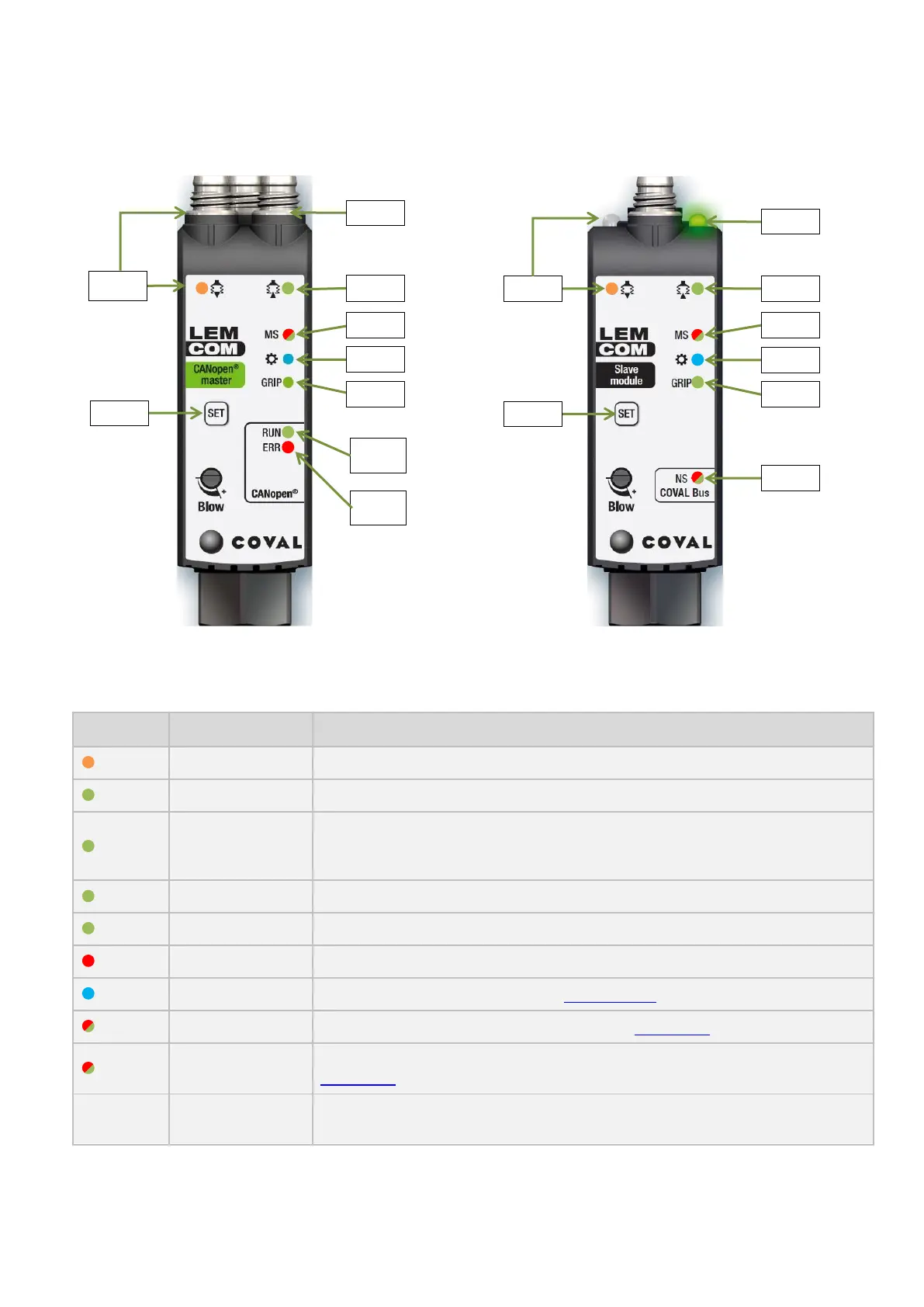
LEMCOM modules feature several indicator lights that describe their operating state.
Figure 6 – Front of LEMCOM master Figure 7 – Front of LEMCOM secondary
Colors: Ox (Orange) – Gx (Green) – Bx (Blue) – MS, NS (Red/Green)
ON: Blowing control active / Otherwise OFF
ON: Internal vacuum control active / Otherwise OFF
Gv indicates the status of the vacuum valve:
If NC valve Gv = G1
If NO valve Gv OFF: vacuum generation / Otherwise ON
ON: “Part gripped” (vacuum level > L1 threshold) / Otherwise OFF
LED configurable by client (refer to section 12.33 for further details)
LED indicating overall module status (refer to section 4.1 for further details)
LED indicating the status of the communication on the local bus (refer to
section 4.3 for further details)
Master module: Reset CAN node ID (NODE-ID = 32)
Secondary module: Assign or reset address on local bus
Table 1 – Meaning of indicator lights


 To Next Page