Front Panel Power Switch Replacement
7-12 Force FX Electrosurgical Generator C Service Manual
Front Panel Power Switch Replacement
1. Remove the front panel assembly (observe all warnings and cautions). Refer to Front
Panel Replacement on page 7-9.
2. Inside the front panel, press the four tabs that secure the power switch and push the
switch (and connected cable) out the opening.
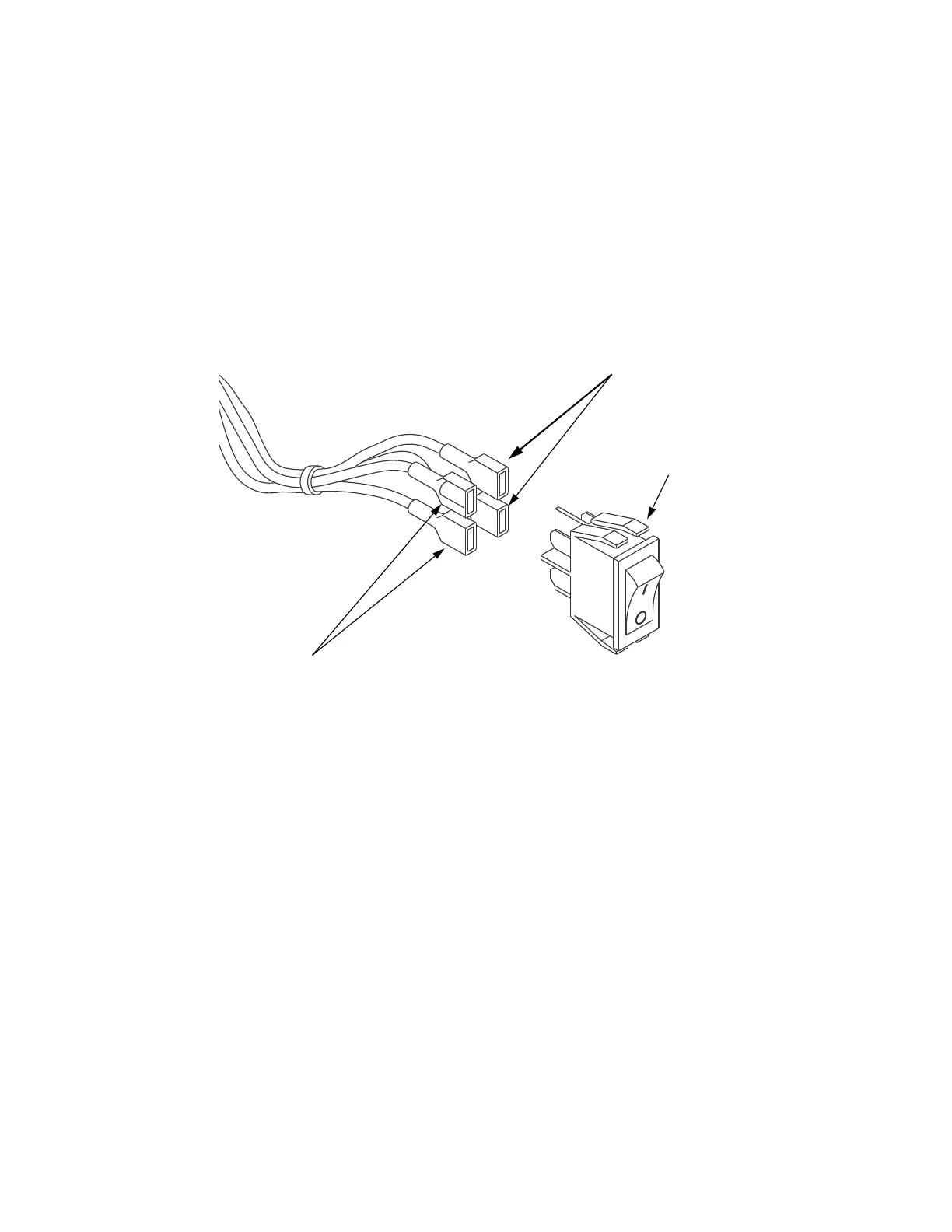
Removing and disconnecting the power switch
3. Remove the heat shrink from the cables and old switch.
4. Slide a piece of heat shrink tubing (1.0" [2.54 cm] wide; 2.5" [6.35 cm] long) over
the wires.
5. Connect the cable to the new power switch assembly, using the illustration or the
assembly you just removed as a reference.
6. Using a heat gun, shrink the tubing around the electrical connectors on the switch.
Do not allow the heat shrink tubing to cover the plastic tabs on the switch.
7. Outside the front panel, route the power switch cable through the power switch
opening.
8. Position the power switch with the On (|) switch above the Off (O) switch. Press to
snap the switch into place.
9. Reinstall the front panel assembly. Refer to Front Panel Replacement on page 7-9.
Brown
Tab
Blue













 To Next Page