12
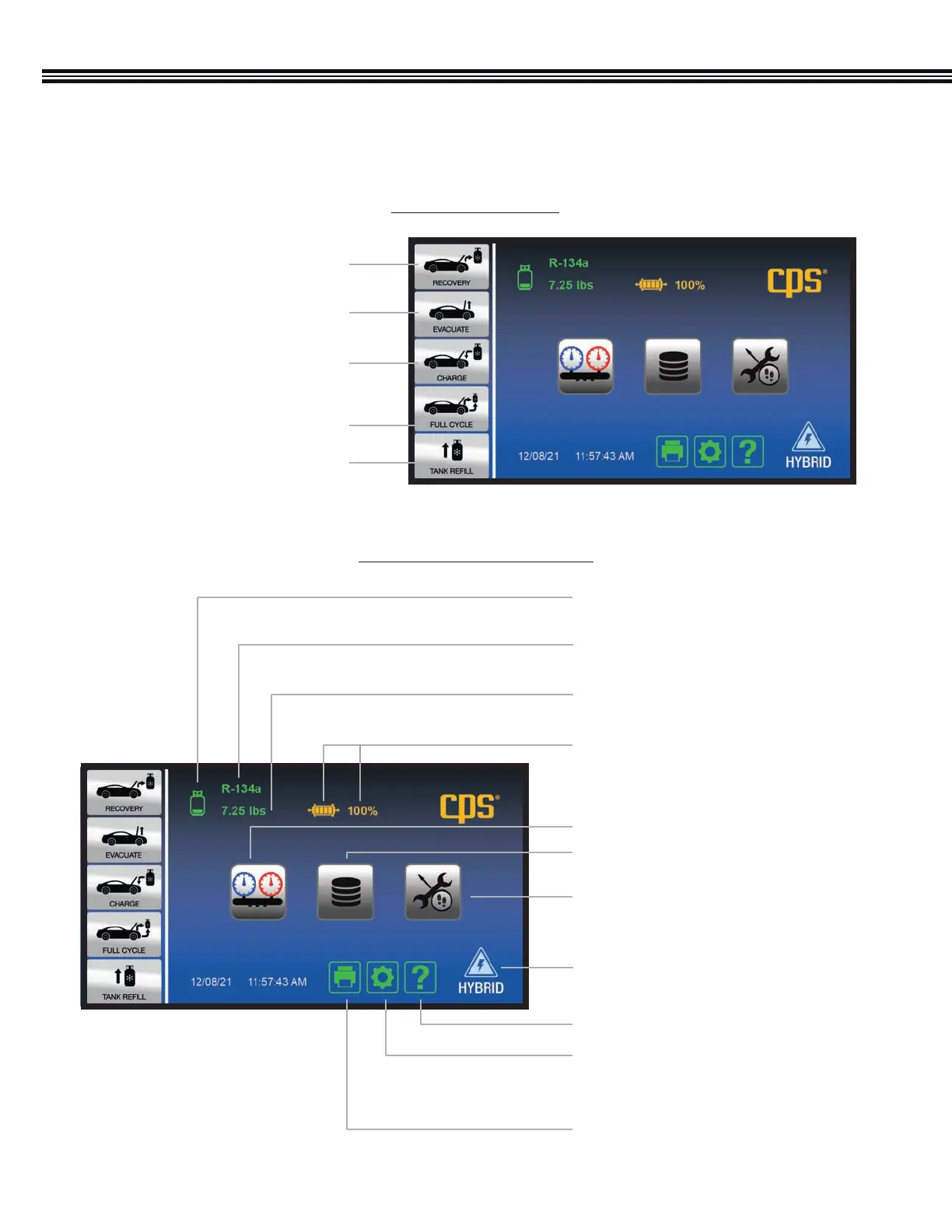
OVERVIEW (Primary Touch Screen Keys)
5 Selectable Functions
HOME SCREEN
This MX series machine features a 7” (17.8 cm), color, touch-screen LCD display from which all machine functions or settings
can be accessed.
Pg 42
Pg 13
Pg 14
Pg 13
Weight Of Refrigerant In
Tank (4 Segment Icon)
Filter Dryer Life (4 Segment Icon)
Weight Of Refrigerant In Tank
Refrigerant Type In Tank
Pg 46Job Tracker Key
Pg 44A/C Data Base & End User
License Agreement Key
Car System Health Mode Key
Help Menu Key
Machine Upkeep Key
- Setup Function
- Maintenance Menu
Print Key
Touch Keys & Information Icons
Pg 15Hybrid Vehicle Key
1. Refrigerant Recovery Key
Pg 24
Pg 26
Pg 27
Pg 29
Pg 30
2. A/C System Evacuation Key
3. Refrigerant Charge Key
5. Refrigerant Tank Refill Key
4. Full Cycle Key (Recovery,
Evacuate & Recharge)


 To Next Page