14
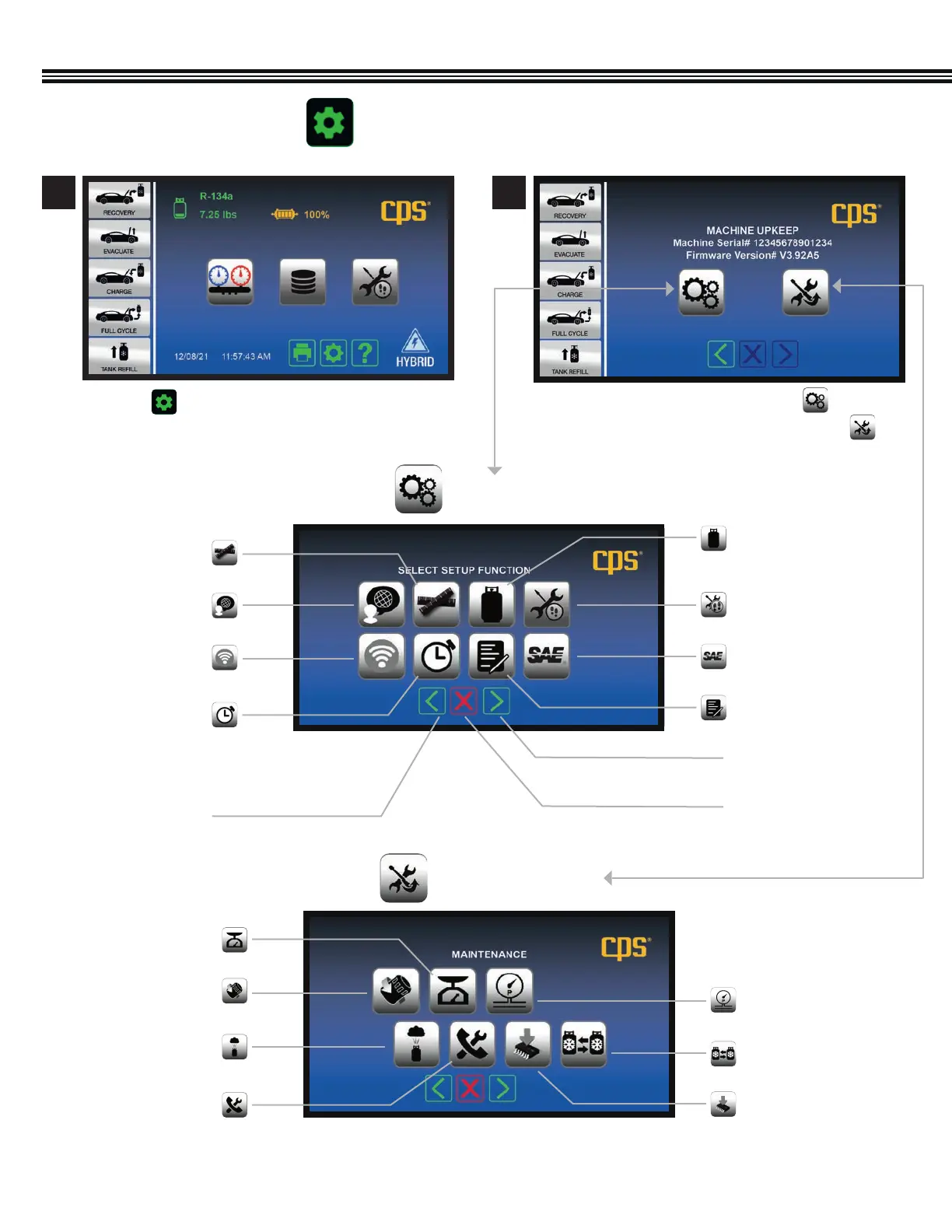
MACHINE UPKEEP (2 Functions)
a. To enter the SETUP FUNCTION, touch
b. Or, to enter the MAINTENANCE MENU, touch
a. Touch to access the MACHINE UPKEEP Screen
Shop Information
Next Screen/Enter
Previous Screen
Cancel
Units Of Measure
Tank Weight Or
Refrigerant Weight
Set Time Or Date
Wireless Setup
SAE (Or Global Standards)
Language Job Tracker
SETUP FUNCTIONS
Home Screen Machine Upkeep Screen
1 2
Filter Change
Automatic Air Purge
Valves & Controls
Pressure Transducer
Change Tanks
Software Upgrade
Scale Maintenance
Modes
MAINTENANCE MENU
OVERVIEW (Primary Touch Screen Keys, Cont’d)


 To Next Page