17
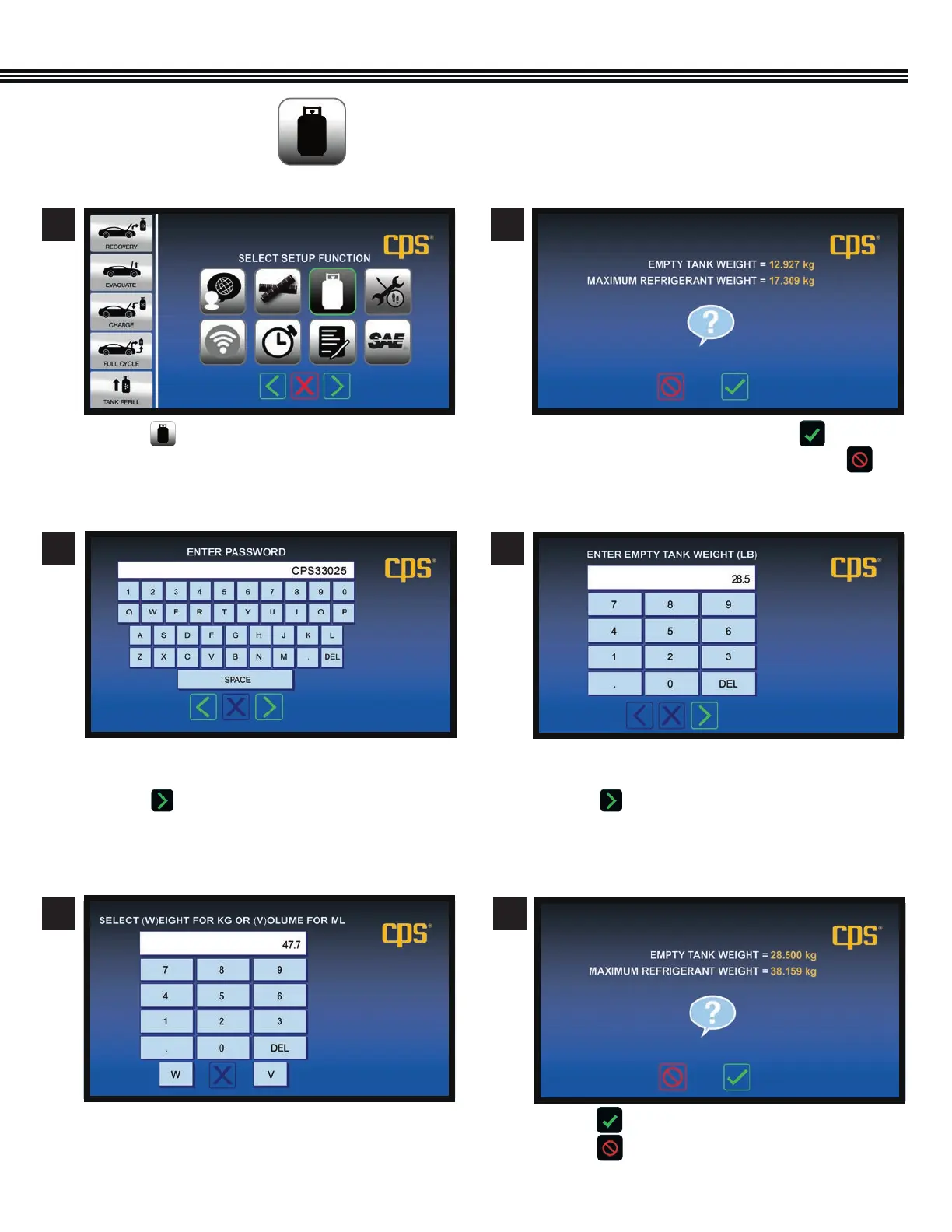
a. Touch if values are correct, and move to next screen.
b. Touch if further changes needed.
SETUP (Cont’d)
Setup Function Screen
Enter Password (Before Changing Weights) Confirm (Or Change) Tank Weight
Confirm (Or Change) Weights*
(*For 30 Lb Tank Shown)
SET TANK & REFRIGERANT WEIGHTS
(Not All Screens Are Shown)
a. Touch and to move to next screen. a. If weights shown are correct, touch .
b. If weights shown must be changed, touch .
a. Use keypad to enter shop password (example only
shown above).
b. Touch to enter password and move to the next
screen.
a. Enter EMPTY TANK WEIGHT. (example only shown
above)
b. Touch to enter tank weight and move
to the next screen.
1 2
3 4
a. Touch “W” for WEIGHT, OR “V” for VOLUME.
5 6
Enter Tank Water Capacity Confirm Or Change Refrigerant/Tank Weights


 To Next Page