44
A/C DATABASE FOR NORTH AMERICAN VEHICLES
1 2
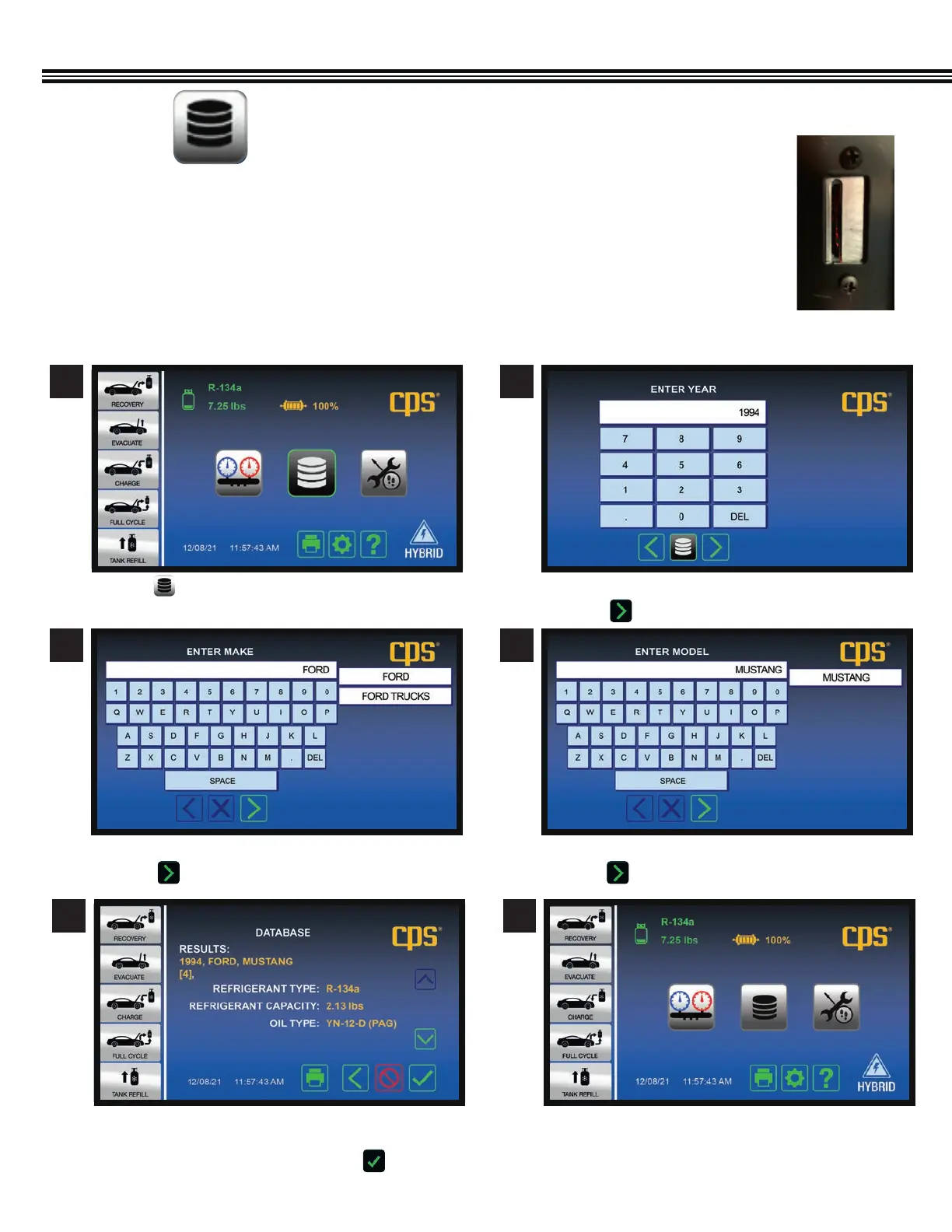
a. Touch . a. Use keypad to enter YEAR vehicle was made.
b. Touch to enter data and proceed to next screen.
A/C DATABASE FOR NORTH AMERICAN VEHICLES (Since 1994)
(Not All Screens Are Shown)
NORTH AMERICAN VEHICLE A/C DATA BASE
1. Insert the included SD Card (Secure Digital Memory Card) into the back of the MX134 Machine.
2. An “End User License Agreement” (see APPENDIX in this manual) will appear on the MX134 color screen.
3. By accessing any of the motor databases via this website, you automatically agree to all the terms
and conditions of this agreement. If you do NOT agree to all terms and conditions, do NOT access or
use the databases.
4. This database shows the type and weight of all refrigerants/oil used in vehicles sold in
North America since 1994.
SD Card Slot On
Back Of MX Machine
3 4
a. Enter vehicle “MAKE” (BRAND)
b. Touch to enter data and move to next screen.
a. Enter vehicle MODEL NAME
b. Touch to enter data and move to next screen.
5 6
a. AC Database will provide REFRIGERANT TYPE,
REFRIGERANT CAPACITY AND REFRIGERANT OIL TYPE
b. If all information shown is OK, touch to enter data
and move to next screen.


 To Next Page