38
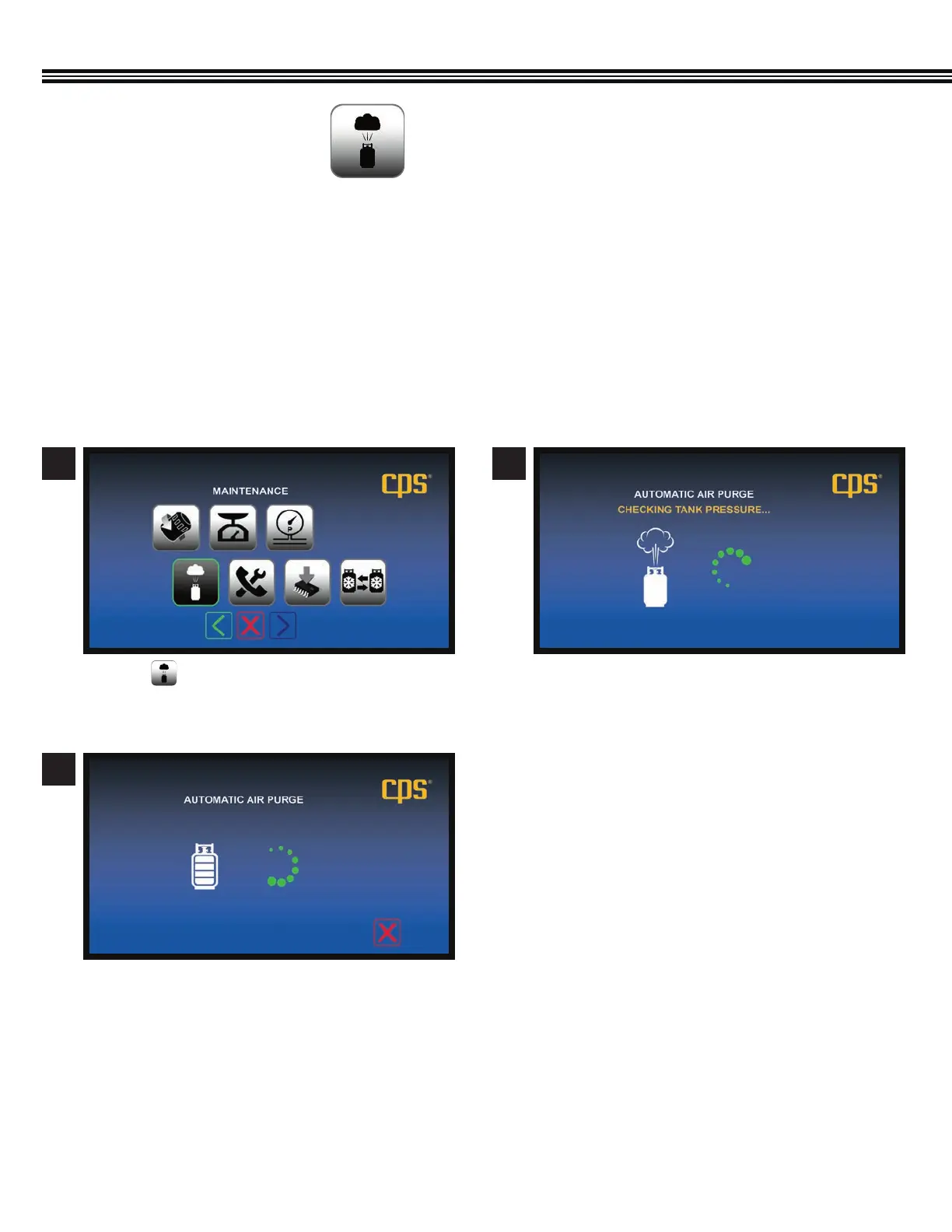
Automatice Air PurgeMaintenance Screen
Automatice Air Purge
a. Touch on the Maintenance Screen.
a. Automatic Air Purge in process.
b. When Air Purge has been completed, the
Maintenance Home Screen will appear.
a. The MX134 will check the Refrigerant Tank
Pressure.
1
3
2
MAINTENANCE (Cont’d)
The MX series features automatic air purge at machine start up. Air Purge may also be selected in the Maintenance Mode. Air
Purge reduces “non-condensable gases” in the storage tank to an acceptable level and may take a few minutes to complete.
DO NOT TURN THE MACHINE OFF OR UNPLUG THE MACHINE DURING AN AIR PURGE CYCLE.
1. This mode should only be entered with direction by CPS Products Technical Support or by a CPS Authorized
Service Center.
2. This mode enables the testing of each device controlled by the MX Series computer. These devices include the
ball valves, vacuum pump, compressor and pressure transducers.
AUTOMATIC AIR PURGE
(Not All Screens Are Shown)


 To Next Page