20
43
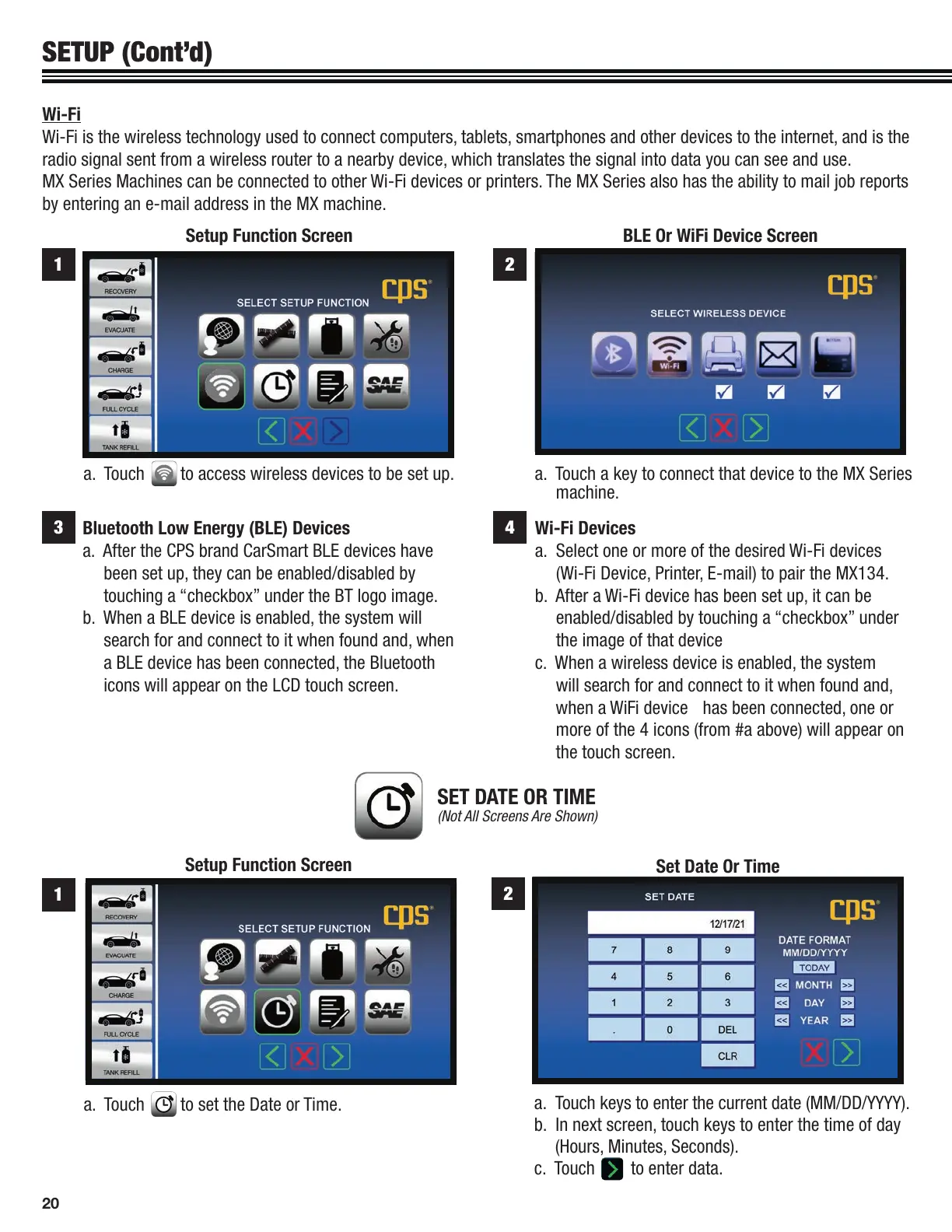
Bluetooth Low Energy (BLE) Devices
a. After the CPS brand CarSmart BLE devices have
been set up, they can be enabled/disabled by
touching a “checkbox” under the BT logo image.
b. When a BLE device is enabled, the system will
search for and connect to it when found and, when
a BLE device has been connected, the Bluetooth
icons will appear on the LCD touch screen.
Wi-Fi Devices
a. Select one or more of the desired Wi-Fi devices
(Wi-Fi Device, Printer, E-mail) to pair the MX134.
b. After a Wi-Fi device has been set up, it can be
enabled/disabled by touching a “checkbox” under
the image of that device
c. When a wireless device is enabled, the system
will search for and connect to it when found and,
when a WiFi device has been connected, one or
more of the 4 icons (from #a above) will appear on
the touch screen.
SETUP (Cont’d)
a. Touch to set the Date or Time.
1
2
Set Date Or Time
SET DATE OR TIME
(Not All Screens Are Shown)
Setup Function Screen
a. Touch keys to enter the current date (MM/DD/YYYY).
b. In next screen, touch keys to enter the time of day
(Hours, Minutes, Seconds).
c. Touch to enter data.
Wi-Fi
Wi-Fi is the wireless technology used to connect computers, tablets, smartphones and other devices to the internet, and is the
radio signal sent from a wireless router to a nearby device, which translates the signal into data you can see and use.
MX Series Machines can be connected to other Wi-Fi devices or printers. The MX Series also has the ability to mail job reports
by entering an e-mail address in the MX machine.
BLE Or WiFi Device ScreenSetup Function Screen
a. Touch a key to connect that device to the MX Series
machine.
a. Touch to access wireless devices to be set up.
21


 To Next Page