27
REFRIGERANT CHARGING
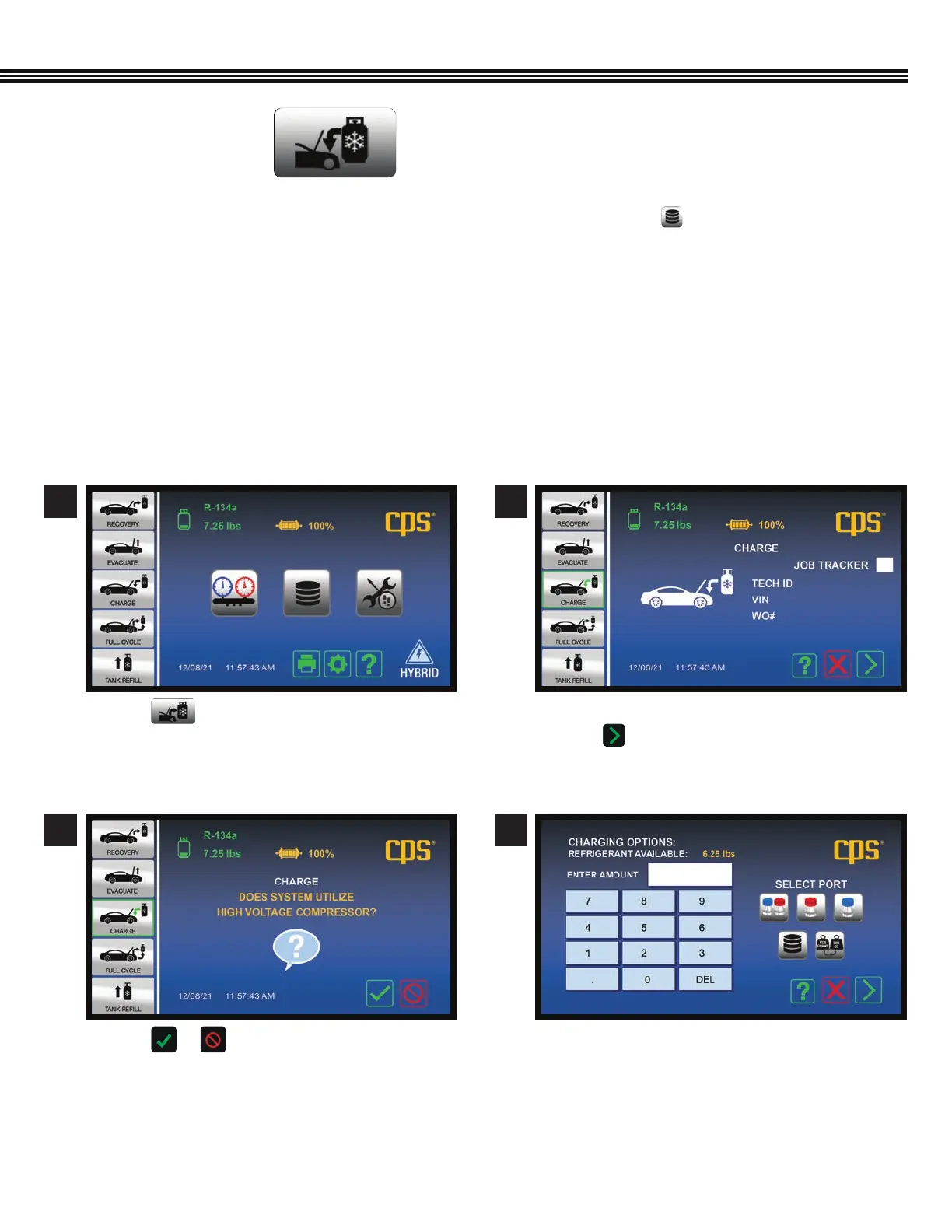
1. An A/C Database is integrated into the MX134 and, can be accessed by touching the key. This database will
specify the correct type and amount (weight) of refrigerant and refrigerant oil for vehicles sold in North America.
2. The charging sequence begins with a 10-minute vacuum leak test. This is an SAE requirement in SAE J2843 (R1234yf
systems only). If the system passes the vacuum leak test, the machine will charge the system to 15% of the
selected charge.
3. Use an electronic leak detector meeting SAE J2913 for R-134a to leak test the evaporator(s).
4. The MX134 will complete the remaining 85% of the charge.
5. Note; During cold conditions, a Heater Blanket (CPS optional accessory # CCXHB) may be wrapped around the
Recovery Tank to assist with charging. If the MX134 cannot complete a charge due to pressure equalization,
it will notify the user to close the high side coupler and start the vehicle.
a. Touch .
a. Touch or to confirm if system uses a high
voltage compressor.
If the system uses High Voltage Compressor, follow
onscreen instructions to flush service hoses. (page 45)
a. Enter: 1. Tech ID#, 2. Vehicle VIN#, 3. Work Order #.
b. Touch White Box for Job Tracker and proceed
to next screen.
a. Using the keypad, enter the desired charge
amount (refrigerant weight).
1
3
2
4
REFRIGERANT CHARGING
(Not All Screens Are Shown)
Home Screen


 To Next Page