16
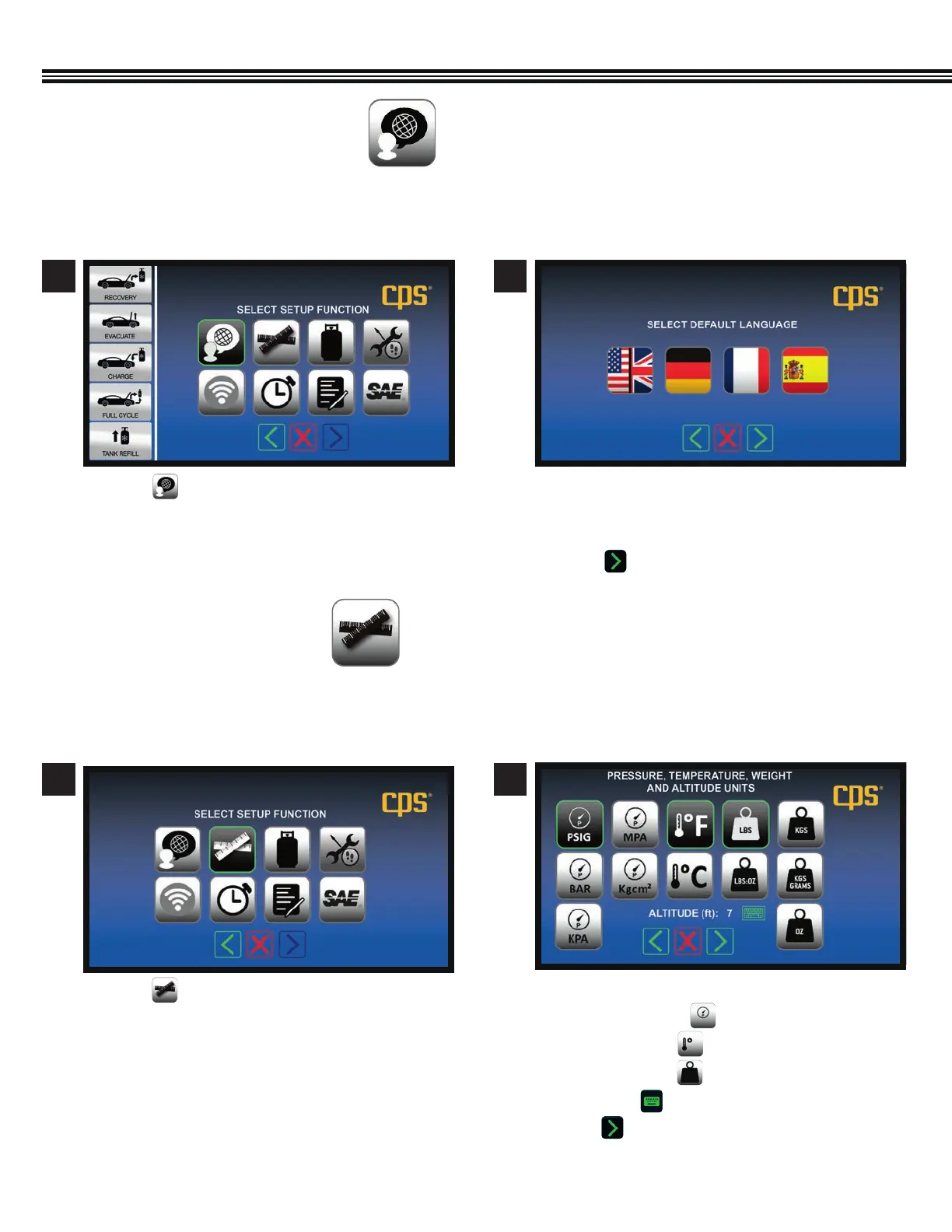
a. Touch keys to select default Units Of Measure:
• Pressure Units
• Temperature
• Weight Units
• Altitude (enter value with keyboard)
b. Touch to enter data and move to next screen.
SETUP
Select Pressure, Temperature, Weight, AltitudeSetup Function Screen
a. Touch to select Units Of Measure.
21
SET UNITS OF MEASURE
(Not All Screens Are Shown)
SET LANGUAGE
(Not All Screens Are Shown)
a. Touch a key that corresponds to the screen
language you prefer: English / Spanish / French /
German.
b. Touch to enter selected language.
a. Touch to veiw languages to work in.
Use this function to set up the MX134 so that it displays Pressure, Temperature, Weight and Altitude in SAE or Metric units of
measure that you want to work with.
MX Series Machines have an English language default setting. To change the default FROM English TO either German, French
or Spanish, use the following instructions.
21
Setup Function Screen Select Default Language


 To Next Page