33
MAINTENANCE (Cont’d)
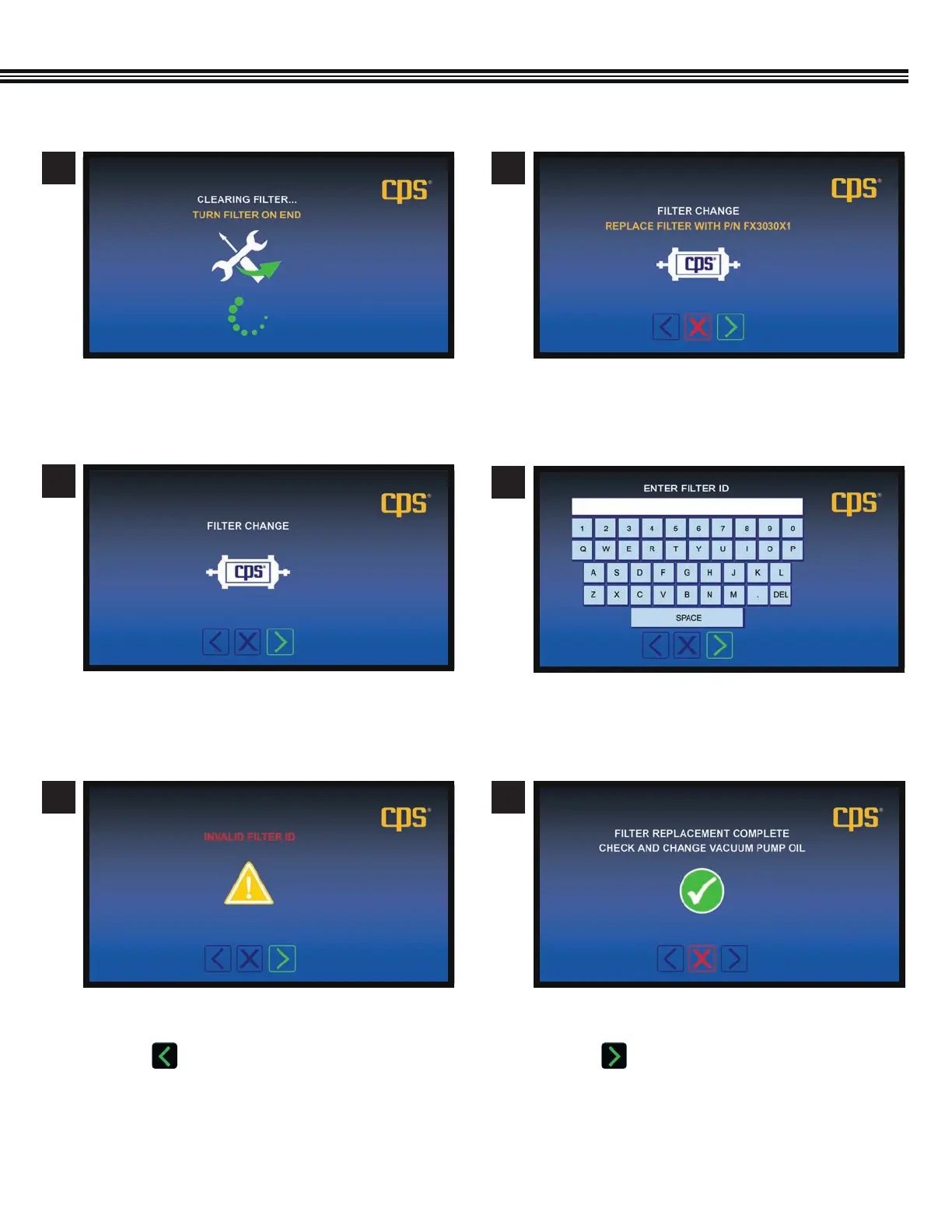
a. Replace the Filter Dryer with CPS part #FX3030X1.
6
a. Turn Filter Dryer on end.
5
Maintenance − Filter/Dryer Change Maintenance − Filter/Dryer Change
a. Using the keypad, enter the NEW Filter Dryer ID #.
a. Install the Filter Dryer
8
7
Maintenance − Filter/Dryer Change Maintenance − Filter/Dryer Change
a. Filter Dryer replacement is complete.
b. Check or change the Vacuum Pump Oil.
c. Touch to move to the next screen.
Maintenance − Filter/Dryer Change
a. This screen will appear if an incorrect Filter ID#
has been entered.
b. Touch to return to the keyboard screen and
re-enter the correct Filter/Dryer ID #.
109
Maintenance − Filter/Dryer Change


 To Next Page