47
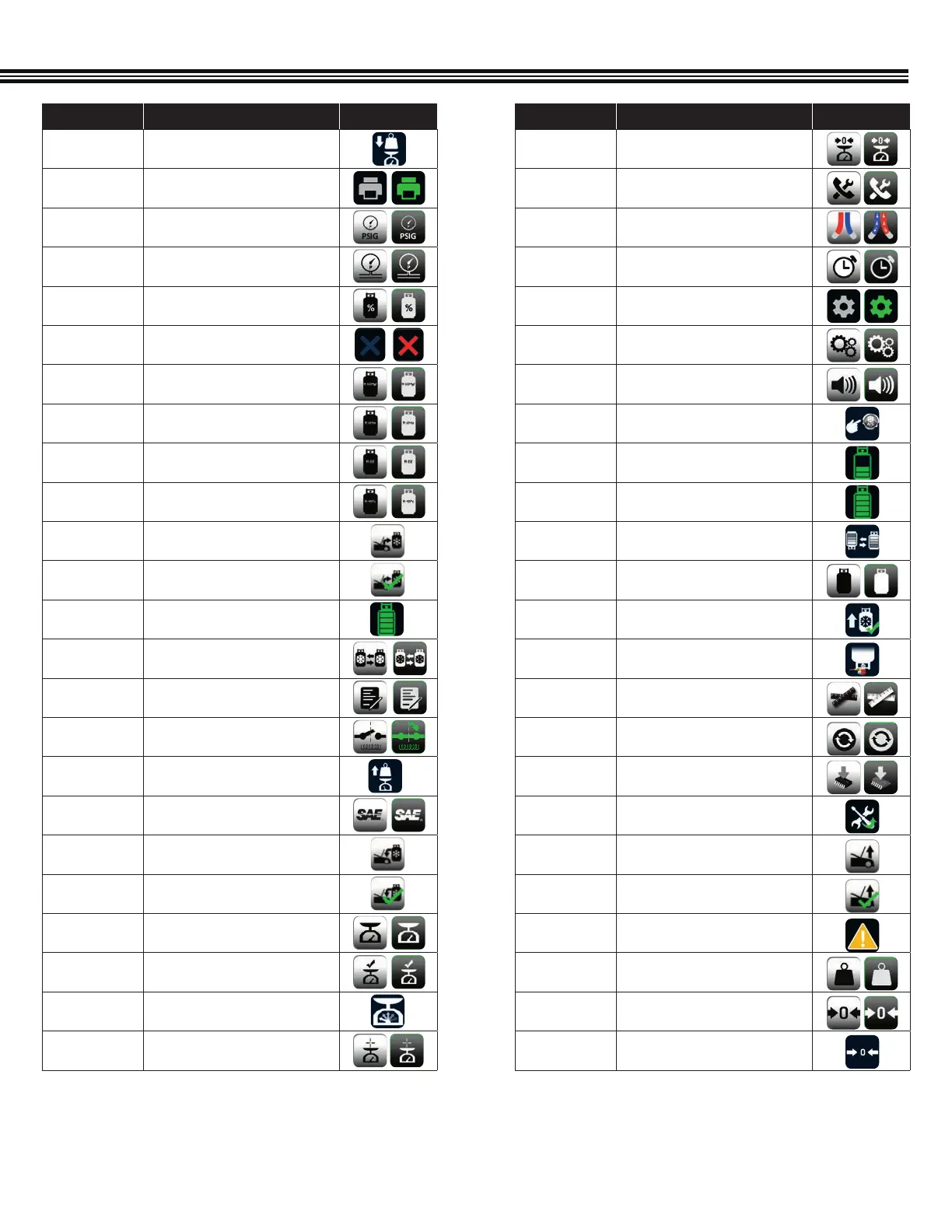
ICON NAME DESCRIPTION OFF/ON
SCALE ZERO
Touch to RE-ZERO the scale
SERVICE
Touch to select SERVICE
SERVICE HOSES
BEING FLUSHED
Indicates that the SERVICES HOSES
are BEING FLUSHED
SET TIME
Touch to SET TIME
SETTINGS
Touch to launch the SETTINGS screen
SETUP
Touch to launch the SEUP menu
SPEAKER
Touch to enable sound
START AC
Notifies user to start vehicle and turn
on AC during service
TANK
Indicates the level of refrigerant in
the TANK
TANK FULL
Notifies user that TANK is FULL
TANK REFILL
Touch to perform a TANK REFILL
TANK TARE
SETUP
Press to change tank weight and WC
TANKS REFILL
COMPLETE
Indicates that the TANK REFILL is
COMPLETE
TURN UPSIDE
DOWN
Notifies user to TURN TANK UPSIDE
DOWN during tank refill
UNIT
Touch to select UOM
UPDATE
Touch to UPDATE
UPGRADE
Touch to select UPGRADE
UPKEEP
Touch to launch the UPKEEP menu
VACUUM
Touch to perform a VACUUM
service
VACUUM
COMPLETE
Indicates that the VACUUM service is
COMPLETE
WARNING
The WARNING icon appears to caution
users of a potential hazard
WEIGHT
Touch to Choose WEIGHT UOM
ZERO
Touch to RE-ZERO the pressure
transducer
ZEROING
Indicates that the unit is ZEROING
ICON NAME DESCRIPTION OFF/ON
PLACE WEIGHT
Notifies user to PLACE WEIGHT on the
scale
PRINT
Touch to PRINT a report of the service
PSIG
Touch to select PSIG
PT
Touch to select PRESSURE
TRANSDUCER
PURITY
PURITY
QUIT
Touch to quit the current function
R-1234yf
Touch to select R-1234yf Refrigerant
R-134a
Touch to select R-134a Refrigerant
R22
Touch to select R22 Refrigerant
R407
Touch to select R407 Refrigerant
RECOVERY
Touch to perform an RECOVERY service
RECOVERY
COMPLETE
Indicates that the RECOVERY service is
COMPLETE
REFRIGERANT
REFRIGERANT
REFRIGERANT
CHANGE
Touch to CHANGE REFRIGERANT
REGISTER
Touch to REGISTER unit
RELAY
Touch to select RELAY
REMOVE
WEIGHT
Notifies user to REMOVE WEIGHT from
scale
SAE
Touch to select SAE
SAE CHARGE
Touch to perform a SAE CHARGE
service
SAE CHARGE
COMPLETE
Indicates that the SAE CHARGE service
is COMPLETE
SCALE
Touch for SCALE functions
SCALE CHECK
Touch to perform SCALE CHECK
SCALE CHECK
The SCALE CHECK icon notifies users
that a scale check is in progress
FULL
CALIBRATION
Touch to perform full calibration
APPENDIX (Complete Icon Library)


 To Next Page