©2015 Cradlepoint. All Rights Reserved. | +1.855.813.3385 | cradlepoint.com
15
User Manual / CBA850
11/5/15
CONNECTION MANAGER
The Connection Manager is used to manage the various WAN interfaces you have available on your router. WAN
interface types (Ethernet, modems) are prioritized in connection preference and failover order (with the top of the list
being highest priority).
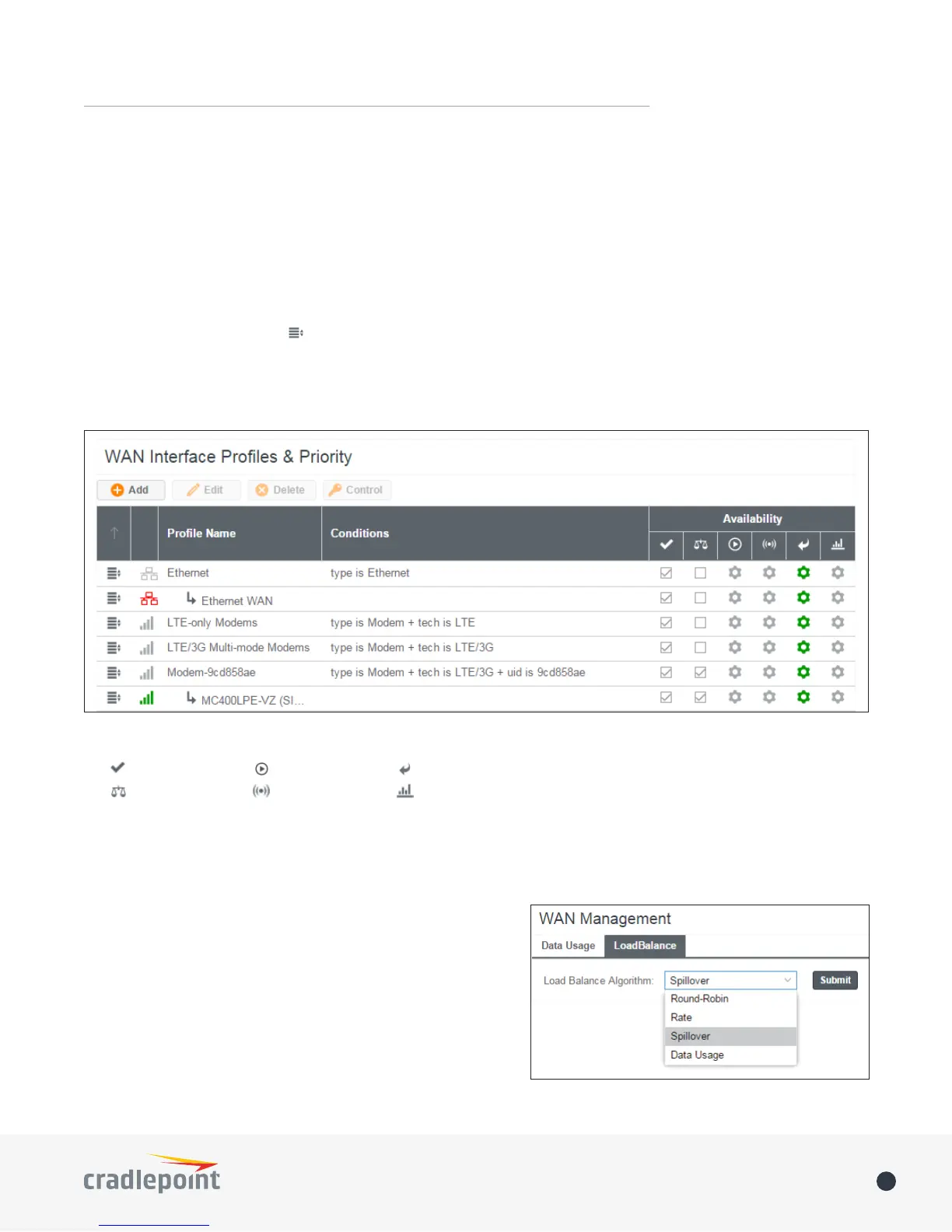
This is a list of the available interfaces used to access the Internet. You can enable, stop, or start devices from this
section. Drag the priority icon ( ) up or down to set the interface the router uses by default and the order that it
allows failover.
In the example shown, Ethernet is set as the primary Internet source, an LTE-only modem is set as secondary, while an
MC400LPE-VZ modem is attached for failover and is “connected.”
WAN INTERFACE PROFILES & PRIORITY
Availability Key
Enable
Load Balance
On Demand
WAN Verify
Data Usage
Failback
LOAD BALANCE
To enable Load Balancing, select the check box for each desired
device. If this is enabled, the router will use multiple WAN
interfaces to increase the data transfer throughput by using any
connected WAN interface consecutively. Selecting Load Balance
will automatically start the WAN interface and add it to the pool
of WAN interfaces to use for data transfer. Turning o Load
Balance for an active WAN interface may require the user to
restart any current browsing session.
From WAN Management, select the Load Balance Algorithm from
the following dropdown options:















 To Next Page