©2015 Cradlepoint. All Rights Reserved. | +1.855.813.3385 | cradlepoint.com
52
User Manual / CBA850
11/5/15
Cradlepoint Enterprise Cloud Manager (ECM) is a cloud-based management service for conguring, monitoring,
and organizing your Cradlepoint routers. Key features include the following:
• Group based conguration management
• Health monitoring of router connectivity and data usage
• Remote management and control of routers
• Historical record keeping of device logs and status
Registering Your Router – Once you have signed up for ECM, click on the Register Router button to begin
managing the router through ECM. Input your ECM Username and ECM Password and click Register. You have now
registered the device with Enterprise Cloud Manager.
Suspending the ECM Client – Click on the Suspend Client button to stop communication between the device and
ECM. Suspending the client will make it stop any current activity and go dormant. It will not attempt to contact
the server while suspended. This is a temporary setting that will not survive a router reboot; to disable the
client altogether use the Advanced Enterprise Cloud Manager Settings panel (below).
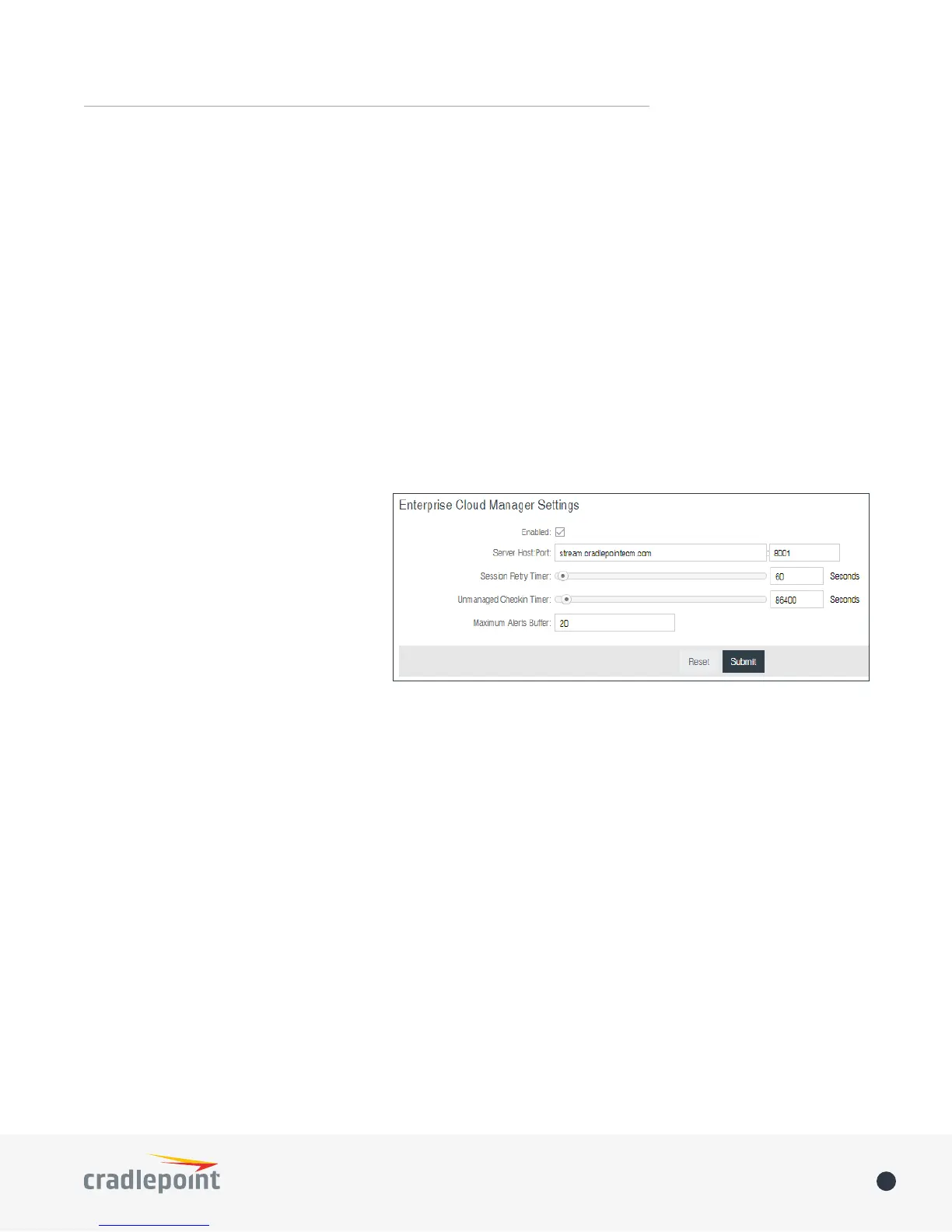
Enterprise Cloud Manager Settings (Advanced)
• Enabled: Enable the ECM client to
contact the server. While this box
is unchecked, the ECM client will
never attempt to contact the server.
(Default: Enabled)
• Server Host:Port: The DNS hostname
and port number for your ECM server.
(Default: stream.cradlepoint.com)
• Session Retry Timer: How long to wait,
in seconds, before starting a new ECM
session following a connection drop
or connectivity failure. Note that this
value is a starting point for an internal backo timer that prevents superuous retries during connectivity
loss.
• Unmanaged Checkin Timer: How often, in seconds, the router checks with ECM to see if the router is
remotely activated. Note that this value is a starting point for an internal backo timer that reduces
network usage over time.
• Maximum Alerts Buffer: The maximum number of alerts to buer when oine.
DEVICE ALERTS
The Device Alerts submenu choice allows you to receive email notications of specic system events. YOU MUST
ENABLE AN SMTP EMAIL SERVER TO RECEIVE ALERTS.
Alerts can be included for the following:
• Firmware Upgrade Available: A rmware update is available for this device.
• System Reboot Occurred: This router has rebooted. This depends on NTP being enabled and available to
report the correct time.
• Unrecognized MAC Address: Used with the MAC monitoring lists. An alert is sent when a new unrecognized
MAC address is connected to the router.
ENTERPRISE CLOUD MANAGER















 To Next Page