©2015 Cradlepoint. All Rights Reserved. | +1.855.813.3385 | cradlepoint.com
47
User Manual / CBA850
11/5/15
SYSTEM
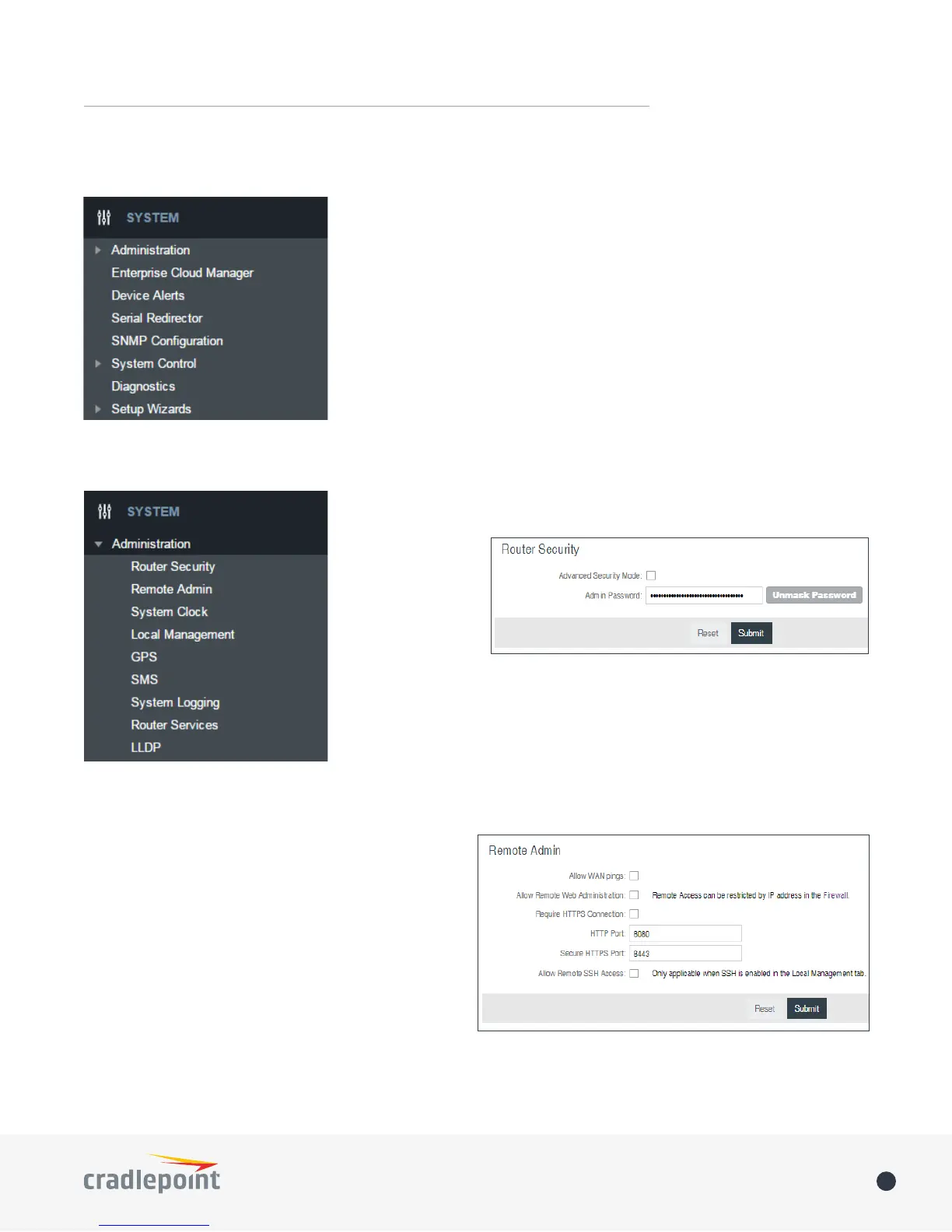
ADMINISTRATION
ROUTER SECURITY
When the router is
congured to use the
advanced security
mode, several
aspects of the
routers conguration
and networking
functionality will be extended to support high security environments. This
includes support for multiple user accounts, increased password security
and additional network spoong lters. If you plan to use your router in a
PCI DSS compliant environment this option is mandatory.
REMOTE ADMIN
Remote Management allows a user to enable incoming
WAN pings or change settings for the router from the
Internet using the router’s Internet address.
Allow WAN pings – When enabled the functionality
allows an external WAN client to ping the router.
Allow Remote Web Administration – When remote
administration is enabled it allows access to these
administration web pages from the Internet. With it
disabled, you must be a client on the local network to
access the administration website. For security, remote
access is usually done via a non-standard http port.
Additionally, encrypted connections can be required for an added level of security.
• Require HTTPS Connection – Requiring a secure (https) connection is recommended















 To Next Page