©2015 Cradlepoint. All Rights Reserved. | +1.855.813.3385 | cradlepoint.com
59
User Manual / CBA850
11/5/15
legacy reasons. The router cannot use 802.11n modes if WEP is enabled; router WiFi performance and
range will be limited.
• None (OPEN): Select this option if you do not want to activate any security features.
• WPA Password - The WPA Password must be between 8 and 64 characters long. A combination of upper
and lower case letters along with numbers and special characters is recommended to prevent hackers from
gaining access to your network.
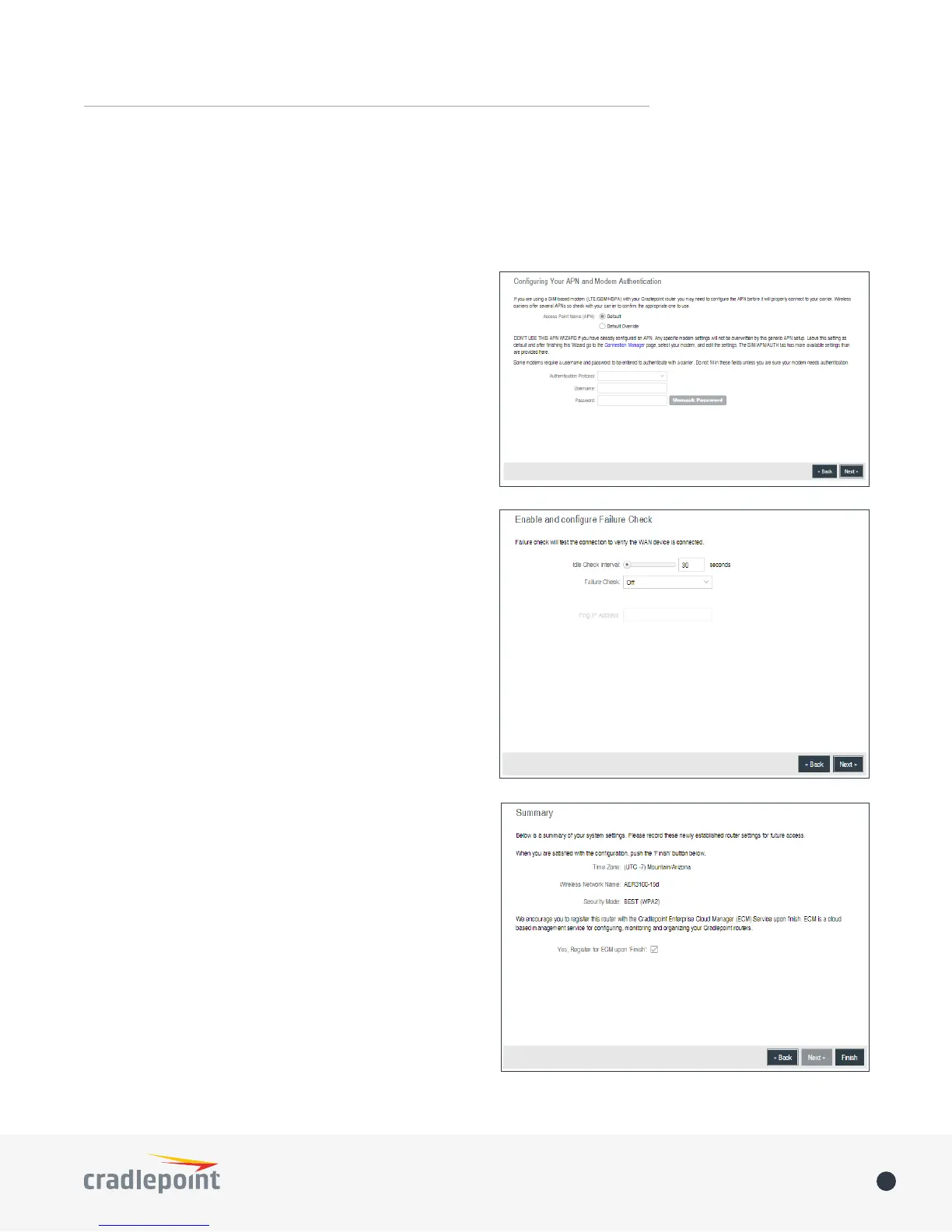
Conguring Your APN and Modem Authentication
If you are using a SIM-based modem (LTE/GSM/HSPA)
with your Cradlepoint router you may need to congure
the APN before it will properly connect to your carrier.
Wireless carriers oer several APNs so check with your
carrier to conrm the appropriate one to use. You can use
the default password on the back of your product, or you
can create a custom Administrator Password.
NOTE: DO NOT USE THIS APN WIZARD if you have already
congured an APN. Any specic modem settings will not
be overwritten by this generic APN setup. Leave this
setting as default and after nishing this Wizard go to
the CONNECTION MANAGER page, select your modem, and
edit the settings. The SIM PIN/APN tab has more available
settings than are provided here.
Some modems require a username and password to be
entered to authenticate with a carrier. Do not ll in the
following elds unless you are sure your modem needs
authentication.
• Authentication Protocol
• Username
• Password
Enable and Congure Failure Check
Failure check will test the connection to verify the WAN
device is connected.
• Idle Check Interval: Set the number of seconds the
router will wait between checks to see if the WAN is
still available.
• Failure Check:
• Off: Once the link is established the router takes
no action to verify that it is still up.
• On: Modems will be set to use the Passive DNS
failure check type. Ethernet and WiFi as WAN
connections will be set to use Active Ping.
• Ping IP Address: This IP address must be an address
that can be reached through your WAN connection
(modem/Ethernet). Some ISPs/Carriers block certain
addresses, so choose an address that all of your WAN
connections can use.
Summary
Review your settings and click Finish to exit or Back to edit.















 To Next Page