Operating modes
●
Pr
ess the VIEW
function button and select
OFFROAD.
If the corr
esponding equipment is a
vailable,
the information that appears is the following:
Compass.
Turning angle of steered wheels.
Coolant temperature.
Lubricating oil temperature
Only 2 of these items of information can be
displayed at the same time, but the user
chooses which to display, and in what order,
by moving the finger vertically over the dials.
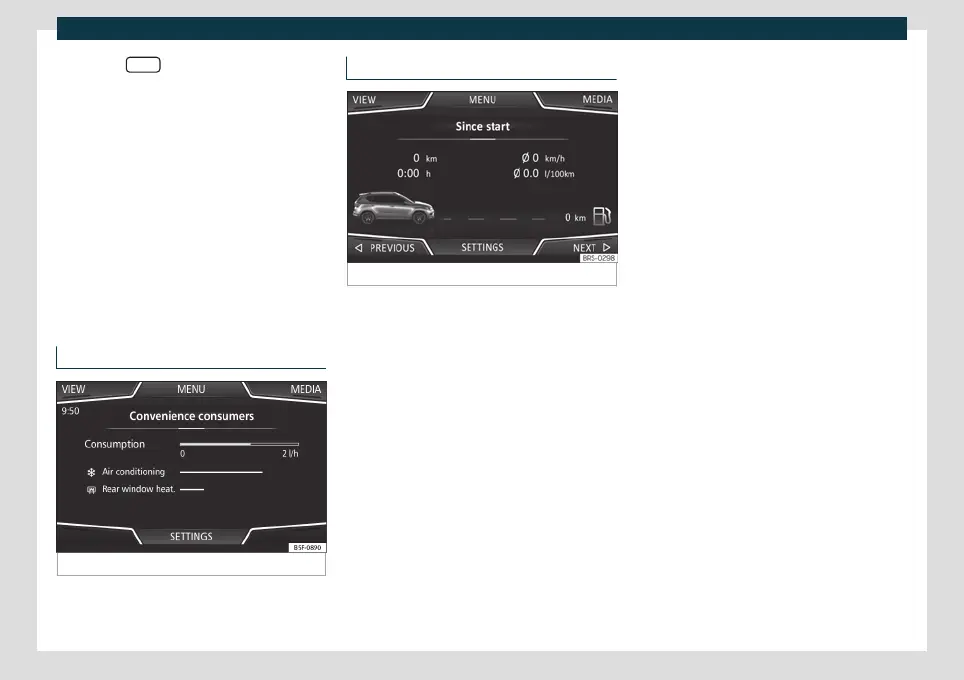
Consumers
Fig. 179
Convenience consumers.
Access information about the vehicle’s main
con
v
enience consumers. It is shown via a
consumption indicator bar in l/h (gal/h).
1.
2.
3.
4.
Driving data
Fig. 180
Driving data.
The on-board computer has 3 memories.
The
y can be used t
o display: distance, time,
average speed, average consumption and
range.
1. Since start
Indication and storage of distance travelled
and consumption values between the igni-
tion being turned on and it being turned off.
2. Since refuelling
Display and storage of the values for the
journey and the consumption. By refuelling,
the memory will be erased automatically.
3. Long-term
The memory records the values for a specific
number of partial trips, up to a total of 19
hours and 59 minutes or 99 hours and 59 mi-
nutes, or 1999.9 km (mi) or 9999 km (mi),
depending on the model of instrument pan-
el.
When one of these values is reached (de-
pending on the version of the instrument
panel), the memory is automatically deleted
and starts counting again from 0.
211



 To Next Page