Infotainment System
Search
Se
ar
ch for addresses and Points of Interest
using the keypad to enter them
›››
Fig. 162.
For cities, post codes and points of interest,
the full details must be entered. You can also
search for points of interest by names or cat-
egories. When necessary, enter the name of
the city to refine the search.
›››
Fig. 162
A
Press to open the cursor buttons (
,
), which
allow you to move within the text.
Steering
When narr
o
wing down the destination ad-
dress, please note that every entry restricts
the available range of subsequent selections.
To enter an address press the function but-
tons in the following order:
●
Country, City (or postcode), Centre
(starts the route to the centre of the indica-
ted city), Street, Number, Junction, LAST
DESTINATIONS, START (starts route guid-
ance to the selected destination).
On the map
●
Select the destination on the map or enter
it using GPS coordinates and confirm with
OK
.
Function button: function
Store
: Store the point of interest in the destination
memory
›››
page 199.
Edit
: Edit the destination or enter another one.
Route options
: Setting route options, see Navigation
Settings > Route options.
Start
: Starts guided navigation to the selected point of
interest.
After starting route guidance
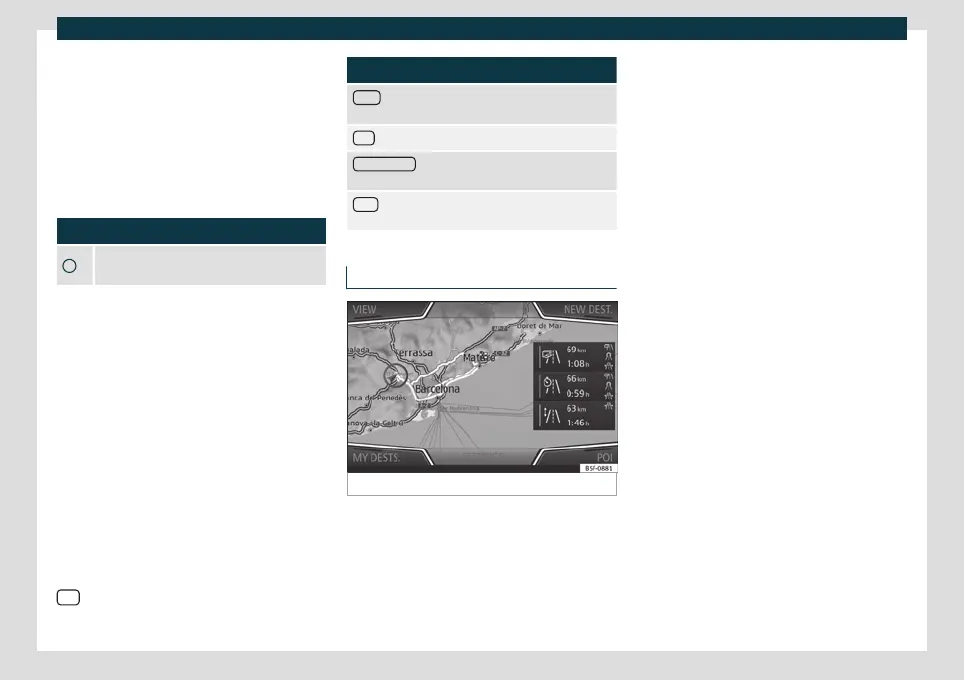
Fig. 163
Route calculation.
When starting route guidance, the route is
calculat
ed based on the dat
a that have been
selected in the
Route options
menu.
Three alternative routes are proposed
›››
Fig. 163. These 3 routes correspond to the
selectable route options: Economical, Fast
and Short.
Blue route: Economic route.
Red route: Fastest route.
Orange route: Shortest route to the
destination, even if it results in longer
travelling time.
●
Select the desired route by pressing it.
The route criteria settings in the Route op-
tions menu are modified accordingly.
If a route is not selected, the route guidance
starts automatically after approx. one minute
according to the setting selected in Route
options.
Once the route has been calculated, the sys-
tem gives the first navigation announce-
ment. Up to 3 navigation announcements
are given before a turn.
●
Press the adjustment knob to listen to the
last audible navigation instruction.
The indicated distances depend to a great
extent on the type of road and the traffic
speed. On motorways, for example, naviga-
tion announcements are received much ear-
lier than in urban traffic.
The corresponding navigation announce-
ments are also given on roads with several
lanes that split, and on roundabouts, for ex-
ample: “Leave the roundabout at the second
exit.”
–
–
–
198



 To Next Page